 Tarren (They/Them)
Wondering what voices besides the Windows One-Core ones people are using on #NVDASR these days. Looking for a break from David.
***Additional Hashtags***
#Blind #A11y #Accessibility #TTS
Wondering what voices besides the Windows One-Core ones people are using on #NVDASR these days. Looking for a break from David.
***Additional Hashtags***
#Blind #A11y #Accessibility #TTS
NVDA 2026.2 Beta 1 is now available for testing!
https://www.nvaccess.org/post/nvda-2026-2beta1/
This release includes a built-in magnifier with zoom and filtering options (currently only full-screen). Touch support has been significantly expanded, custom speech dictionaries are now available, you can press NVDA+x to repeat the last spoken information, the Braille display can automatically scroll and more!
#NVDA #NVDAsr #ScreenReader #NewVersion #Accessibility #Beta #PreRelease
From the NVDA Screen Reader Group on Facebook ...
Post from Abdullah Ashraf
Last December, I introduced the mw-word-lexicon add-on to provide a seamless way to look up word definitions, synonyms, and antonyms instantly from any application without interrupting your workflow or needing to open a web browser. Utilizing the Merriam-Webster Dictionary API, this tool was built to integrate a comprehensive dictionary directly into NVDA, ensuring quick and reliable access to rich linguistic data. Today, I am thrilled to announce the release of version 2.0, a major update that brings full support for NVDA 2026 and its 64-bit architecture, ensuring maximum compatibility and performance for all users.
This new release introduces a smart replacement feature designed to make the rephrasing process much smoother. When you request synonyms or antonyms for a selected word within your text, you can now simply choose a preferred alternative from the Definition dialog and press Ctrl+Enter to automatically replace the original word directly in your text. Furthermore, handling misspelled words is now much smarter; if you look up a misspelled word, the add-on instantly opens a context menu offering up to 10 spelling suggestions, seamlessly fetching the requested information once the correct word is chosen. Moreover, for those moments when you are unsure of an exact spelling, the newly added advanced wildcard search allows you to use a question mark for a single missing letter or an asterisk for multiple letters, presenting up to 15 potential matches to help you find exactly what you need.
Managing your previous lookups has also been significantly upgraded with our enhanced History dialog. You can now use the Spacebar to perform multiple and extended selections across your history, allowing for quick batch actions like copying or removing scattered items all at once. The dialog's context menu now features powerful sorting and filtering capabilities, giving you the ability to organize items alphabetically or chronologically, and filter results by specific lookup types like definitions, synonyms, antonyms, or the word of the day.
You can now find this version 2.0 update available directly within the NVDA Add-on Store. If you wish to learn more about the add-on's capabilities, I encourage you to explore the comprehensive User Guide, available in both English and Arabic through this link:
https://mw-word-lexicon.netlify.app/
For a seamless experience, you can access this user guide directly from the add-on itself by pressing Ctrl+Shift+D to enter the main layer, followed by F1, which will open it instantly in your web browser.
You can also explore the source code at our add-on repository through this link:
https://github.com/.../MW-word.../tree/MW-word-lexiconIf you would like to read what others are saying or share your own experience, please visit the Community Reviews page at:
https://github.com/nvaccess/addon-datastore/discussions/6798
I am truly looking forward to your feedback and suggestions to help refine the add-on further. In case you encounter any issues while using the add-on, please do not hesitate to report the problems you face during using the add-on through any of the official communication channels listed at the end of the User Guide page.
#NVDA #NVDASR #Blind
@mastoblind
We've got a big In-Process for you this week!
- NVDA 2026.1.1
- Running on the sign in screen
- NV Access at Sight City
- Microsoft Outlook with NVDA module update
- Update on ARM Support
- Searching for text
All here: https://www.nvaccess.org/post/in-process-22nd-may-2026/
#NVDA #NVDAsr #News #Newsletter #SightCity #SightCity2026 #Outlook #ARM #Searching #Find #Accessibility
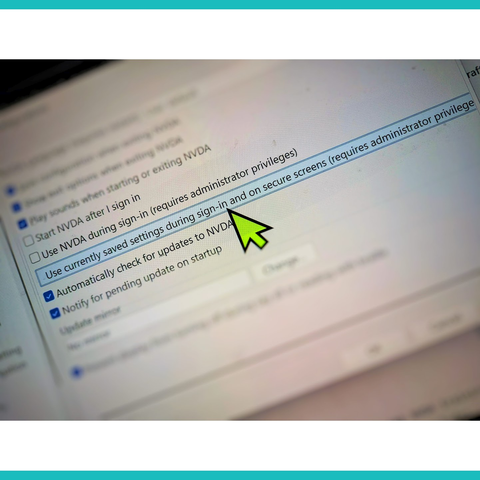
NVDA 2026.1.1 is now available! This is a patch release to fix security issues. A bug fix is also included for an issue introduced in 2026.1 with how ctrl+f is handled in File Explorer. A change introduced in 2026.1 with how NVDA handles connection issues with Remote Access was removed.
Read more and download from https://www.nvaccess.org/post/nvda-2026-1-1/
#NVDA #NVDAsr #ScreenReader #Accessibility #News #NewVersion #Update
 NV Access
 Pratik Patel
 Ty
Ty 🇨🇦Samuel Proulx🇨🇦
 Doug
Doug