Rewolucja w świecie gamingu. Wine 11 drastycznie przyspiesza działanie gier z Windowsa
Uruchamianie windowsowych hitów na innych systemach operacyjnych właśnie wchodzi na zupełnie nowy poziom.
Premiera środowiska Wine 11 to nie jest zwykła aktualizacja. To całkowite przepisanie fundamentów, które w niektórych tytułach przynosi wzrost płynności o… kilkaset procent. Z tej zmiany ucieszą się nie tylko fani Linuksa i posiadacze konsol Steam Deck, ale w dłuższej perspektywie również użytkownicy komputerów Mac.
Dla osób grających poza ekosystemem Windowsa, oprogramowanie Wine (i bazujący na nim Proton od Valve) to absolutna świętość. To właśnie ta warstwa kompatybilności w locie „tłumaczy” gry napisane dla systemu Microsoftu tak, aby działały na innych platformach. Wydana właśnie wersja z numerem 11 przynosi zmiany architektoniczne, na które branża czekała od lat.
Windowsowe gry z turbodoładowaniem
Największą i najważniejszą nowością w nowym wydaniu jest wsparcie dla NTSYNC. Do tej pory środowisko uruchomieniowe musiało radzić sobie z ogromnym problemem – gry na Windowsa są niezwykle obciążające dla wielordzeniowych procesorów i wymagają ciągłej synchronizacji tysięcy wątków na sekundę. Linux (podobnie jak macOS) nie posiadał natywnych odpowiedników windowsowych komend synchronizacyjnych. Oprogramowanie musiało to sztucznie emulować, co tworzyło potężne „wąskie gardło” i powodowało spadki klatek na sekundę.
NTSYNC całkowicie zmienia zasady gry. To nowy sterownik zaimplementowany bezpośrednio na poziomie jądra systemu (kernel), który natywnie naśladuje zachowanie Windowsa. Omija on wszystkie dotychczasowe procesy emulacji. Efekty? Liczby mówią same za siebie. W deweloperskich testach porównawczych gra „Dirt 3” przyspieszyła z 110 do absurdalnych 860 klatek na sekundę (wzrost o blisko 678 procent). Płynność w „Resident Evil 2” skoczyła z niegrywalnych 26 FPS do płynnych 77 FPS, a tytuły takie jak pierwsze „Call of Duty: Black Ops” w końcu zaczęły działać w pełni stabilnie.
Dlaczego to ważne dla posiadaczy Maców?
Choć NTSYNC to rozwiązanie stricte linuksowe (trafi m.in. na Steam Decki), nowa wersja środowiska przynosi inną, przełomową nowość – całkowite ukończenie architektury WoW64.
Co to oznacza w praktyce? Oprogramowanie potrafi teraz samodzielnie i w pełni wewnętrznie tłumaczyć 32-bitowe aplikacje na systemach 64-bitowych, bez konieczności instalowania jakichkolwiek przestarzałych bibliotek zewnętrznych. Z punktu widzenia użytkowników Apple to wiadomość wielkiego kalibru. Apple całkowicie porzuciło obsługę 32-bitowych programów w macOS już lata temu, co skutecznie zabijało możliwość grania w setki starszych klasyków.
Warto pamiętać, że autorskie narzędzie Apple dla deweloperów – Game Porting Toolkit – opiera się na technologii CrossOver, która bezpośrednio czerpie z otwartego kodu Wine. Wszelkie optymalizacje, lepsza obsługa wielowątkowości, ukończone WoW64 i usprawnienia renderowania (m.in. nowy silnik EGL), które dziś debiutują w darmowym oprogramowaniu, z czasem przenikną do komercyjnych rozwiązań na komputerach Mac.
Dziś świętują fani pingwina, ale to jasny sygnał dla całej branży: ekskluzywność gier dla Windowsa kruszy się na naszych oczach w niesamowitym tempie.
Kupiłeś najtańszego Maca? Szykuj się na łatkę. Apple wypuszcza macOS 26.3.2 wyłącznie dla MacBooka Neo
#crossover #GamePortingToolkit #granieNaMacu #gryWindowsNaLinuksie #LinuxGaming #NTSYNC #optymalizacjaGier #SteamDeckWydajność #Wine11 #WoW64 knoppix
 Linux Easy
 TechLİfe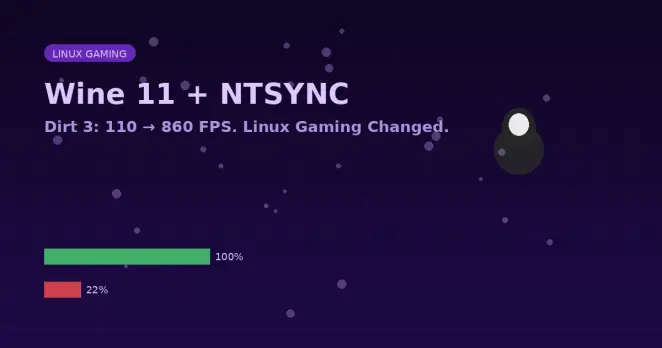
 Agnieszka Serafinowicz
 Gea-Suan Lin
 sebsauvage
 Édouard Muller 🇪🇸 🐧
 AerynOS.com
 Liam @ GamingOnLinux
 Liam @ GamingOnLinux 🐧🎮