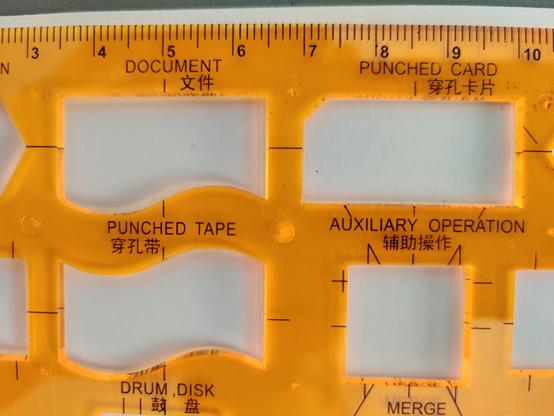
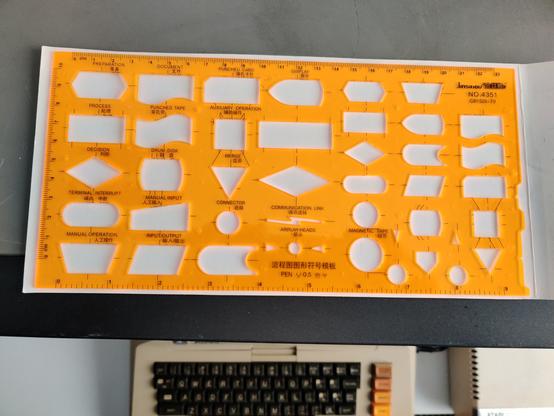
Looking forward to trolling my colleagues with diagrams made using this template. My excuse? I was denied a licence for #LucidChart. #VintageComputing #Flowchart #PunchedCard #PunchedTape #DrumDisk #MagneticTape
I use #Lucidchart for these because UML style used by #drawio is the crappy and convoluted UML version, and with #yEd you have to go too great lengths for a trivial task: https://yed.yworks.com/support/qa/2054/is-a-data-flow-diagram-palette-available

It is sad how weak the support is for this diagram type among the tools, given that it is the most useful of them all...

Edit: actually draw.io also has old school versions in the palette so I was wrong. I might use that in the future :-)
Akkoma

@malwaretech I can't tell for sure what software created those specific graphs, but #LucidChart is a great tool for this. https://www.lucidchart.com/pages/product
Diagramming, Data Visualization and Real-Time Collaboration | Lucidchart

Learn how Lucidchart helps visually solve complex problems by creating diagrams and flowcharts that bring clarity, collaboration and innovation.

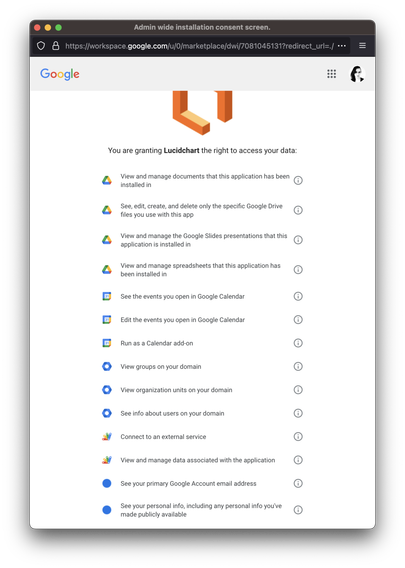
Went to add #LucidChart to my Google Docs and was presented with this permissions prompt, and quite frankly, fuck that: why the hell does LucidChart need to see my Calendar??

#privacy

When your old manager in accounting is tasked with creating the org chart in #lucidchart but does the whole thing, manually inputted and formatted. Took weeks to get me a copy so I could finally update my ITSM and AD.

After seeing how it was put together, I take 1-2 hours to learn how to use Lucid's Excel/CSV template to build an org chart from it and feed it into a working model in Lucid that is adaptive to the data table. Overall I've maybe spent a day total in Lucid apps lifetime, including my old job. It's not that difficult to work with, and this is my first time importing data into their system.

Handles adaptive location data with color coded borders, with a sheet grouping each set into their locations. Also groups together each set of matching employees based on role, again color coded by location to highlight within the groupings. I even have a location key to show which location they belong to by color. Tomorrow, I'll get the executive and manager groups' conditional formatting working to fill the OC cards.

Once I'm done with the model, I plan to turn it over to the HR personnel after fully demoing how easy it is to update it.

I'm not out to 1-up my old boss, but there are just better ways to do things than flat out manually when you have enough data points to work with altogether. My job in Information and Technology is to make the best use of both. When you're trying to bash the computer with a hammer to drive in information, it's time for IT to step in and suggest a better tool.

Quite peculiar that #Lucidchart is claiming that Apple's policies are why they can't provide their iOS app to their individual subscription tier customers anymore. πŸ€”
Are there #software #architecture #design tools out there? Basically a #GUI for #developing #code but with the focus on the design of the #software? Maybe a combo of #scratch and #LucidChart or #diagramsio

I tired out #LucidChart for a hobby project last night and was blown away in two ways.

1) This is intuitive and useful software.
2) The free-tier is self-defeating low - it has an object limit, so complex charts are impossible.

Now I'm seeking #foss alternatives because I can't see playing an ongoing subscription for something I'll rarely use.

I'm probably atypical, but I often start using software in my hobbies then move to using it professionally.

I guess I won't use lucid chart this way.

@kstewart did I hear #figma? I am currently using both figma and figjam for brain storming and collaboration. I am creating wireframes to illustrate a process instead of just written content. Teaching myself, but I also like #lucidchart for creating some quick workflows as well. As a newbie on figma my turnaround is a bit slower. Not a designer, but faster in other tools. #figma has a lot of community templates. Unless I am missing something you can't edit the shared ones. Nice to look at.