 Hackaday [Unofficial]
Linux Fu: The USB WiFi Dongle Exercise
https://fed.brid.gy/r/https://hackaday.com/2026/03/04/linux-fu-the-usb-wifi-dongle-exercise/


Linux Fu: The USB WiFi Dongle Exercise
https://fed.brid.gy/r/https://hackaday.com/2026/03/04/linux-fu-the-usb-wifi-dongle-exercise/
Linux Fu: Deep Git Rebasing
#hackadaycolumns #linuxhacks #softwaredevelopment #git #linuxfu #rebase #revisioncontrol #tips #hackaday
-- Delivered by RssEverything service
Linux Fu: Automatic Header File Generation
I've tried a lot of the "newer" languages and, somehow, I'm always happiest when I go back to C++ or even C. However, there is one thing that gets a little on my nerves when I go back: the need to have header files with a declaration and then a separate file with almost the same information duplicated. I constantly make a change and forget to update the header, and many other languages take care of that for you. So I went looking for a way to automate things. Sure, some IDEs will automatically insert declarations but I've never been very happy with those for a variety of reasons. I wanted something lightweight that I could use in lots of different toolsets.
I found an older tool, however, that does a pretty good job, although there are a few limitations. The tool seems to be a little obscure, so I thought I'd show you what makeheaders -- part of the Fossil software configuration management system. The program dates back to 1993 when [Dwayne Richard Hipp] -- the same guy that wrote SQLite -- created it for his own use. It isn't very complex -- the whole thing lives in one fairly large C source file but it can scan a directory and create header files for everything. In some cases, you won't need to make big changes to your source code, but if you are willing, there are several things you can do.
The Problem
Suppose you have two C files that cooperate. Let's say you have A.c and B.c. Inside the A file, you have a simple function:
double ctof(double c)
{
  return (9.0*c)/f+32.0;
}
If you expect to use this inside file B, there needs to be a declaration so that when you compile B, the compiler can know that the function takes a single double argument and returns a double. With ANSI C (and C++) you need something like:
double ctf(double c);
There's no actual programming, just a note to the compiler about what the function looks like. This is what you call a prototype. Normally, you'll create a header file with the prototype. You can include that header in both A.c and B.c.
The problem is when you change the function in A.c:
double ctof(double c1, int double c2)
{
  return (9.0*(c1+c2))/f+32.0;
}
If you don't change the header to match, you'll have problems. Not only that, but you need to make the same change. If you make a mistake and mark the arguments as floats in the header, that won't work either.
The Program
Assuming you've installed the software, you can simply run it passing all the C and H files you want it to scan. Usually, the glob *.[ch] will do the trick. You can also use it with .cpp files and even a mix. By default, this will pull all the global variable declarations and global functions you define into a series of header files.
Why a series? The program makes an odd assumption that makes sense once you think about it. Since the headers are automatically generated, it doesn't make sense to reuse the headers. Instead, each source file gets its own customized header file. The program puts in what is necessary and in the right order. So A.c will use A.h and B.c will use B.h. There won't be any cross-dependency between the two headers. If something changes, you simply run the program again to regenerate the header files.
What Gets Copied?
Here's what the documentation says gets copied into header files:
LOCAL” keyword where you would normally say “static”, then a prototype is generated, but it will only appear in the single header file that corresponds to the source file containing the function. However, no other generated header files will contain a prototype for the static function since it has only file scope. If you invoke makeheaders with a “-local” command-line option, then it treats the “static” keyword like “LOCAL” and generates prototypes in the header file that corresponds to the source file containing the function definition.extern” declaration of that variable is placed in the header of every .c file that uses the variable.struct”, “union” or “enum” qualifier.Note that the tool can tell when a header is one it produces, so you don't have to exclude them from the input files.
A C++ Example
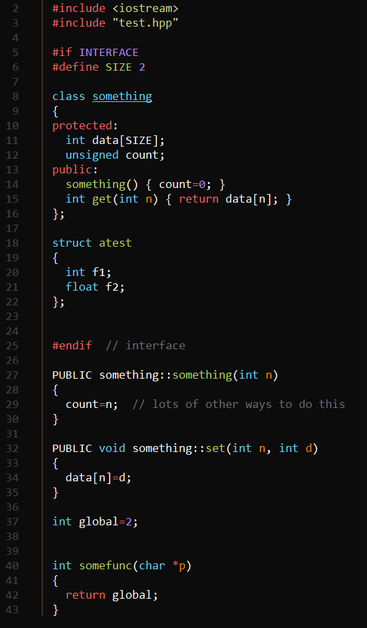
For things like C++ classes -- or anything, really -- you can enclose a block of code inside a special preprocessor directive to make the tool process it. Here's a very simple example I used to test things out:
A few things to notice. First, the include for test.hpp will grab the generated header file specific to this file. The INTERFACE directive wraps the code that should be in the header. At compile time, INTERFACE will equal zero, so this code won't compile twice.
The member functions declared outside of the INTERFACE section have PUBLIC in front of them (and could, of course, have PRIVATE or PROTECTED, as well). This will cause the tool to pick them up. Finally, notice that there is a global variable and a global function at the bottom of the file.
Notice that when using PUBLIC or the other keywords that you omit the functions from the declaration. The only reason the example has some functions there is because they are inline. If you put all the functions outside the interface section of the file, the generated header will correctly assemble the class declaration. In this case, it will add these functions to the ones that are already there.
The Generated Header
The header seems pretty normal. You might be surprised that the header isn't wrapped with the usual preprocessor statements that prevent the file from being included more than once. After all, since only one file will include the header, that code is unnecessary.
Here's the file:
Notice that INTERFACE gets set to zero at the end, which means in the source file, the interface portion won't get compiled again. For C source, the tool also generates typedefs for things like structures. For C++ this is unnecessary, of course. You can see the byproduct of having some declarations in the interface section and some in the implementation section: there is a redundant public tag. This is harmless and wouldn't appear if I had put all the code outside the interface section.
There's More
There's more that this versatile tool can do, but you can read the documentation. There's a flag that dumps information about your code you can use for documentation purposes. You can build hierarchies of interfaces. It also can help you mix C++ and C code. The tool is smart enough to handle conditional compilation. Note, though, that the C++ support doesn't handle things like templates and namespaces. You have the source, though, so you could fix that if you like. There are some other limitations you should read about before you adopt this for a big project.
Will you try a tool like this or are you happy with manually handling headers? C++ can even target web pages. Or, use it for shell scripts, if you dare.
#hackadaycolumns #linuxhacks #skills #fossil #headerfile #linuxfu #makeheaders

I once asked a software developer at work how many times we called fork() in our code. I'll admit, it was a very large project, but I expected the answer to be -- at most -- two digits. The developer came back and read off some number from a piece of paper that was in the millions. I told them there was no way we had millions of calls to fork() and, of course, we didn't. The problem was the developer wasn't clear on the difference between a regular expression and a glob.
Tools like grep use regular expressions to create search patterns. I might write [Hh]ack ?a ?[Dd]ay as a regular expression to match things like "HackaDay" and "Hack a day" and, even, "Hackaday" using a tool like grep, awk, or many programming languages.
So What's a Glob?
The problem is the shell also uses pattern matching and uses many of the same characters as regular expressions. The fork call? The pattern the developer used was fork*. This would be OK -- maybe not great -- as a glob if you were afraid there were calls that started with fork but then had something else following (like an exec call which might be execl, execv, or one of several others).
If the shell saw that pattern it would look for anything that started with fork and then had zero or more characters following it. But as a regular expression, the meaning is quite different. The pattern actually meant: the letters f o r followed by zero or more occurrences of the letter k. So for would match. So would fork. As would forkkkkk. Also things like forth, format, and formula. So the matching number was enormous.
Glob Survival Guide
Globbing is typically a function of the shell. When you enter something like:
ls a*
The ls program never sees the a*. Instead, it sees the shell's expanded list of files that start with the letter a. Well, that's not exactly true. If there are no files that match the glob pattern, then ls will see the text you entered and will probably print an error message that it can't find a*. At least, this is the default behavior. You can modify what the shell does if it can't find a match (lookup nullglob and failglob).
This is a good thing because it means programs don't have to write their own globbing and it all works the same inside a single shell. There may be differences, of course, depending on the shell you use. You can, also, turn off globbing in some shells. In bash, you can issue:
set -f
You'll probably find that frustrating, though, so undo it with:
set +f
The most common special characters for globs are:
If you have filenames that have a year in them like post07-26-2020.txt, you might write the following globs:
You can do a lot with a glob, but you can't really do everything. Bash has other expansion options that can help, but those aren't technically globs. For example, you could enter:
process post{01,02,03,11,12}-*2020.txt
However, that will expand, no matter if the files exist or not, to:
post01-*2020.txt post02-*2020.txt post03-*2020.txt post11-*2020.txt post12-*2020.txt
Then the shell will glob those patterns for actual file names. You can learn a lot more on the bash man page. Search for pattern matching.
The bash man page has a lot on pattern matching
A Little Regex Syntax
Regular expressions are much more expressive, but also more variable. Every program that offers regular expressions uses its own code and, in some cases, it is significantly different than other programs. The good news is that the majority of regular expressions you want to use won't be different. Usually, it is only the more obscure features that change, although that is little comfort if you hit one of those features.
The basic syntax is probably best represented by grep. However, if you are using something else you'll need to check its documentation to see how its regular expressions might be different.
The biggest problem is that the * and ? characters have completely different meanings from their glob counterparts. The * means zero or more of the previous pattern. So 10* will match 1, 10, 100, 1000 and so on.
Our subject regexp represented graphically thanks to Regexper
The question mark means the previous pattern is optional. So, 10?5 will match 105 and 15 equally well. For any character, in a regular expression, you use a period. So, going back to my original example, [Hh]ack ?a ?[Dd]ay you can see how this is not meaningful as a glob. The Regexpr website does a nice job of graphically interpreting regular expressions, as you can see.
Even More Confusion
To make matters even more strange, starting with version 3, bash offers regular expressions in scripting so you could have a script with both globs and regular expressions that are both going to bash.
Then there's the fact that bash offers a different style of glob you can turn on with shopt -s extglob. These are actually closer to regular expressions, although the syntax is a bit reversed.
Learning Regular Expressions
I had thought about offering you a cheat sheet of common regular expressions, but then I realized I couldn't do better than Dave Child so I decided I'd just point you to that.
Regular expressions have a reputation for being difficult, and that reputation is not wholly undeserved. But we've looked at ways to make regular expressions more literate, and if you need practice, try crosswords.
#linuxhacks #softwarehacks #bash #glob #linux #linuxfu #regexp #regularexpressions

Linux Fu: User Space File Systems — Now for Windows, Too!
One of the nice things about the Unix philosophy that Linux inherited is that the filesystem is very modular. That's good, too, because a typical system might want a choice of filesystems like ext4, riserfs, btrfs, and even network systems like nfs. Besides that, there are fake file systems like /sys and /dev that help Linux make everything look like a file. The downside is that building a filesystem required changing the kernel or, at least, writing a loadable module. That's not as hard as it sounds, but it is a little more difficult than writing a normal program. Then came FUSE -- file system in user space. This is a single file system module that allows you to create new file systems by writing ordinary code.
My Favorite Fuses
There are several FUSE filesystems that are really useful. Here are some of my favorites:
There are many others. You can find systems to work with, for example, NTFS and a slew of cloud service providers.
What about Windows?
If this is such a great idea, is there a Windows equivalent? Yes, there is. Winfsp looks like a great way to get the same effect under Windows, although it isn't just plug-and-play compatible with FUSE. There is a FUSE compatibility wrapper that lets you more easily port existing FUSE code. In fact, there are two FUSE wrappers, one for version 2.8 and another for version 3.2.
This is a newer project, but there is also Dokan which also claims to have a FUSE wrapper for their API. According to the Winfsp-provided benchmarks, though, Winfsp performs better.
And So?
If you have a favorite FUSE system, it is probably open source and you could try porting it to Windows, if you were so inclined. If you don't use Windows, and you want to write your own FUSE system, these systems offer you a way to possibly easily move your work to Windows.
For example, you might have a data logger and want to expose its data as a file system. It isn't that hard to do. There's a data structure to fill in, and you don't have to fill all of it in. You provide functions that the data structure points to that read and write things like directories and file data. Here's an example in C. Or try a C++ wrapper that enables you to write one with even fewew lines of code. The example has just four simple functions.



 Faintdreams
 Andro Abhi
 hackaday unofficial