Time for some digital pest control! 🐜🧹

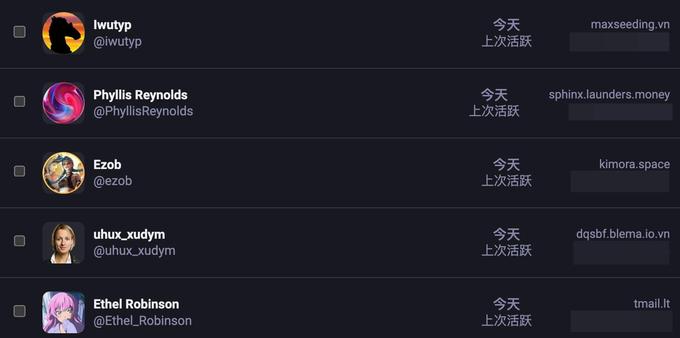
I recently noticed some uninvited guests trying to treat my server like a free SEO buffet. A swarm of bots decided to sign up and "politely" boost my posts — not because they loved my content, but to piggyback on our domain's reputation for their shady SEO gains.

I wasn't aware of this specific "parasitic" method before, but today was the big "clobbering time." All bots have been evicted, and their data is gone. Consider the server officially de-bugged! 🚫🤖

To keep things cozy and human, I’ve switched to manual registration approval. From now on, real humans only — no parasites allowed (see the attached photo for their "portraits" 😂).

To my fellow instance admins: How are you handling these digital ticks? Any favorite blocklists or moderation pro-tips to share?

#Mastodon #Fediverse #SelfHosting #AdminLife #CyberSecurity #DigitalPestControl #StopSpam #SEO #InstanceAdmin #MastodonAdmin

Mastodon 4.5.6 update deployed

#instanceAdmin

Mastodon v4.5.5 update deployed

#instanceAdmin

To improve timezone coverage @k8vsy has been promoted to moderator.

#instanceAdmin

Edmontonian Social went down few hours ago due to repetitive failure to issue new secure connection certificates, a mechanism that allows you to connect to Edmontonian Social securely even on public WiFi.

Tech jargon heavy explanation:
SSL Certs were able to issue and renew just fine just a couple days ago. I am not sure why, but they have been failing for Edmontonian Social domain.

Only theory I have is that the script I was relying on to auto-renew probably didn't update for the changes Let's Encrypt might have done on their API for
upcoming features, and something broke at some point. Script repeated requests more often than Let's Encrypt would like, and paused further requests from edmontonian.social domain. This is due to DDOS prevention mechanism on Let's Encrypt's side to protect it form rogue scripts like mine, until I intervene.

If you are dealing with such issue, use
staging environment of Let's Encrypt to test your scripts.

Notes for admins
1. In your Nginx logs look for a line that reads
Your account is temporarily prevented from requesting certificates for YOUR_DOMAIN and possibly others. Please visit: https://portal.letsencrypt.org/sfe/v1/unpause?jwt=YOUR_DOMAIN_ID. Open that link on the browser and unpause your account after fixing your back-end.
2. If you are using Docker, logs can be accessed with
docker compose logs command.

#EdmontonianSocial #instanceadmin #Admininstration #Nginx #Docker #Misskey
Upcoming Features

For announcements of upcoming changes, please subscribe to the Technical Updates mailing list or see the API Announcements category on the Let’s Encrypt community forum. Upcoming Features Short-lived Certificates Around the end of 2025, we intend to allow any client which supports ACME Profiles (see below) to request a “shortlived” certificate. These certificates are valid for such a short time that they do not need to have revocation information embedded in them at all.

【繁體中文版】

📝 Sharkey/Misskey 實例重裝後的聯邦宇宙同步問題解決指南

如果你曾經重新安裝過 Sharkey 或 Misskey 實例,可能會遇到一個棘手的問題:其他實例的使用者突然無法與你正常互動了!

🔴 常見症狀:
• 好友請求卡在待處理狀態,無法接受或拒絕
• 你的大頭貼和橫幅圖片在其他實例上顯示不出來
• 遠端使用者嘗試互動時會收到錯誤訊息

🔍 問題根源:
這是因為 ActivityPub 協議設計時,假設每個使用者的識別碼(Actor URI)是永久不變的。但當你重裝實例後,系統會生成全新的使用者 ID 和加密金鑰,導致其他實例快取的舊資料失效。簡單來說,其他伺服器還在用舊地址找你,當然找不到!

解決方案:
最有效的方法是請對方實例的管理員刪除你的舊使用者記錄,系統就會自動重新抓取你的新資料。雖然會失去追蹤關係和歷史互動記錄,但這是最乾淨的解法。如果想保留資料,也可以選擇手動更新公鑰,但操作較為複雜。

💡 預防建議:
重裝實例前記得備份資料庫和設定檔!未來 ActivityPub 社群也正在開發身份可攜性的標準,希望能從根本解決這個問題。

#Sharkey #Misskey #ActivityPub #聯邦宇宙 #Fediverse #技術筆記 #實例管理 #去中心化社交

【English Version】

📝 Solving ActivityPub User Sync Issues After Sharkey/Misskey Reinstallation

If you've ever reinstalled your Sharkey or Misskey instance, you might have encountered a frustrating problem: users from other instances suddenly can't interact with you properly!

🔴 Common Symptoms:
• Follow requests get stuck in pending status, unable to accept or reject
• Your avatar and banner images don't display on other instances
• Remote users receive error messages when trying to interact with you

🔍 Root Cause:
This happens because the ActivityPub protocol assumes that each user's identifier (Actor URI) is permanent. When you reinstall your instance, the system generates a completely new user ID and cryptographic keys, causing the cached data on other instances to become invalid. Simply put, other servers are still looking for you at your old address!

Solutions:
The most effective approach is to ask the admin of the remote instance to delete your old user record, allowing the system to automatically fetch your new data. While this means losing follow relationships and interaction history, it's the cleanest solution. If you need to preserve data, you can manually update the public key, though this is more complex.

💡 Prevention Tips:
Always backup your database and configuration files before reinstalling! The ActivityPub community is also developing identity portability standards to fundamentally solve this issue in the future.

#Sharkey #Misskey #ActivityPub #Fediverse #TechNotes #InstanceAdmin #DecentralizedSocial #FediverseTips

【日本語版】

📝 Sharkey/Misskey 再インストール後の連合宇宙同期問題の解決ガイド

Sharkey や Misskey のインスタンスを再インストールしたことがある方は、厄介な問題に遭遇したかもしれません。他のインスタンスのユーザーが突然正常にやり取りできなくなるのです!

🔴 よくある症状:
• フォローリクエストが保留状態のまま、承認も拒否もできない
• あなたのアバターやバナー画像が他のインスタンスで表示されない
• リモートユーザーがやり取りしようとするとエラーメッセージが表示される

🔍 問題の根源:
これは ActivityPub プロトコルが各ユーザーの識別子(Actor URI)が永久不変であることを前提に設計されているためです。インスタンスを再インストールすると、システムは全く新しいユーザー ID と暗号鍵を生成し、他のインスタンスにキャッシュされた古いデータが無効になります。簡単に言えば、他のサーバーはまだ古いアドレスであなたを探しているのです!

解決方法:
最も効果的な方法は、リモートインスタンスの管理者にあなたの古いユーザーレコードを削除してもらうことです。そうすれば、システムが自動的に新しいデータを取得します。フォロー関係や過去のやり取り履歴は失われますが、これが最もクリーンな解決策です。データを保持したい場合は、公開鍵を手動で更新することもできますが、操作はより複雑になります。

💡 予防のヒント:
再インストール前には必ずデータベースと設定ファイルをバックアップしましょう!将来的には ActivityPub コミュニティがアイデンティティの可搬性に関する標準を開発しており、この問題を根本的に解決できることが期待されています。

#Sharkey #Misskey #ActivityPub #連合宇宙 #Fediverse #技術メモ #インスタンス管理 #分散型SNS #連合型SNS #developer

@RaysofRed
This instance has been on the #GardenFence blocklist for a long time.

If you're an #instanceAdmin, you should look into it.

Sorry, should have posted an announcement before taking the server down for longer than planned.

However!

christopher@mastodon:~$ cat /etc/debian_version
13.0

#instanceAdmin

I've just paid the invoice to renew the mastodon.radio VPS for another year 

We have enough cash on hand to keep running at current costs for 4 more years (2030)  

If you want to support the instance financially I'd suggest helping out @nocturne who made our awesome Alex emoji - either by commissioning your own emoji or just a direct donation 

#instanceAdmin