Petite question pour les utilisateurs d’#emacs et d’#android ici, qu’est-ce que vous utilisez comme gestionnaire de mots de passe avec un client disponible pour les deux et auto-hebergeable?

J’utilisais #passwordstore qui me convenait parfaitement mais le client android n’est plus maintenu :(

Pour l’instant je teste #vaultwarden mais je trouve le client bureau de #bitwarden pas super pratique à utiliser, c’est trop pensé pour une navigation à la souris et ça rend l’utilisation beaucoup moins fluide que ce que j’ai actuellement.

Password-store encore une fois a un super paquet pour emacs qui me permet en un raccourci clavier de lancer le client, rechercher mon mot de passe, le copier et à nouveau avec le premier raccourci de rebasculer sur l’appli ou j’étais avant (j’utilise #exwm comme environnement de bureau)

Je n’ai pas vu de client natif emacs pour bitwarden, la meilleure piste que je vois c’est le paquet #emacs-bitwarden (https://github.com/seanfarley/emacs-bitwarden?tab=readme-ov-file) qui est en fait un wrapper pour le client en ligne de commande bw et qui permet d’intégrer bitwarden comme auth-source en mode lecture seule.

Ceci-dit les vraies fonctionalités de partage de mots de passe et d’organisation de vaultwarden sont plutôt attirantes.

Avant de me lancer à fond sur vaultwarden je voudrais être sûr qu’il n’y a pas d’autre solution évidente que j’aurais zappée…

#autohebergement #secrets #motdepasse

@amy I have a bunch of #exwm simulation keys too but never thought to do C-x h, good idea!

For M-f/M-b I map them to C-left and C-right. I also have C-d to delete, C-k to S-end and delete, C-y to C-v, M-w to C-c and a few others.

One challenge is to make C-s work similarly to isearch so that the same key can both initiate the search and search again. I try to do that by sending both C-f and C-g but it's not always perfect.

A couple weeks ago, I posted about my guix setup in-progress, and I think it's finally stabilized a little and the last few things I thought were necessary for a desktop environment were implemented, like a good screen-lock/display power/sleep/hibernate setup, switching from docker to podman and podman-compose, setting up a java language server, and getting all of my emacs config and packages guix-ified.

Oh, and I added two new exwm key translations: C-x h being mapped to C-a, and M-f/M-b being mapped to just four arrow keys in either direction. Really what I use M-f/M-b for is just a faster C-f/C-b, and hopping four letters in each direction is good enough for that purpose. My favorite key translation I've thought of so far is C-k, which is mapped to S-<end> C-x, and works in every application I've tried.

Anyways, I feel a little bad, because
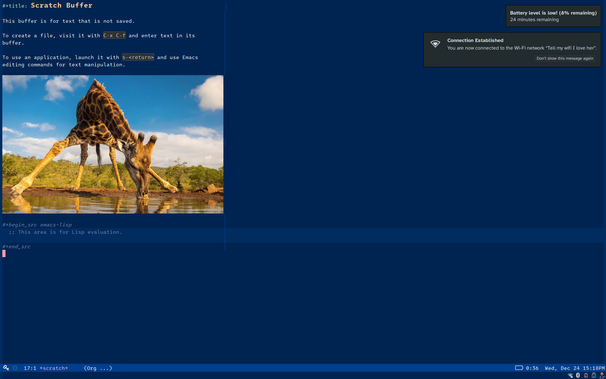
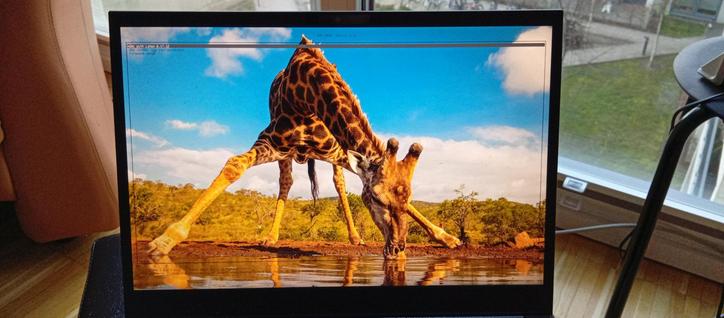
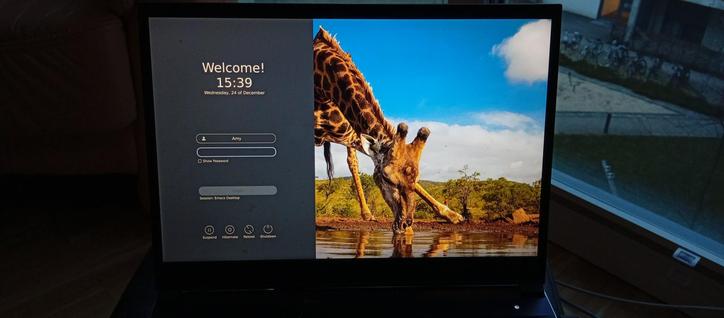
@deedend asked for a screenshot, and I promised to send some of my config upstream to guix, and then proceeded to have a lot of life events happen at me. I am still planning on submitting some merge requests a little later, but I did finally remember to make screenshots, so this is how my system looks now, built from this source code. I've also added pictures of my grub screen, login screen, and screenlock. #guix #emacs #exwm

Think of switching to EXWM and I have 3 questions:

* Is EXWM theme and look as customizable as Sway or i3 ?

* How do you config the sytem (network, printers, etc) from EXWM ?

* Is the performance good when displaying a video game window ?

#EXWM
#Emacs
#TillingWindowManager

Deseando escuchar los scripts de #ChucK en el entorno multimedia #EMMS pw-jack no encontraba chuck. Como uso #EXWM intenté usar exec-path pero es interno de #Emacs, aprendí que PATH se hereda a subprocesos. Solución: setenv PATH.

Más detalles en: https://github.com/son0p/folletos/blob/main/social.org#escuchar-scripts-de-chuck-con-emms-en-guixpipewire

@mason @len @ericsfraga @len

> Is there something beyond "C-x 5 o" to get to different frames?

`exwm-workspace-*` series of commands to create, manipulate, and switch to different frames (aka workspaces).

> Can you use both multiple frames *and* tabs within each? Tabs
> within windows within a frame?

You can have multiple frames, tabs in a frame (`tab-bar-mode`), and tabs in a window (`tab-mode`). I stick to one frame per monitor and use `tab-bar-mode` on each frame. I typically have 4-6 tabs on one monitor (the one that has my focus most of the time) and usually only one on the other monitor.

> [...] 80-column windows with big enough text for me to read
> comfortably is by overlapping them. How gracefully can exwm handle
> this?

exwm is probably not the window manager for this kind of use. You can have floating windows but exwm is best used as a tiling window manager in my experience. I do pop out (float) videos, for instance, but that's about it.

#Emacs #exwm

Alight, I just saw a post from @ericsfraga and now I want to try #exwm.

https://github.com/emacs-exwm/exwm

#emacs

GitHub - emacs-exwm/exwm: Emacs X Window Manager

Emacs X Window Manager. Contribute to emacs-exwm/exwm development by creating an account on GitHub.

GitHub

Ready for today's session at EmacsConf: mpv running, irc (via erc, of course) channels open, browser window with links to discussions for the talks, tracking the fediverse (with mastodon.el), all within exwm. Cannot be more Emacs than this. 😉

Looking forward to it.

#Emacs #EmacsConf #EmacsConference #exwm #erc #MastodonEL

@lxsameer @debacle
> We won't have to spawn many frames like EXWM [...] but one frame
> can manage all the workspaces and application windows.

Except maybe for multiple monitors? I use exwm and have only two frames, one for each monitor. I then use tab-bar-mode in each frame to give me "workspaces".

#exwm #Emacs #Wayland

So! Today is the 1st day of December, and it's the day I've chosen to make massive digital changes, gather my project and start them.
1- Technical:

  • After 10 years using it, I give up with #Firefox. Its AI shit stuff is not for me  I've replaced it with @Vivaldi #vivaldibrowser and if vivadi includes AI one day, I'll replaced it with #librewolf 
    Dear @mozilla be clearly aware that absolutely nobody wants AI in one's browser. Actually, we don't want ai anyxhere. It's quite ironic that the browser claiming security and privacy first is including AI with all the known security and privacy issues it comes with. Not with me this time
  • Both my computers are now running a #linux distro also because of the AI present in Windows 11. Debian 12 with #yunohost for the gmktec nucbox G3, and debian testing on the main computer  
  • it's today I start learning #GuixSystem with a dedicated VM, also learning #elisp #GuileScheme #bash and how to properly use the terminal and #git
    2- I want to create a community around the HardTech concept. I have this whole scifi universe in my mind and I'd like to keep it alive through various media (wiki, newsletter, why not on Gopher/Gemini used for very short fictions, writing some short stories, making a #fanzine etc...)
  • A website, probably using #doomemacs with #orgmode #orgroam and #orgpublish about scifi and colouter/technical stuffs
  • probably a personnal #bonfire instance
  • I've started to work on my personnal wiki and website. I stay on the web, but the #IndieWeb I try to find interesting and different content for each. Content will be available in french, english and esperanto
  • A lychee gallery to share my nicest screenshots.
  •  Discourse or Flarum forum
    3- Custom OS
  • I start today the project of the debian based, CLI/TUI only, no distractions, writing only focused OS featuring #emacs with orgmode and orgroam, #vim  and #neovim  with #NeorgMaybe with emacs #exwm 🤔 There will be monthly reports on my website.