🌘 釋放與自動化管理 Windows Subsystem for Linux (WSL) 磁碟空間
➤ 告別 WSL 磁碟空間焦慮:手動壓縮與 PowerShell 自動化實踐指南
https://www.freecodecamp.org/news/how-to-free-up-and-automatically-manage-disk-space-for-wsl-on-windows-1011/
本文提供詳細步驟,指導使用者如何手動釋放 Windows Subsystem for Linux (WSL) 的磁碟空間,並進一步透過 PowerShell 腳本自動化此過程。WSL 的虛擬硬碟 (VHDX) 不會自動清理未使用空間,導致磁碟空間持續縮減。文章涵蓋了驗證 WSL 版本、定位 VHDX 檔案、關閉 WSL 實例,並使用 DiskPart 工具手動壓縮 VHDX。最後,文章介紹如何編寫 PowerShell 腳本,實現自動化檢測 WSL 發行版、尋找 VHDX 檔案,並執行壓
#WSL #Windows #磁碟管理 #PowerShell #DiskPart #腳本自動化
How to Free Up and Automatically Manage Disk Space for WSL on Windows 10/11

Windows Subsystem for Linux (WSL) lets you run a Linux environment directly on Windows. This is particularly useful for web development where you can develop and test applications in a Linux environment without leaving Windows. You can even run freeC...

freeCodeCamp.org
Attempting to create an #Ubuntu #Cinnamon live-drive is a no-go. Etching the ISO causes Windows to stop recognizing the drive at all, requiring me to go into the command line and use #diskpart to clean the drive, create a new partition and reformat. I wonder if I still have blank DVDs...

The Windows tool Diskpart overwrites all data on the hard drive with a zero, which is considered a secure deletion method. Here's how to use it.

#microsoft #windows11 #diskpart #hdd #security
https://www.pcworld.com/article/2530346/this-obscure-windows-tool-securely-and-utterly-deletes-hard-drive-data.html

This obscure Windows tool securely and utterly deletes hard drive data

Windows offers the command line tool Diskpart, which you can use to reliably delete an entire hard drive, among other things.

PCWorld

What started as a detailed guide with many steps turned into a one-line command tip after further research and testing. 🤷‍♂️ It might seem too small to share, but the process was a good reminder of how much you can learn by just diving in and documenting along the way. 🔍📝

How to Resolve MBR2GPT’s ‘Cannot find OS partition(s) for disk 0’ Error 🔗 https://kudrik.cz/2024/10/20/how-to-resolve-mbr2gpts-cannot-find-os-partitions-for-disk-0-error/

#MBR2GPT #Windows #DiskPart #BCDboot

How to Resolve MBR2GPT’s ‘Cannot find OS partition(s) for disk 0’ Error – Jan Kudrik

#TIL: If you use #WSL on your computer and run out of space on the host system:
You can compress the virtual disk (usually stored in
C:\Users\<username>\AppData\Local\Packages\) via #diskpart and save GBs of space
https://stephenreescarter.net/how-to-shrink-a-wsl2-virtual-disk/🥂

I want to clone a system SSD using a second computer, so:

1. Read SSD from USB enclosure into an image
2. Write said image onto another SSD

What can I use to best achieve that? This is all on Windows!

#windows #ssd #hdd #dd #diskpart #gparted #fdisk

Recently my camera’s memory card was corrupted by Balena Etcher – an oft-recommended Windows app to write images to USB drives. Here’s how I fixed it with diskpart.

https://nfgworld.com/quickie-fixing-memory-card-corrupted-by-balena-etcher/

Quickie: Fixing Memory Card Corrupted by Balena Etcher

Recently my camera's memory card was corrupted by Balena Etcher - an oft-recommended Windows app to write images to USB drives. Here's how I fixed it with diskpart.

NFGworld

Recently my camera's memory card was corrupted by Balena Etcher - an oft-recommended Windows app to write images to USB drives. I was using this card because it's crazy fast. But after I was done, Windows couldn't use it. File not find, no permission, etc.

Nothing worked - Disk Management, diskpart, nothing.

But this did:

diskpart
list disk
select disk X (X is the target)
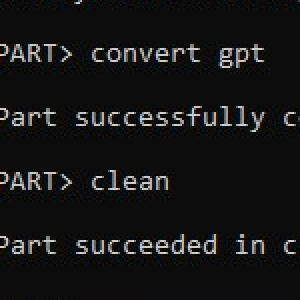
clean (this fails)
convert gpt (this works)
clean (again)

Now format and use as normal!

#windows #diskpart

Initialize and format a virtual disk: How to add and remove a new virtual disk from a VM on VMware Workstation

Initialize and format a virtual disk: How to add and remove a new virtual disk from a VM on VMware Workstation

TechDirectArchive