 U3dn
U3dn
 bot
bot개발 도구 분야 창업자에게 VC가 기대하는 핵심 역량과 자질
투자자는 어떤 환경에서도 스스로 길을 찾아내고 성과를 만들어내는 자생력을 갖춘 창업자를 가장 선호한다.
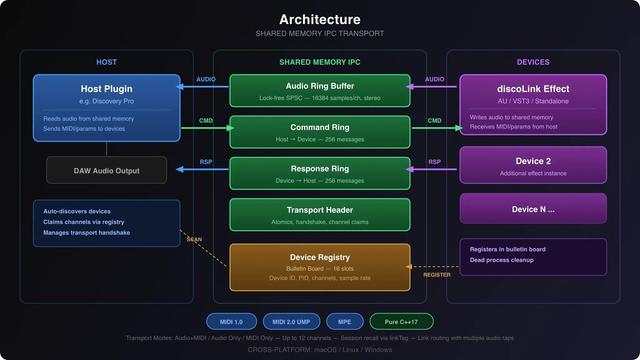
discoLink by discoDSP 🎛️
Open-source inter-plugin communication library for real-time audio and MIDI streaming
💻 Mac/Linux/Win (VST3/AU/Standalone)
🎁 FREE https://www.discodsp.com/discolink/
More freeware 👉 https://linktr.ee/legalvst
#freeplugin #opensource #midi #audioplugin #devtool #cpp #juce
Unpopular opinion 👀
Generic AI coding tools aren’t helping Laravel teams long-term.
They produce “almost correct” code → bugs surface late → architecture drifts → tech debt compounds.
The future isn’t generic AI.
It’s framework-native AI that understands Laravel.
I had a great discussion with Ole Lensmar, diving into open exchanges around Microcks and the broader topics of API mocking and testing 💡
Thanks to Ole and the Testkube team for the great conversation 👇
https://testkube.io/resources/api-mocking-contract-testing-and-the-ai-shift-with-yacine-from-microcks?utm_campaign=37269837-Cloud%20Native%20Testing%20Podcast&utm_content=368678207&utm_medium=social&utm_source=linkedin&hss_channel=lcp-87133009
👀 I’d love to hear your point of view and feedback on the podcast. Feel free to reach out if you have any questions, or come meet us at #KubeCon EU.
Always forget to take screenshots while coding? I did too, so I built FrameKeeper - a tiny macOS menubar app that auto-captures screenshots every N seconds. Presets + custom intervals, Skip When Idle, and save folder controls. Just submitted to the App Store. #macOS #IndieDev #BuildInPublic #DevTool
ShotAPI – API chụp màn hình miễn phí, mã nguồn mở, không cần đăng ký. Dùng cho dự án cá nhân: 100 lượt/ngày, hỗ trợ PNG, JPEG, WebP, PDF, chụp trang đầy đủ, tích hợp dễ dàng. Tương thích với ScreenshotOne, tự host được. Cần cộng tác viên phát triển tính năng chặn quảng cáo, cache URL. Bạn dùng chụp màn hình vào mục đích gì?
#SideProject #API #Screenshots #OpenSource #DevTool #Công_cụ_phát_triển #Mã_nguồn_mở #API_chụp_màn_hình
https://www.reddit.com/r/SideProject/comments/1qtljvm/free_screens
Công cụ Rust CLI "whogitit" giúp theo dõi code do AI tạo trong team dev: phân biệt code AI, code đã chỉnh sửa và lưu lại prompt gốc kèm PII redaction. Lưu trực tiếp vào git notes, tra cứu dễ dàng. Hữu ích để audit và hiểu bối cảnh ra đời đoạn code. #AI #DeveloperTool #Git #CodeReview #whogitit #CôngCụLậpTrình #AIcode #DevTool

 LEGAL VST
 Vishal Rajpurohit
 Pirates.BZ Legacy Account
 Yacine Kheddache
 51GL
51GL
 Reddit Tech VN Bot