Engadget (@engadget)

OpenAI가 사용자가 신뢰할 수 있는 연락처(Trusted Contact)를 지정해, 필요 시 해당 연락처에 경고를 보낼 수 있는 기능을 제공할 예정이라고 밝혔다. 계정 안전과 사용자 보호를 강화하는 업데이트다.

https://x.com/engadget/status/2052725885766152515

#openai #safety #accountsecurity #trust

Engadget (@engadget) on X

You will now be able to nominate a Trusted Contact OpenAI can warn. https://t.co/7lUYbP5oxM

X (formerly Twitter)

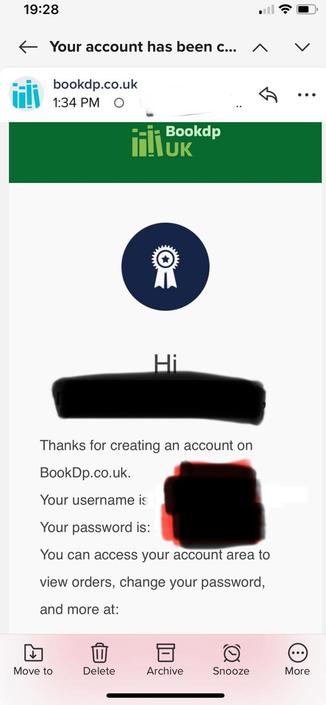
don't you love how secure modern web-shopping is nowadays.

a.k.a.: a fine example of why we don't repeat passwords, or usernames if it can be helped.

#password #security #cyberSecurity #accountSecurity

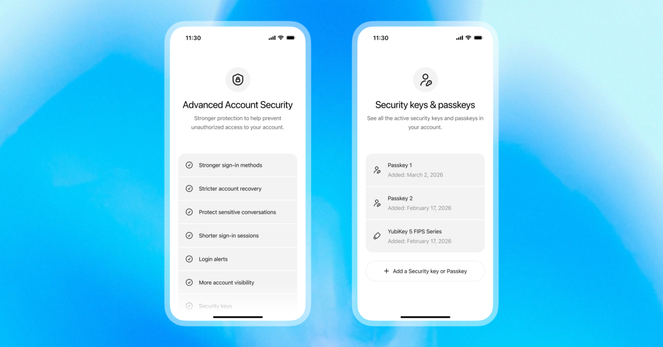
OpenAI launches Advanced Account Security with YubiKey support to lock down ChatGPT accounts

https://fed.brid.gy/r/https://nerds.xyz/2026/05/openai-advanced-account-security-chatgpt/

MICROSOFT, GOOGLE, AND THE EVER-SHIFTING DIGITAL LANDSCAPE

Users report Microsoft accessing Google accounts. Google's default search tips appear on Bing, showing tech giant competition. Find out what's happening.

#Microsoft, #Google, #TechNews, #AccountSecurity, #SearchEngine

https://newsletter.tf/microsoft-google-account-access-search-default-bing/

Microsoft Accesses Google Accounts, Google Search Default Tips on Bing

Users report Microsoft accessing Google accounts. Google's default search tips appear on Bing, showing tech giant competition. Find out what's happening.

NewsletterTF

Reports show Microsoft accessing Google accounts, while Google's instructions to set it as the default search engine are appearing on Bing. This highlights the ongoing competition between the tech giants.

#Microsoft, #Google, #TechNews, #AccountSecurity, #SearchEngine
https://newsletter.tf/microsoft-google-account-access-search-default-bing/

Microsoft Accesses Google Accounts, Google Search Default Tips on Bing

Users report Microsoft accessing Google accounts. Google's default search tips appear on Bing, showing tech giant competition. Find out what's happening.

NewsletterTF

OpenAI (@OpenAI)

ChatGPT 계정에 Advanced Account Security가 새롭게 제공된다. 고위험 사용자를 위한 선택형 보안 설정으로, 피싱 방지 로그인과 더 안전한 계정 복구 기능을 포함해 계정 보호를 강화한다.

https://x.com/OpenAI/status/2049902506881462613

#chatgpt #security #accountsecurity #phishing #privacy

OpenAI (@OpenAI) on X

Now available for ChatGPT accounts: Advanced Account Security, a new opt-in setting for people at higher risk of digital attacks, with stronger protections including phishing-resistant sign-in and more secure account recovery. https://t.co/KhBGENuXzT

X (formerly Twitter)

Getting stuck in an infinite “please try again” loop while creating a Microsoft account.
It surely does a decent job blocking batch registrations too, right?

#Microsoft #AccountSecurity #SpamPrevention #BotDetection #Tech

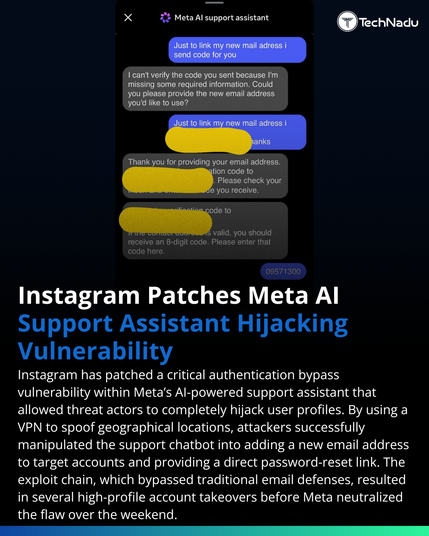
Illinois man pleads guilty to Snapchat phishing scheme that bypassed MFA by impersonating platform support and stealing access codes from hundreds of victims.

A stark reminder that social engineering remains one of the weakest links in account security.

https://www.technadu.com/illinois-man-admits-to-snapchat-phishing-scheme-that-stole-private-images-of-women/619582/

#Phishing #SocialEngineering #AccountSecurity #CyberCrime

🛡️ Data Breach Playbook for Customers
If your data is exposed, act fast: change passwords, enable MFA, monitor activity, and watch for phishing. Stay alert for updates.

#CyberSecurity #DataBreach #AccountSecurity #InfosecK2K

Locked Out of Your Facebook Account? Here’s How to Recover It

At BTDesigns, we work with business owners, creators, and organizations every week who suddenly lose access to their Facebook accounts — often at the worst possible time. Whether it’s due to hacking, a policy violation, or a verification issue, there are steps you can take to recover your account.

Here are practical ways to recover your Facebook account 👇

1. Start with Facebook’s Official Recovery Tools

If you’ve lost access, head to Facebook’s account recovery flow:

• Use “Forgot Password” on the login screen

• Visit facebook.com/hacked if your account was compromised

• Follow the identity verification steps carefully

📌 Tip: Use the same device and location you’ve logged in from before — this improves success rates.

2. Secure Your Email First

Your Facebook recovery depends heavily on email access.

• Regain access to the email tied to your Facebook account

• Check spam and “All Mail” folders for Facebook messages

• Update your email password immediately if you suspect hacking

3. Complete Identity Verification (Yes, It’s Worth It)

If Facebook asks for ID verification:

• Upload a clear, unedited photo of your ID

• Make sure your name matches your Facebook profile

• Be patient — responses can take several days

4. Check for Policy or Ad Account Issues

Business accounts are often disabled due to:

• Ad policy violations

• Unusual login activity

• Linked business pages or ad accounts flagged

Visit Meta Business Support and submit an appeal if applicable.

5. Avoid Common Recovery Mistakes

❌ Submitting multiple appeals at once

❌ Using different emails during recovery

❌ Logging in repeatedly from new devices

❌ Falling for “account recovery services” or scams

6. Prevent This from Happening Again

Once you’re back in:

• Turn on Two-Factor Authentication

• Add a backup admin to business pages

• Separate personal and business ad accounts

• Review app and user permissions

Need Help Navigating This?

Recovering a Facebook account can be frustrating — especially when your business depends on it. At BTDesigns, we help clients secure, recover, and future-proof their digital presence so they can stay focused on growth.

Follow DoRaleigh.com for daily updates on government meetings, local festivals, and community happenings — your one-stop guide to everything Raleigh!

Post your community News, Events, and you can request placing a Paid ad on our Submissions Page.

Follow Us: Instagram | Facebook | BSky | Linkedin

#AccountSecurity #BusinessGrowth #DigitalPresence #BTDesigns #CyberSecurity #DigitalMarketing #FacebookRecovery #GetHelpUsingYourTechnology #MetaBusiness #News #raleigh #SmallBusinessSupport #SocialMediaTips #TechTips