 lee smiths workshop
Replacing the power switch on the Commodore 1084S CRT monitor

Replacing the power switch on the Commodore 1084S CRT monitor

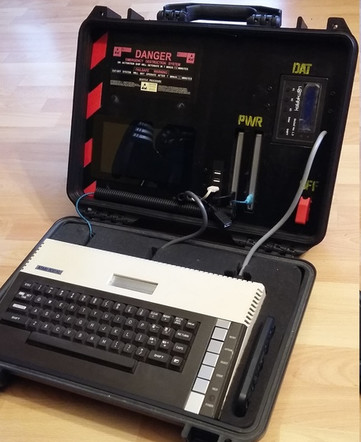
I should combine it with my #6502portable and begin a mobile #arcade.

For some weird reason I had believed the 1084S display cannot be connected to my computers, because it does not have the 21-pin RGB fitted in. Then one day I realised I have an cable that does the job for Amiga.
Then I thought perhaps QL should work with it too, if not with the analog RGB then with the digital. This is something I tried a few years ago, mostly by guessing, but then abandoned it as I couldn't get it to sync.
I then found these instructions which made me rethink the cable.
<http://sinclairql.speccy.org/articulos/bricolaje/RGB_1084S.html>
https://foro.speccy.org/viewtopic.php?f=15&t=643
I'll replicate the info here.
It turned out I needed to disconnect one wire and reconnect another in my already existing cable.
These are the female connectors at the backside of the 1084S and QL respectively:
So, to connect the QL to the 1084S a cable with 8-pin DINs is needed. 5 connections are made.
RED=Red signal
GREEN=Green signal
BLUE=Blue signal
WHITE=SYNC
YELLOW=GROUND
The picture I got was really good.
Some additional QL notes
I admit I was somewhat flummoxed when turning my QL on after this long while. But one reason for making this blog is that I can go back to old material and again remember how things work. I don't really understand my boot arrangement anymore, but at least it works.
Using a QL keyboard after a long while was not an entirely positive experience. It is far more clunky and noisy than I remembered. The basic sensitivity of the keys is ok.
CTRL+left or right is Backspace and Delete, and this is rather intuitive as the CTRL is really close. Not having to reach further is a benefit after getting used to it. For some kind of tasks this layout can be good, but for games it's not too great.
WTV can be a helpful command if the image does not fit the screen. With the 1084S the screen can be adjusted to fit, though. MODE 0 and MODE 8 switch between the lower and higher resolutions.
Depending on the setup the drive might respond to following commands (mdv is microdrive, flp for floppy drive and so on)
dir mdv1_
dir flp1_
dir win1_
dir sdc1_
dir ram1_ for the RAM drive
load sdc1_filename loads BASIC programs, whereas exec sdc1_qed launches programs such as Qed. Using Qed, F3 enters command mode, where Q exits and X exits and saves.


For some weird reason I had believed the 1084S display cannot be connected to my computers, because it does not have the 21-pin RGB fitted in. Then one day I realised I have an cable that does the job for Amiga.
Then I thought perhaps QL should work with it too, if not with the analog RGB then with the digital. This is something I tried a few years ago, mostly by guessing, but then abandoned it as I couldn't get it to sync.
I then found these instructions which made me rethink the cable.
<http://sinclairql.speccy.org/articulos/bricolaje/RGB_1084S.html>
https://foro.speccy.org/viewtopic.php?f=15&t=643
I'll replicate the info here.
It turned out I needed to disconnect one wire and reconnect another in my already existing cable.
These are the female connectors at the backside of the 1084S and QL respectively:
So, to connect the QL to the 1084S a cable with 8-pin DINs is needed. 5 connections are made.
RED=Red signal
GREEN=Green signal
BLUE=Blue signal
WHITE=SYNC
YELLOW=GROUND
The picture I got was really good.
Some additional QL notes
I admit I was somewhat flummoxed when turning my QL on after this long while. But one reason for making this blog is that I can go back to old material and again remember how things work. I don't really understand my boot arrangement anymore, but at least it works.
Using a QL keyboard after a long while was not an entirely positive experience. It is far more clunky and noisy than I remembered. The basic sensitivity of the keys is ok.
CTRL+left or right is Backspace and Delete, and this is rather intuitive as the CTRL is really close. Not having to reach further is a benefit after getting used to it. For some kind of tasks this layout can be good, but for games it's not too great.
WTV can be a helpful command if the image does not fit the screen. With the 1084S the screen can be adjusted to fit, though. MODE 0 and MODE 8 switch between the lower and higher resolutions.
Depending on the setup the drive might respond to following commands (mdv is microdrive, flp for floppy drive and so on)
dir mdv1_
dir flp1_
dir win1_
dir sdc1_
dir ram1_ for the RAM drive
load sdc1_filename loads BASIC programs, whereas exec sdc1_qed launches programs such as Qed. Using Qed, F3 enters command mode, where Q exits and X exits and saves.


 Boris Kretzinger
 eiZen
eiZen Stefaan Henninck 🕹️🎥🍿🍺
 old machinery (unofficial)