Jonas M. Ribe

@ribe
133 Followers
533 Following
22 Posts
🛠 Maker of Highlights app ⌨️ iOS and Mac Developer 🎓 PhD in Biophysics 🔬 Microfluidics and Lab-on-a-Chip Research 🧫 He/him
Twitter@jonas_ribe
@MacBalance @highlights No, thank you for sharing! Highlights does remember the page you were on, but not area of the page and document specific zoom level. However, that should be doable, I’ll look into it😊

@MacBalance @highlights From the question, I assume you are talking about the notes panel on iPad. The panel is hidden by default in portrait orientation and shown in landscape. This makes sense for standard document sizes, but if you always use the iPad in landscape (e.g. in a keyboard case) I can see it being less optimal..?

(On macOS the app remembers your sidebar configuration, but rotating screens are less of an issue there)

@stroughtonsmith thanks for doing this every year!

@highlights is a PDF reader made for researchers or anyone who annotate a lot of documents. Now available in Liquid Glass on iPhone, iPad and Mac✨

The iPad version is desktop-class with support for the menu bar, resizable windows, keyboard navigation and optimized for Apple Pencil.

https://apps.apple.com/app/id1498912833 #showcase25

Highlights 2024.1 is out with support for dark and tinted app icons, Control Center widgets and Lock Screen controls on iOS and iPadOS 18✨

+ A whole new experience annotating with the Apple Pencil using hover previews and the new floating tool palette


We've launched a second giveaway in our Discord community for Club MacStories+ and Club Premier members.

Today, we've got Highlights, an excellent PDF viewer and annotation app for iOS, iPadOS, and macOS by Jonas Myren Ribe.

Details: https://club.macstories.net/discord/960298030546960436/1164314962466975826

More on Highlights: https://apps.apple.com/us/app/highlights-pdf-reader-notes/id1498912833

Now through Oct. 31, you can join any Club MacStories plan and get 20% off an annual membership

Details here: https://www.macstories.net/news/announcing-the-club-macstories-fall-membership-event-and-discount/

Club MacStories Discord Message

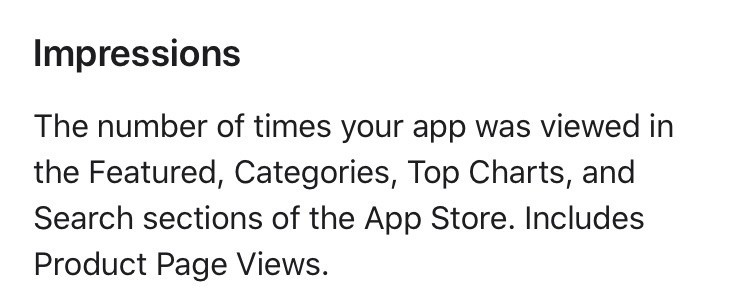
@charliemchapman According to to the docs search is included. I think they count PPO impressions differently depending on the test you run. If your treatment includes app icons basically all impressions will count, but when testing screenshots only views showing screenshots will be included.

That’s also why the analytics for the same time period are not 1:1 with the PPO numbers. (Check your unique impressions and filter by “Page Type”)

From: https://developer.apple.com/help/app-store-connect/view-app-analytics/view-product-page-optimization-results

View product page optimization results - Measure app performance - App Store Connect - Help - Apple Developer

@matthewcassinelli @highlights is a PDF reader for iPhone, iPad and Mac for research or just people who annotate a lot of documents. It also includes a document scanner that can do OCR (unlike the one built into Files.app). It is done on-device and does not require the Pro subscription.

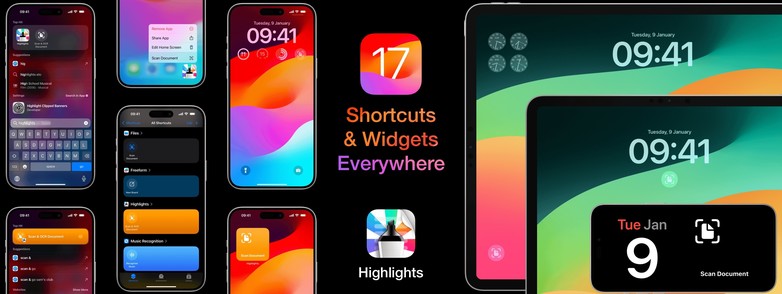
The latest update lets you launch the document scanner from a bunch of new places thanks to the new widgets & shortcuts in iOS 17✨

https://apps.apple.com/app/id1498912833

‎Highlights: PDF Reader & Notes

‎"It’s the novel approach to PDF annotation that makes this app a cut above the rest"- TapSmart.com "A simple and effective tool for helping you strip key information out of research PDFs." - iCreate Magazine, Issue 221 "... an app that students, academics, and anyone who does substantial amounts o…

App Store
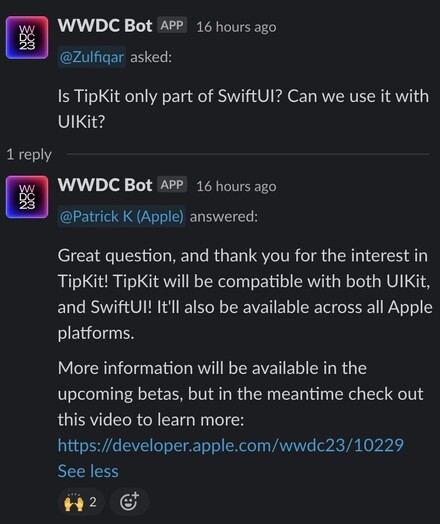
@palmin TipKit is not in beta 1, but from the Slack it sounds like it might come to UIKit in an upcoming beta:
@maxrudberg @plantry seeing a large drop as well, but it has to be missing data because if I filter by territory and select Europe it shows 0 active subscriptions😵‍💫

Today is a very sad day for the Apple automation community. Alex Hay, the maker of Toolbox Pro, recently passed away after a battle with cancer.

Alex was a rare talent whose apps empowered people by extending what was possible with automation. Please join the MacStories team in remembering Alex during Automation April: https://www.macstories.net/stories/remembering-alex-hay-the-maker-of-toolbox-pro-during-automation-april/

Remembering Alex Hay, the Maker of Toolbox Pro, During Automation April

I have some sad news to share with the MacStories community. Recently, Alex Hay, the developer of Toolbox Pro and other apps, passed away after a battle with cancer. I can’t tell you how hard it is to write those words, and I can only imagine what those closest to Alex are going through. However,