
 Christopher Guess
Remember, anyone at #36c3 who's having problems with being overwhelemed, you can always dip out and see "Cats" to remind you it can always get much, much weirder.
Holly 🇳🇱🌹🇪🇺
@intherain
- 72 Followers
- 268 Following
- 1.5K Posts
This account will be closing soon. Follow me here: @holly
@schnittchen There's an established blink pattern for (kinda*) this. Implement on whatever wearable blinky you have: busy = green pulse/fades, open to communicate = long yellow blinks, looking for chaos/fun = blue short long short long pattern, overloaded/leave me alone = solid red #36c3
*not dating-specific
Migrating now! Signing off from this account. You can now find me here instead: @holly
 muesli
If you love working on the command-line as much as I do, you may like what I have been working on recently!
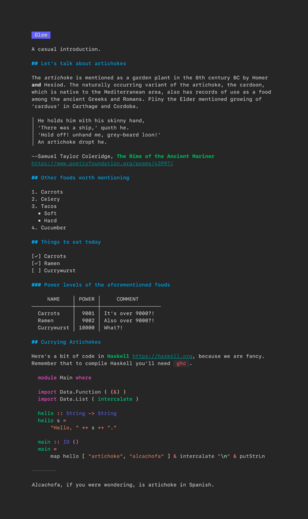
Meet glow - a stylish #markdown viewer for your shell:

Finally migrating to a smaller instance 🥳. I'm going to do the migration tomorrow, but if you know your instance doesn't implement automatic follower migration you can do it diy style by following me here: @holly
@erikthedane @th Finally set up our own instance, so moving there from mastodon.social. Pro tip: turn off notifications before you migrate (or, you know, have a migration dance party to the tune of one notification ring for every follower)
@manicdontpanic One way to deal with too many notifications drowning out each other is to bunch your habits and have a reminder for the bunch rather than individual. For instance I've set up my morning routine with Shortcuts, so it pops up dialogs one after the other to gather the laundry, brush my teeth, take meds, etc., and then only one reminder is needed for the whole block. (If you haven't tried Shortcuts, it's worthwhile to learn if you use iOS and have #ADHD imho)
@manicdontpanic I use iOS reminders with a time alert for remembering to take my meds because it's the only thing I've ever found that will pop up notifications on all my devices and make them _really annoying_ until I actively dismiss them. On iOS they stay on the lock screen so I'll see it every time I open the phone, and on MacOS they sit in the upper corner blocking part of the screen. Plus I can use Shortcuts to automatically set up the next one 4 hours from when I take a pill.