NIST is asking for comments on the proposed AES-wGCM - wide GCM mode with Rijndael-256 and 192-bit IV.
| Website | https://dchest.com |
| I Write Like | https://iwl.me |
| Apps | https://www.codingrobots.com |
| Location | Montenegro |

| Website | https://dchest.com |
| I Write Like | https://iwl.me |
| Apps | https://www.codingrobots.com |
| Location | Montenegro |
NIST is asking for comments on the proposed AES-wGCM - wide GCM mode with Rijndael-256 and 192-bit IV.
My site with my stories is up! 🎉 You're all invited to click and read. There are short stories and fairy tales (for the lack of a better term. They differ from usual fairy tales.) They are all free, in more than one meaning: they cost nothing and also they are no longer trapped in offline folders. I hope they'll bring you as much joy as they've been bringing me.
#author #writing #fiction #shortstory #blog #Sarafidou #indieauthor
I also wrote up a blog post about my writerdeck which goes into a smidge more detail about how I set things up. kmscon is really a viking here.
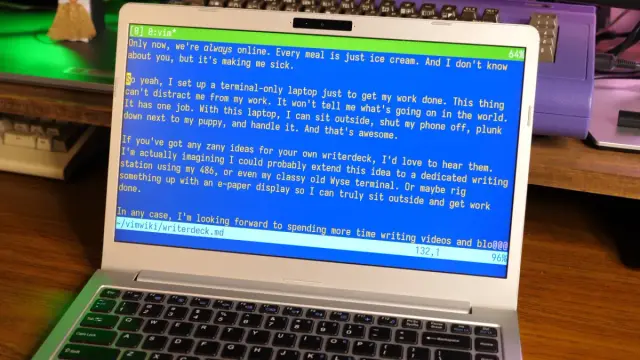
tldr: * I installed console-only Debian on an old laptop (no desktop OS at all) * I added some packages to make it work better for writing: * network-manager for connecting to hotspots while I'm away * kmscon for custom fonts and more than 16 colors in the tty * tmux for a nice status
If you ever attended C4, I have a favor to ask: the videos from the conference aren’t available online and if you have any of them stashed away, I’d like to get a copy to organize and upload (I have Wolf’s permission to do this).
2006-2009 was such a formative time for both macOS and iOS: these talks are a great record of what was happening.
For those of you who have no idea what I’m talking about:
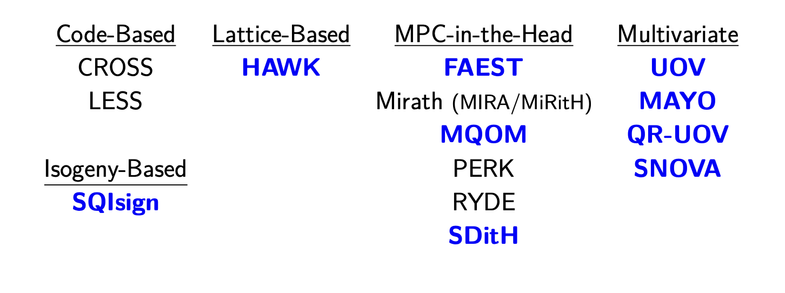
After evaluation, NIST has selected nine candidates for the third round of the Additional Digital Signatures for the Post-Quantum Cryptography Standardization Process.
1 Isogeny-Based
1 Lattice-based
3 MPC-in-the-Head
4 Multivariate
https://csrc.nist.gov/News/2026/nist-advances-9-candidates-to-the-3rd-round-of-pqc
This is so true: https://justsitandgrin.im/posts/native-all-the-way-until-you-need-text/ There's still no competitive "native" replacement for web-based tech. This is one of the reasons we have Electron everywhere.
Fun fact: the original iPhone text fields were backed by WebKit.
 I Write Like
 Daniel Jalkut
 Veronica Explains
 Craig Hockenberry
 Frédéric Jacobs