well this is the scariest thing my work computer has ever done. I didn’t even know it was structurally possible for popup windows to appear over the Windows Update screen
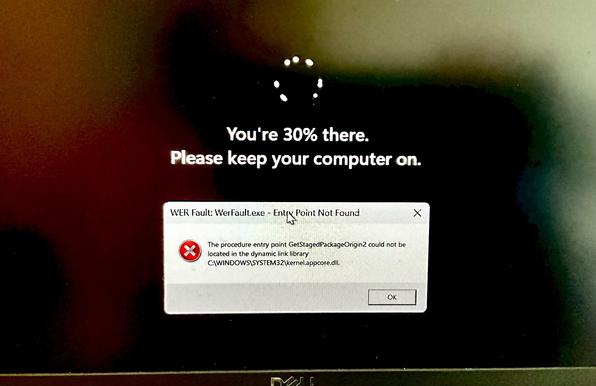
to my genuine but relieved surprise, it still booted after this.

what's truly mystifying, however, is how the Dell firmware manages to have two or three ⚠️Critical⚠️ bios updates a week. I understand neither where they're all coming from nor how Dell sustains such a rapid release cycle of high-risk firmware patches long-term.

@0xabad1dea I have a Lenovo that did something like 7 bios updates in the same day, laptop was disconnected for a while, but instead of doing last one windows update makes it step each one at a time.

Also if you had a critical error before it's a good idea to do a sfc /scannow I was sceptic before but that command fixs a lot of corrupted files all the time.

@0xabad1dea those firmware updates give me a great excuse to do nothing for several minutes while it updates & reboots, which perhaps the firmware writers also appreciate
@0xabad1dea yeah, now I remember that in Big Corporate we've had Dell firmware updates quite often (whitelabeled by the corporate though)
@0xabad1dea This is interesting, I use linux on my Dell, so does my better half and there's no firmware updates unless we say so ☺️
@Iloo I'm confused why you think that's different from Windows? the updates exist whether you choose to install them or not, in either case
@0xabad1dea I don't get them automatically, if I want them I can do them as needed in the time that is convenient for me, which means I get to decided what my laptop is doing at any given time not the other way around ☺️
@Iloo please turn down your sunny evangelization rays for a moment so you can hear me repeat that is not in any way different from how it works on Windows
Microsoft will let you pause Windows Updates indefinitely, 35 days at a time

Microsoft is rolling out changes to Windows Update that will let users pause updates for 35 days at a time and repeat the pause as many times as they want.

The Verge

@0xabad1dea @Iloo So you can decide to never install an available Windows update? Or are you talking only about firmware updates specifically?

My partner's Windows system seems to update itself. The only control seems to be that you can defer it a few times, but eventually it happens regardless. Most of the time it happens when noone is watching, and without asking whether it is OK to do so.

Are we missing some simple setting?

@kauer @Iloo I'm talking about Dell firmware updates. Blocking Windows updates is harder. In particular, if you are using a home license, they don't consider you smart enough to make an informed decision on the matter.

Apparently one trick is to lie to Windows that your home wifi connection is "metered", that is, charged by the megabyte, as it won't download updates in the background while metered. However, this may cause other apps to also stop doing what you expect them to do in the background.

@0xabad1dea @Iloo Thanks. I thought that was the case.
@0xabad1dea Such error message can cause fear to an experienced system administrator ...
@0xabad1dea We had two "new" Dell tower computers delivered decades ago (it seems). The monitor was used and I wanted to send it back since I paid for "new". They refused. When Dell kept crapping out, we finally went to Macs. I hate the rapid-stupid "modification" updates. Do people even test anymore?

@0xabad1dea ooooo Dell firmware story time.

Back when I worked IT we had an hardware refresh cycle which involved issuing out a bunch of brand new Dell all in ones. Part way through this cycle though the network started to choke, networking spent a LOT of time trying to debug what the hell was bringing down the network, while we continued to roll out the AIOs to the different workspaces.

@0xabad1dea Well, part way through this refresh cycle Dell released a firmware update. Turns out there was a bug in their wake on lan feature where, when the AIOs were put into sleep mode, they'd start pinging EVERY device on the network looking for a wakeup call. We had rolled out hundreds of these AIOs that were now DDOSing our own network due to this bug.
@0xabad1dea and this was before Dell had any sort of auto updater for their firmware, so to fix this issue we all got issued USB sticks with the updated BIOS on it and had to go back out and manually update every single AIO that was previously issued.
@0xabad1dea I found it mystifying that Dell purchased the quest tools and then ran then intuitive the ground by don't no real work on them for about 10 years or so. (They were the bees knees tools for active directory migrations, could charge anything they wanted). Maybe this is two sides of the same coin?
@0xabad1dea Possibly they are updating "trusted" boot signatures? I seem to recall that being a thing...
@0xabad1dea my bad I misunderstood that these are forced on you automatically, assumed the os was the culprit and genuinely found it was interesting. No evangelism was intended and I'm truly sorry if that was the vibe you got.
@0xabad1dea I had a Dell system once, that always said there was a firmware update. I would run Dell's tool, it would say "install success, rebooting" then after reboot the icon in the Windows taskbar would show an update pending and it would be the update that had just "installed successfully". No matter what method I tried to use to perform the firmware update, it would always do the "success" and then reboot to "update required".
@0xabad1dea I am sorry that the malware quarantine failed.

@0xabad1dea Earlier this year there was a Windows bug that caused some computers to immediately boot back up after shutting down, and this caused the Dell updater on my laptop to repeatedly install the same BIOS update without ever getting to the part where it updates the flash ROM.

Edit: I think the shutdown bug was caused by the KB5073455 update.