 abadidea
well this is the scariest thing my work computer has ever done. I didn’t even know it was structurally possible for popup windows to appear over the Windows Update screen
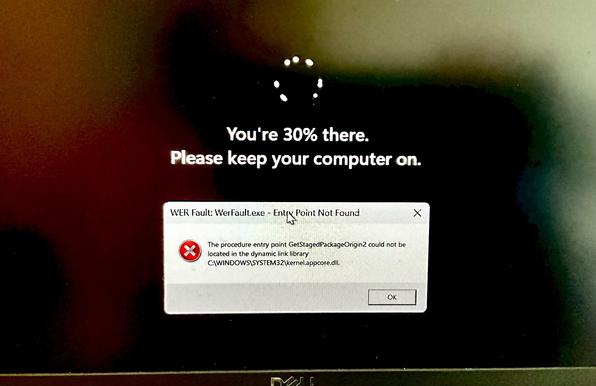
to my genuine but relieved surprise, it still booted after this.
what's truly mystifying, however, is how the Dell firmware manages to have two or three ⚠️Critical⚠️ bios updates a week. I understand neither where they're all coming from nor how Dell sustains such a rapid release cycle of high-risk firmware patches long-term.
@0xabad1dea @Iloo So you can decide to never install an available Windows update? Or are you talking only about firmware updates specifically?
My partner's Windows system seems to update itself. The only control seems to be that you can defer it a few times, but eventually it happens regardless. Most of the time it happens when noone is watching, and without asking whether it is OK to do so.
Are we missing some simple setting?
@kauer @Iloo I'm talking about Dell firmware updates. Blocking Windows updates is harder. In particular, if you are using a home license, they don't consider you smart enough to make an informed decision on the matter.
Apparently one trick is to lie to Windows that your home wifi connection is "metered", that is, charged by the megabyte, as it won't download updates in the background while metered. However, this may cause other apps to also stop doing what you expect them to do in the background.
 iloo
iloo kauer
kauer