 Beam me out!
 Alfonso Siciliano
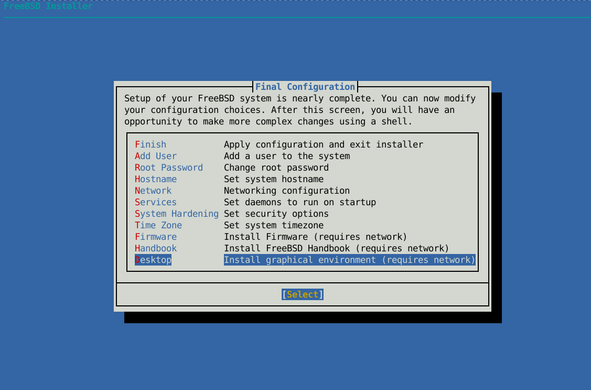
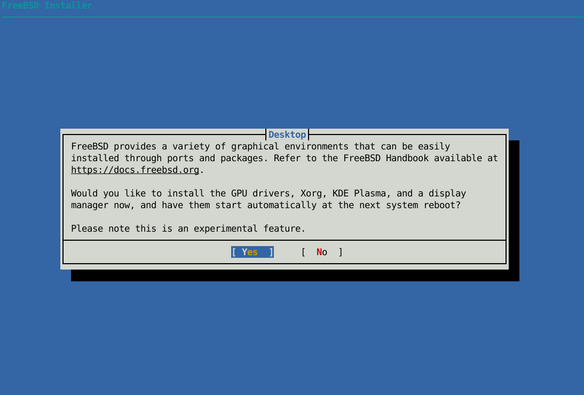
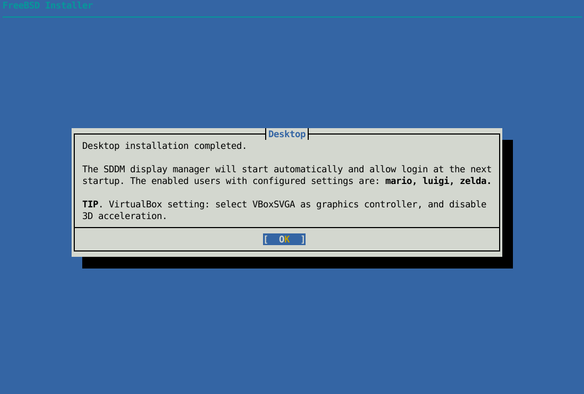
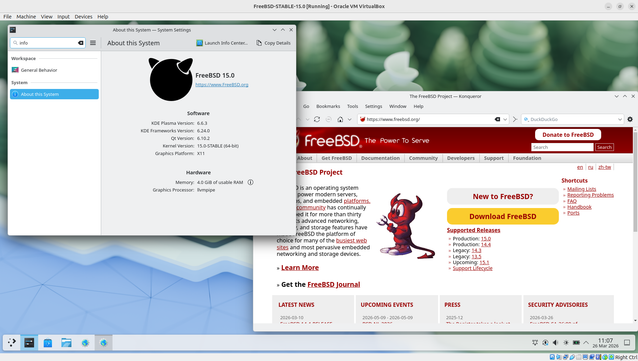
Finally, I managed to install and configure a graphical environment directly during a #FreeBSD installation session 🎉
Most of the friction was around GPU drivers, but the feedback and suggestions I received were incredibly helpful. A lot of people want to use FreeBSD on their laptops and desktops, and that really shows.
For now, the goal was to provide a simple option to install #KDE Plasma. If there’s interest and more requests, we can definitely expand this in the future with additional desktop environments and options.
Special thanks to the FreeBSD Foundation for their support 🙌
#RUNBSD #FreeBSDDesktop #FreeBSD #BSD #OpenSource #Unix #KDE #KDEPlasma #DesktopEnvironment #GUI #Laptop #Desktop #FOSS #Tech #SysAdmin #DevOps #OperatingSystem
 Harald Eilertsen
 Maciej Barć
 Jasper Vinkenvleugel
 libUnderseaMonkey.so 🇪🇺
 Karma Sahne - R.I.P @natenom
 Mox
Mox