I am a web developer and even I have no clue what this actually means
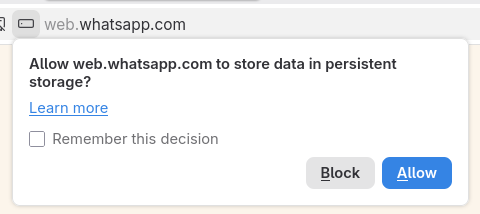
the "Learn more" link takes me to a support.mozilla.org page which talks about "cookies and site data"
Just yesterday Firefox on my phone asked me if I wanted to allow a site to access devices on the local network. I wrote the site. I have no idea what the site is doing that would prompt Firefox to ask that. Bring back software that actually tells you any salient details at all!!!
@hailey I consider this a warning for #malware that #Firefox rightfully blocked!

@kkarhan @hailey It's not malware. It's a new warning they're putting on when you use StorageManager. Basically if you store any site data which really should be clientside (think session data, or for games, think things like high scores etc.) it will give you a warning like this now.

It's not a malware thing at all, necessarily.

I use it on my own sites all the time, esp because I like to make applications that don't depend on a central server.

@kkarhan @hailey The main issue is they dumbed down the information about the warning to the point it is useless if you actually know what you're doing, it's like "haha don't worry dumb luddite, this is just storing data from the website on your computer."

It... is not reassuring or helpful, to be quite blunt.

@hailey I've seen a LOT of websites recently asking for permission to see other devices on my local network, and I've always been like, "uh, no??"
@hailey I assumed it was just the gradual enshittification of the internet, but you've given me a new theory which is that the web browsers are bad.
@hailey it's also binary all local devices or none
@hailey
That one made me curious as i had never once seen it and as far as i am concerned no freaking website has any business connecting to other devices in my LAN, here's the Firefox help page: https://support.mozilla.org/en-US/kb/control-personal-device-local-network-permissions-firefox
Control personal device and local network permissions in Firefox | Firefox Help

Learn why Firefox now asks permission before allowing sites to access your personal device or local network.

@hailey is that just persistent cookies?
@erin nope! cookies are "persistent storage" but they do not cause this permisson prompt

@hailey additional cache beyond Cookies aka. If you allow #WhatsApp to barf unlimited amounts of data on your drive.

  • Always decline that shit!
@hailey cookies but theyre american size
@hailey tells the browser not to evict *gesticulates vaguely* any of the local storage methods with out express user consent

e.g. cookies or local storage
@hailey
I'm pretty sure that's where websites can store localstorage or something and it won't automatically clear after an inactivity period, for example https://windows96.com/
@hailey in addition to the thing other people have pointed out where sites can ask the browser to make sure none of their storage gets evicted (i don't think I've actually ever had that happen? at least not on sites I use with any regularity… so this feature is only useful for sites that you use very rarely…), I think a very similar prompt can also be shown when a site asks to expand its storage to a larger size.
Window: localStorage property - Web APIs | MDN

The localStorage read-only property of the window interface allows you to access a Storage object for the Document's origin; the stored data is saved across browser sessions.

MDN Web Docs
@hailey i think it’s like . allow storage but More storage like 1 grillion storage instead of a few storage

@hailey see https://developer.mozilla.org/en-US/docs/Web/API/StorageManager/persist

it seems to increase quotas and give more assurance that the data will actually stay, otherwise the browser may just randomly decide to nuke the stuff if it feels that’s appropriate

StorageManager: persist() method - Web APIs | MDN

The persist() method of the StorageManager interface requests permission to use persistent storage, and returns a Promise that resolves to true if permission is granted and bucket mode is persistent, and false otherwise. The browser may or may not honor the request, depending on browser-specific rules. (For more details, see the guide to Storage quotas and eviction criteria.)

MDN Web Docs