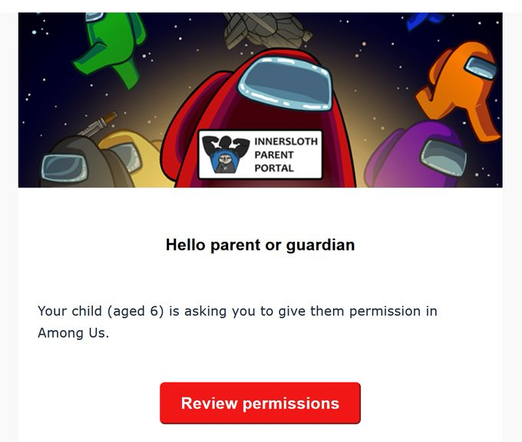
hey fedi i need tech support. after the latest ubuntu update it asked for my birth date and i accidentally mistyped and put the year 2015 instead of 2005. i clicked "finish later" when it asked me to do ID verification and now my computer thinks I'm 10 and i can't change it anymore. the problem is that now i can't access the USB drive with all my uni documents anymore:

$ sudo mount /dev/sdc1 /run/media/lea/documents [sudo] password for lea: mount: error: compliance requirements not met
please help i have a paper due next week
😭

@lea I’m calling your mum
@lea access to the unsafe language c++ is forbidden to users under the age of 18.
@breaadyboy @lea as it should be. Filth.
@lea try putting the filesystem in fstab so the os thinks its an internal disc
@lea I can see youg people bypassing this with a "Boot in rescue mode" or "init=/bin/sh" and then simply setting a password for root. Reboot, login and play as root
@eragon @lea Kids will always find a way, won't they? Just a good reminder it will never ever do what it's claiming to do anyway...
@lea plz tell me ur jokin
@efi no its real. many such cases
@lea  we're doomed
@lea also, try reverting the packages to before the update and just pin em

@efi @lea
I still can't tell if this is a joke or real.

Reality became so absurd, it's becoming harder to differentiate between fiction and real.
We're doomed in each case.

@lea @efi I think I'd treat this as any other credential lockout mishap.

If the disk isn't encrypted, I'd boot from a load to Ram distribution like Knoppix, then edit the user fields,.or failing that, backing up the files, deleting the user, and then recreating the account with the correct information this time and restoring the backup.

Khrys (@[email protected])

The Engineer Who Tried to Put Age Verification Into Linux https://www.sambent.com/the-engineer-who-tried-to-put-age-verification-into-linux-5/ The lasting damage was knowing it could happen at all: that a single contributor with no stated organizational backing could submit compliance infrastructure for surveillance law directly into the software that boots your computer, get it merged by two Microsoft employees, and have the creator of systemd personally block the removal.

Mamot - Le Mastodon de La Quadrature du Net
@lea if you know the root password you could try logging in to that directly
@lily @lea Ubuntu does not set one by default ;-)

@lea

Disconnect network (remove power from your WiFi AP if you're using WiFi) so that it can't do NTP, reboot, enter BIOS/UEFI, set date 20 years into the future, boot into OS (still without network connects, so no NTP), change your age.

(the level of shitpost of this answer is set to be equal to the level of shitpost of the OG question)

@lea true linuxshitposter doesn't need to see the lea dot pet instance tag to see that it's a uhhh I forgot how it goes
@Stellar @lea this is why we need alt text
@Stellar @lgm did you ask deepseek what material 3 looks like or what am i looking at ​:kittybluntsmoke:​
@lgm @lea
left is hollow knight, right is silsonk girl. bottom is the title of a reddit post with the silkposting flair, and the famous quote you wrote
@lgm @lea
left is hollow knight, right is silsonk girl. bottom is the title of a reddit post with the silkposting flair, and the famous quote you wrote

@lea

You know we live in fucked up times when it's impossible to distinguish satire and reality

@lea Can you overwrite the birth date property with the userdbctl command?
@lea if this stupid age verification system is coming to Europe and will be implemented into macOS, I’ll set my age so that I’m only 10 years old, so the IT department will have some fun and I’ll have a short time off .
@lea unplug the USB and run `rm -fr --no-preserve-root /`, this will remove federally required (f) record types (r)

@lea when all else fails you could chroot into the system from a live USB environment.

See here: (ignore the things after "sudo chroot /mnt/")
https://askubuntu.com/questions/1238355/failed-upgrade-from-ubuntu-19-10-to-20-04-please-update-the-microcode/1238393#1238393

then you have a "root" shell within your original system and can change all you need.

Failed upgrade from Ubuntu 19.10 to 20.04 "Please update the microcode"

While installing the Ubuntu 20.04 updates during upgrade from 19.10 to 20.04, my screen suddenly went completely white and displayed a message saying Please logout and try again. But I could not ...

Ask Ubuntu
@lea did they finally release ubuntu 26.03 holy hawk?

@lea
You reboot,
stop grub,
put in init=/bin/bash
mount / as rw
vim /etc/systemd/userbirthdate-crossedfinger-oath.txt

and set the correct date.
You being able to exit vim proves the age is correctly set.

@lea do you still have the install cd/usb? Booting the "live" OS from there would probably let you access the docs as a short term workaround 🀞
@lea oof yeah sorry, sudo is an 18+ binary now
@lea sorry, the DOB is already burned into EFI vars. You’ll have to wait it out, or start over with a new computer.