 Michael Dorner
 Steve Troughton-Smith
Here's one for the icons-in-menus haters on macOS Tahoe:
defaults write -g NSMenuEnableActionImages -bool NO
It even preserves the couple of instances you do want icons, like for window zoom/resize
/cc @gruber
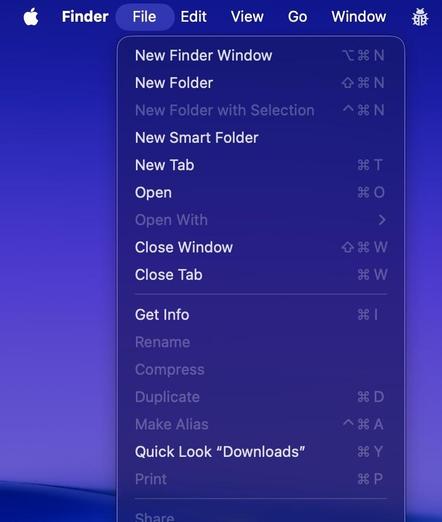
Here's one for the icons-in-menus haters on macOS Tahoe:
defaults write -g NSMenuEnableActionImages -bool NO
It even preserves the couple of instances you do want icons, like for window zoom/resize
/cc @gruber
FINALLY!
Thank you!
That is the only way to use the main menu in #macOS 26 "BrokenGlass"!
What a mess that version is, crazy really.
@stroughtonsmith @gruber awesome.
PS: Some applications seem to be unimpressed by this, e.g. iTerm.
@stroughtonsmith @gruber just added a script to Raycast so you can toggle your menu icons at will!
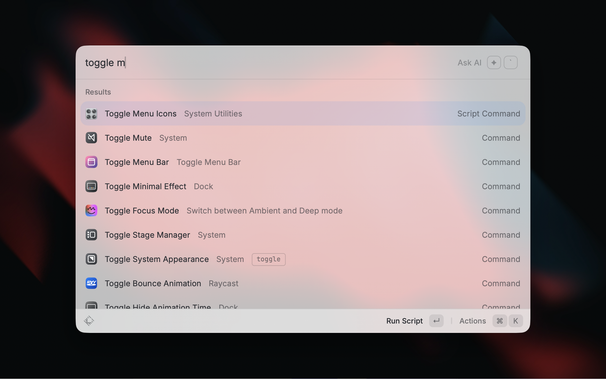
@chrismessina @stroughtonsmith @gruber Here you can also find a LaunchBar action for toggling menu icons. Have fun!
@stroughtonsmith @gruber heh, another case of Apple engineer rebellion. I like it. The previous one was where you could bring back the sensible (pre-Big Sur) layout of NSAlerts with a defaults write command. They did remove it eventually.
(I myself am staying on Sonoma for now)
@jasonjahnkefilms @stroughtonsmith You can read a good intro to the MacOS `defaults` command here:
@stroughtonsmith @jasonjahnkefilms @gruber
As for the „know what they do“: depending on the command, this requires knowledge of the unix underpinnings of macOS and what various commands do can vary extremely.
In my tests ChatGPT provides good answers for the prompt „What does this command do?
defaults write -g NSMenuEnableActionImages -bool NO“ but malicious actors could poison LLM results. https://www.anthropic.com/research/small-samples-poison
 Machiel
 NMDoerner
 Captain Salem
 Dmian 🇪🇺
 olof hennig
 QuarterSwede
 John Gruber
 lookmark
 ben
ben hyperjeff
 Patrick Seemann
 gcanyon
 Stefan Hecht
 Chris Messina
 Norbert Heger
 Gregory
 enMTW
enMTW toniwonkanobi2
 jasonjahnkefilms
 Andreas Hartl
 The Peter Pan of Nerdery™