 Ján Trenčanský
 Merill Fernando

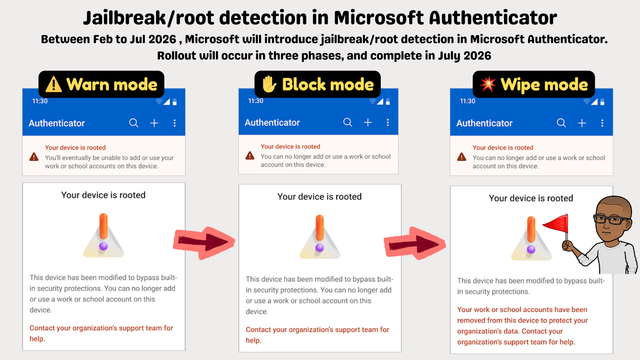
Microsoft Authenticator is about to wipe work accounts from jailbroken/rooted phones automatically 👏.
No IT config needed. 🔥
3-phase rollout starting Feb 2026:
⚠️ Warn → 🚫 Block → 🗑️ Wipe
Let your help desk and security teams know.
Microsoft Authenticator is about to wipe work accounts from jailbroken/rooted phones automatically 👏.
No IT config needed. 🔥
3-phase rollout starting Feb 2026:
⚠️ Warn → 🚫 Block → 🗑️ Wipe
Let your help desk and security teams know.
Wow. So a LOT of you folks are not happy.
The good news is your org can still allow you to use passkeys and other Authenticator apps.
You can opt out any time by showing documentation that you are in the files (tangentially mentioned because they cited your work in an email does not count sorry)
@thaodan @fluffykittycat @merill Why?
The keys and such associated with the authenticator app should be in a TPM. Something the bootloader can't touch. It can't get the private key to then send it to whoever.
The bootloader could attack in other ways and get the info you're accessing once logged in, but I don't think it can mess about or bypass the actual security mechanism.
I think they're trying to sell bullshit here so the ignorant support them as they lock us all down.
Soo instead of just rooting a phone one needs now to also deploy 38473894 shady scripts and workarounds to hide it from Microsoft Authenticator?
Congratulation on improving security (NOT).
Ehm, the azure codes are a bit different than the TOTP ones. Their app also has a kinda proprietary auth code format too. I think it is mainly about them. As for all others you literally just have to store a picture of the QR-Code you used to set them up...
Edit: But yea, it probably will end in there being a shady cracked version of the Microsoft Authenticator App that continues to work on rooted phones...
And make your employer pay for it. I got my work phone when I refused to put a similarly shitty 2FA app onto my personal one.
I just said I've a PinePhone with Postmarket OS and I'm not going to buy a new one just for that. + I asked if they'd cover damages for any data deleted because of someone hitting the "wipe phone" button in the MDM that would have come with it accidentally (or on purpose).
The phone was cheaper for them than continuing the discussion btw :p
@merill I have to admit one of the reasons I use the web application for Outlook on my phone is because installing the Outlook app and adding my work account to it would in theory give work access to control (parts of) my phone - which I don't want. I didn't think the authenticator alone would give that level of access to the device though!
Is this likely to just drive more people to switch to using Google's authenticator (or another TOTP app) instead of the Microsoft one? I do anyway, because I was already using it for other sites, and it was easier to have them all in one place. You'd lose push authentications: but I feel safer without those anyway!
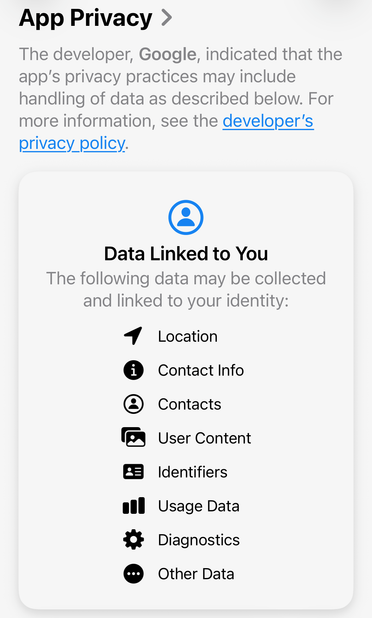
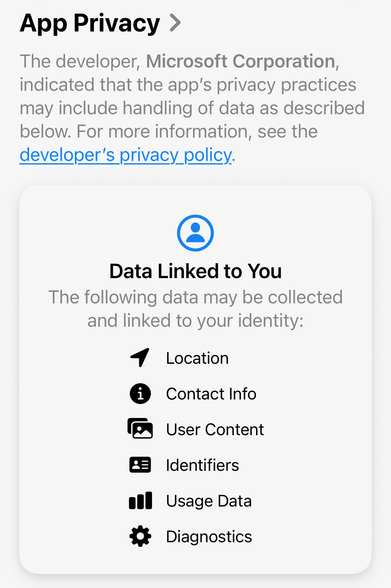
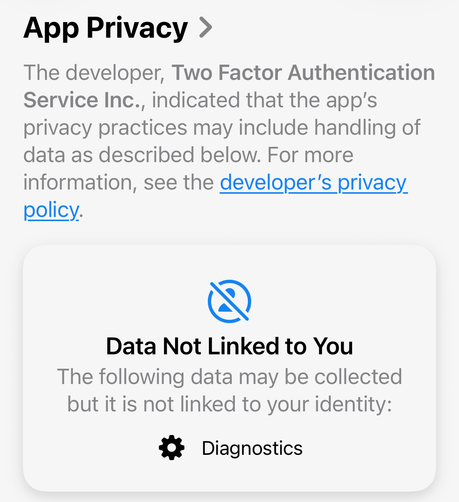
@lnr @merill *If* you consider using another TOTP app, I recommend 2FAS Authenticator. Other than the MS and Google authenticators, who are incredibly greedy data harvesters, 2FAS phones home nothing but anonymised diagnostics data. (It does, optionally, sync/backup on Google Drive/iCloud.) Has been working well for me for years. Open source, on Android and iOS.
We have heard of weaknesses in (some) password managers, but I think I haven't heard of a really compromised and exploited one. Has anyone? I may have missed it.
So, in the end, I may indeed at some point move all those 2FA secrets to my password manager. Maybe when I am retired, so at least there is no (theoretical) harm for $ORK. (2/2)
@lnr
Well another pretty bad idea. You seem to have quite a streak with those, lately.
Time to stock up with popcorn and wait for the fallout.
Hmm, I would never in my life install any M$ crap on my /e/OS ungoogled Fairphone. It's not rooted, but I guess it's also among the undesirables...
For authentication to our goddamn work accounts on M$, I use AEGIS. Or the standard authenticator on Linux Mint. Export/Import between the two works like a charm.
And it could well be that we are moving away from microslob in the not so far future. Unthinkable not so long ago. Halleluja!
@merill Blanket bans of any sort implemented by large and powerful companies always produce false positives that hurt non-customer that have to interact with their systems no matter how obliquely.
I do not use any Microsoft product or services directly but I am sure I will discover ways that this change will affect me. Likely at a moment I need to do something urgently.
Never forget Scunthorpe!
@merill people making a mountain from a molehill? On Mastodon? Never expected it…
Yes, it’s shitty. But:
Jailbreak/root detection in Microsoft Authenticator.
Between Feb to Jul 2026, Microsoft will introduce jailbreak/root detection in Microsoft Authenticator. Rollout will occur in three phases, and complete in July 2026.
Warn mode:
Your device is rooted.
You'll eventually be unable to add or use your work or school accounts on this device.
This device has been modified to bypass built-in security protections. You can no longer add or use a work or school account on this device
Contact your organization's support team for help.
Block mode:
Your device is rooted.
You can no longer add or use a work or school account on this device.
This device has been modified to bypass built-in security protections. You can no longer add or use a work or school account on this device.
Contact your organization's support team for help.
Wipe mode:
Your device is rooted.
You can no longer add or use a work or school account on this device.
This device has been modified to bypass built-in security protections.
Your work or school accounts have been removed from this device to protect your organization's data. Contact your organization's support team for help.
 Joan of Contention 😷
 TheKilt
  zsapi
zsapi Xavier
 Nacho
Nacho Fluffy Kitty Cat
 George Liquor, American
 George B
 Björn
Björn derptron
 Klaus Frank
 1.3.6.1.4.1.61513
 Eleanor LNR Blair
 Resuna
 Jyrgen N
 Markus Sugarhill
 dmi 💽
dmi 💽  amy
amy kuriko
 Bernard Sheppard
 Arik
Arik Adam Beer
 Clemens Zauner
 Krazov
 Sarah [7252]
 Graeme 🏴
 Oriel Jutty
 silhouette


 xrvs
xrvs Eggs now in different baskets.
 🔻 aetios 🇪🇺
 Jeffrey
 Omnivore
 Justin Fitzsimmons