 Merill Fernando

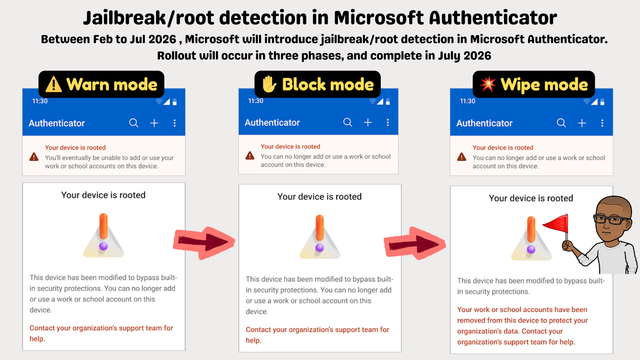
Microsoft Authenticator is about to wipe work accounts from jailbroken/rooted phones automatically 👏.
No IT config needed. 🔥
3-phase rollout starting Feb 2026:
⚠️ Warn → 🚫 Block → 🗑️ Wipe
Let your help desk and security teams know.
Microsoft Authenticator is about to wipe work accounts from jailbroken/rooted phones automatically 👏.
No IT config needed. 🔥
3-phase rollout starting Feb 2026:
⚠️ Warn → 🚫 Block → 🗑️ Wipe
Let your help desk and security teams know.
@merill I have to admit one of the reasons I use the web application for Outlook on my phone is because installing the Outlook app and adding my work account to it would in theory give work access to control (parts of) my phone - which I don't want. I didn't think the authenticator alone would give that level of access to the device though!
Is this likely to just drive more people to switch to using Google's authenticator (or another TOTP app) instead of the Microsoft one? I do anyway, because I was already using it for other sites, and it was easier to have them all in one place. You'd lose push authentications: but I feel safer without those anyway!
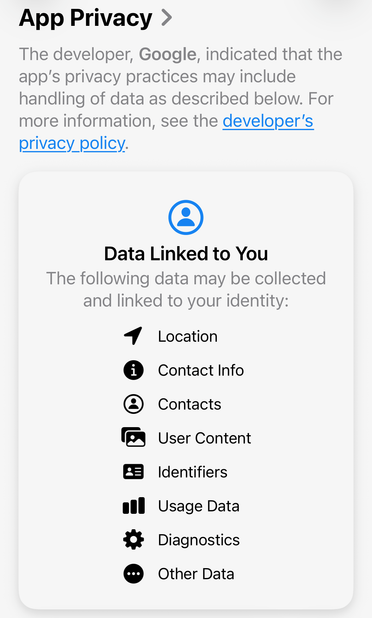
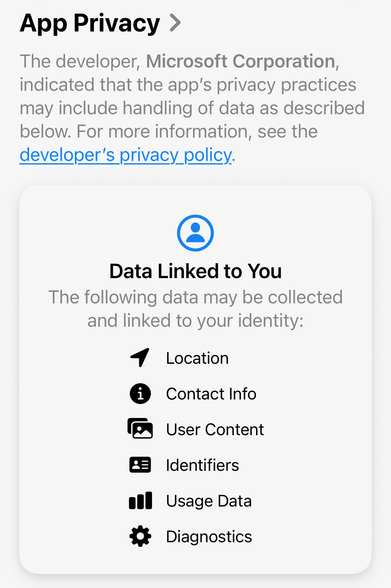
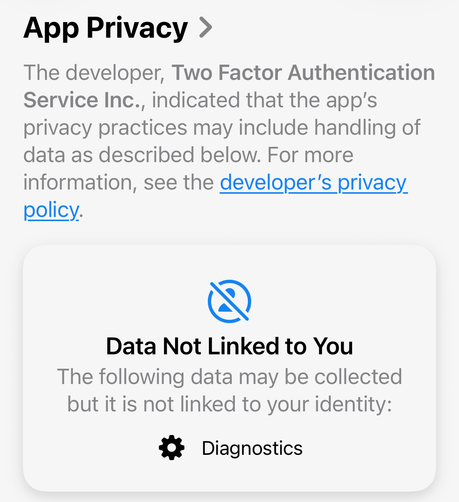
@lnr @merill *If* you consider using another TOTP app, I recommend 2FAS Authenticator. Other than the MS and Google authenticators, who are incredibly greedy data harvesters, 2FAS phones home nothing but anonymised diagnostics data. (It does, optionally, sync/backup on Google Drive/iCloud.) Has been working well for me for years. Open source, on Android and iOS.
We have heard of weaknesses in (some) password managers, but I think I haven't heard of a really compromised and exploited one. Has anyone? I may have missed it.
So, in the end, I may indeed at some point move all those 2FA secrets to my password manager. Maybe when I am retired, so at least there is no (theoretical) harm for $ORK. (2/2)
@lnr
 Eleanor LNR Blair
 Jyrgen N