 🇳🇿
🇳🇿  💉*10 Roger
Does anyone know the secret of connecting a laptop to Auckland Libraries' WIFI? My Android devices are fine but my Lubuntu laptop just won't. It connects, I get a DHCP address, but it doesn't register with Tomizone so all requests are blocked. I can't get it to go to the Tomizone portal so I can't do anything. Last time I tried it I sent a support request to Tomizone and got zero response. I just sent another one.
It worked about a year ago if I fiddled with the DNS settings, but not any more.
Maybe someone knows the current trick?
Thanks for the help guys. This time Tomizone support did get back to me and I did get connected.
I'm not completely sure which step was key to making it work.
I had already cleared the Chromium caches, including the dns cache, and that alone didn't help.
I set the captive portal service to true in FF and that was encouraging in that it popped up the "get connected" page, but it failed after that.
Then I restarted the network service, still no joy in FF
But when I went into Chromium it worked. FF requests worked after that too. So Chromium managed to register me okay at that point.
I'm using de-googled Chromium, so it's safe enough. It must do some handshake that FF doesn't (or not without further tinkering).
 Colin Jackson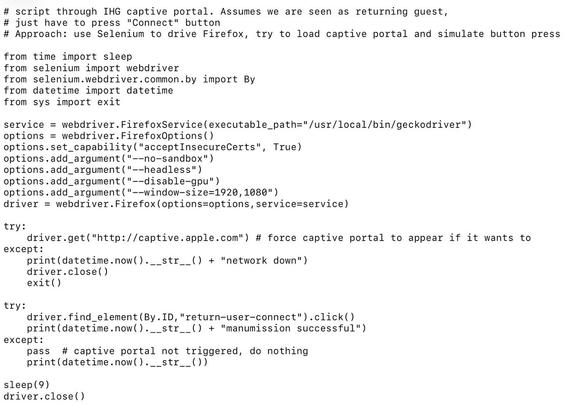
 Stephen
@rogerparkinson @phil_stevens @ThisCJ @Phil_Tanner @jackyan I've definitely been able to do it with FF and Debian at the central branch recently. It did take a few goes of connecting and reconnecting, almost as if something needed to "settle" before it could work. But I didn't do anything special other than try again.
 Jack Yan (甄爵恩)
@stephen @phil_stevens @rogerparkinson @ThisCJ @Phil_Tanner Repeated attempts over 45 minutes without changes to the settings worked for me once (in Wellington), but soon my hour was up. Library staff didnʼt know and neither did their support line, both of whom claimed my situation was unique (obviously not).
 Phil Stevens
 @rogerparkinson Captive portals are the bane of Linux networking. I've been using Portmaster for a while now and it seems to help by trapping the requests and alerting me to authenticate.
@phil_stevens @rogerparkinson I had to write a captive portal scripter when I was living in an apartment with hotel wifi. I used a RPi w dnsmasq to relay the hotel wifi to a WAP of my own, and some Python code to watch for the portal and script through it. A bonus was that I could measure how often the hotel wifi was down.
@ThisCJ @rogerparkinson That sounds like a brilliant solution...a dongle you can keep with you for travel and sorts out hotel wifi is next to priceless.
@phil_stevens @rogerparkinson Added bonus: RPi has an HDMI interface, with an external SSD it makes a streaming media server...
@ThisCJ @rogerparkinson What? The 25 freeview channels not good enough for you?
@phil_stevens @rogerparkinson Kind of places I go you're lucky to get any live TV...
@ThisCJ @rogerparkinson We had one of those in my hometown...the No-Tel Motel.
Rooms by the hour.
 Phil Tanner
@phil_stevens @ThisCJ @rogerparkinson I have something similar, a RPi setup with an RJ45 ethernet for connection, then an ap-hotspot shares the WiFi - and routes everything thru my home VPN.
If there's a network socket, I'm all set for home access and VPN browsing.
@Phil_Tanner @phil_stevens @rogerparkinson Nice! I used tailscale on the Pi to get home, but the wifi speed wasn't reliable enough to stream off my home server
@rogerparkinson I canʼt even connect a Windows laptop to Wellington libraries (which are Microsoft, I think) but like you, Android is fine. If I have to work from a library, I choose Porirua, where it works with Windows. I have an awful feeling this is the state of libraries not being able to afford decent tech that works with us all.
@jackyan Auckland libraries seem to be consistent across the region here, probably heroic efforts by badly paid people. When I say consistent I mean I've tried 3 libraries and run into the same issue 🙃 but they all go through Tomizone and they all give me 500Gb/device/day (assuming I can connect).
I mostly use it when I'm waiting for a car service.
I mostly use it when I'm waiting for a car service.
 Julia Clement
@rogerparkinson Using Debian Trixie with GNOME I issue a request for http://1.1.1.1/ which works for me on FF but not on Chrome. Chrome quietly converts http to https which the Tomizone sign-on can't read because they don't have the SSL key. They do, however trap any http request before you log in.
From your description, I'm picking the your FF has SSL anywhere turned on.
I've wondered what to do if FF decides not to work any more. I wounder what Lynx would do?
@juliaclement could be. I'm not able to test it now I'm home but I was putting http addresses into FF and seeing them switch to https, and Chromium definitely wasn't. However when I was trying Chromium earlier at the library it wasn't working. So I think the network restart must have played a part. I'll check that always https setting when I get back on my laptop. Good info, thanks.
@rogerparkinson Good luck.
If you do try Lynx, let me know how it goes please :)