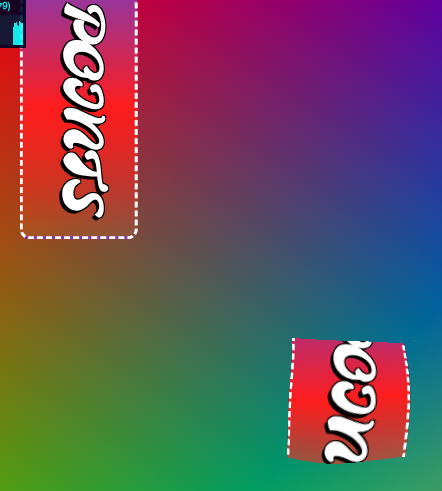
For the new version of POINTS I'm adding a way to load an HTMLElement as a texture. I think it's a simple way to load a weird font asset without an atlas/spritesheet. Or basically anything in the DOM.

Top Left: HTML
Below: texture in the canvas.

https://github.com/Absulit/points

#webgpu #javascript #webdevelopment #webdev #gamedev #screenshotSaturday

@absulit 😮 So cool! How does this work? I'm totally stumped on how you'd get an image of an element like that. And it seems to have some transparency?

@Loopsaround Hi, thank you, it does have transparency. This is basically html inside a svg tag, and then you can convert the svg to an image. You have to use the foreignObject tag for it too https://developer.mozilla.org/en-US/docs/Web/SVG/Reference/Element/foreignObject

If you want, you can take a look at the current progress of the code here: https://github.com/Absulit/points/blob/html_texture/src/texture-element.js

<foreignObject> - SVG | MDN

The <foreignObject> SVG element includes elements from a different XML namespace. In the context of a browser, it is most likely (X)HTML.

MDN Web Docs
@absulit That's so slick! I wonder how much of CSS would work with your method without more special code like you did for fonts. Thanks for sharing your cleverness

@Loopsaround oh I have to test this more, certainly. The code will pull all the css related to that specific tag, even e.g. the div, if it's declared in the css files, so it should work with anything you declare for that element in the css.

But I did notice that if you do something like a transform or a scale it wont work... not super concerned about this, but it would be a nice to have