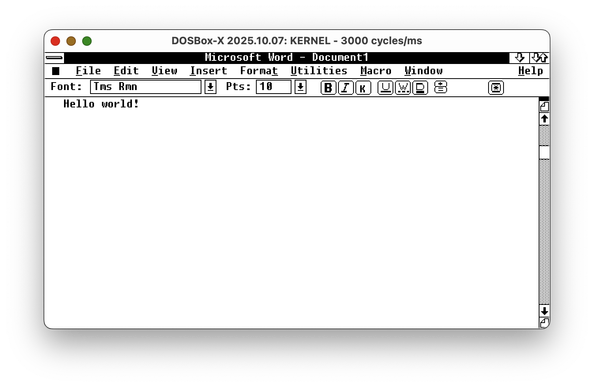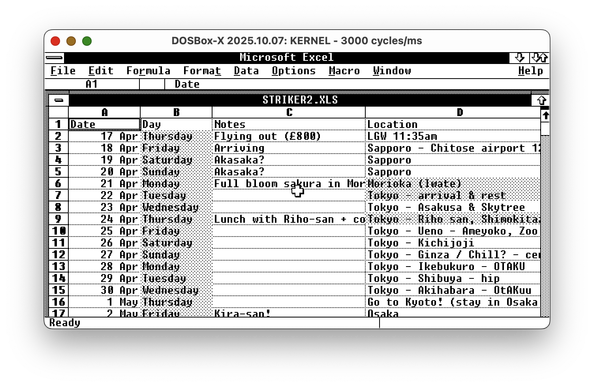
I discovered a wonderful hack that likely would allow me to run Windows 2 on my vintage Apricot PC Xi before the New Year.

Quick recap: Apricot PC is a British computer from 1983, not compatible with the IBM PC. It had a Windows 1 port, but not Windows 2, and thus couldn't run Word, Excel, or Illustrator. With a bit of driver-writing, I managed to start Windows 2 on it, but my video driver is rudimentary and cannot be used for practical purposes. Windows video drivers are super-complicated, so I was fully expecting to spend over a month writing one (at least there are docs for everything!)

But I just discovered a way to run Windows 2 with Windows 1 video drivers. So if I had a Windows 1 driver for Apricot, I could use it in Windows 2. Of course, it's never that simple...

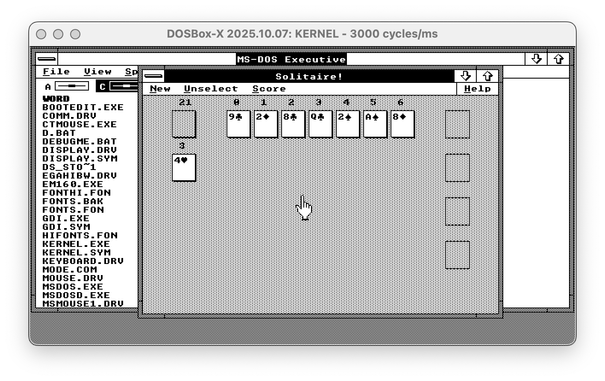
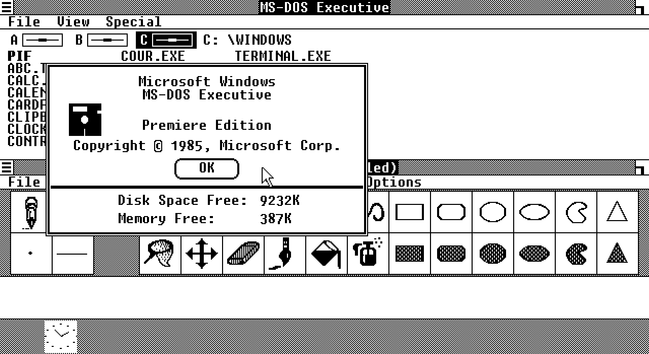
Find the difference between Windows 2 with Win1 driver and Windows 2 with the real Win2 driver - both are EGA 640x350!

🧵 thread with a few more screenshots and pointers
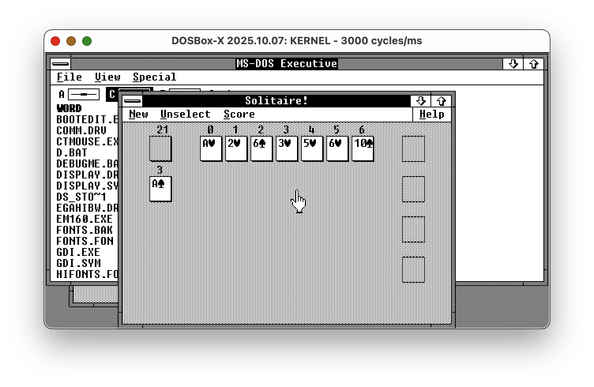
As you might know, graphical drivers for Windows 1/2/3 are _complicated_. They are expected to implement a huge chunk of Windows GDI, the graphical abstraction library. This means they're responsible for drawing parts of the window decorations, and so on.

You also might remember that Windows 1 had window decorations _completely_ different from Windows 2, as it was using tiled windows instead of overlapping ones. But for some reason, Windows 1 video drivers can render floating windows just fine, and even can draw minimize and maximize buttons.

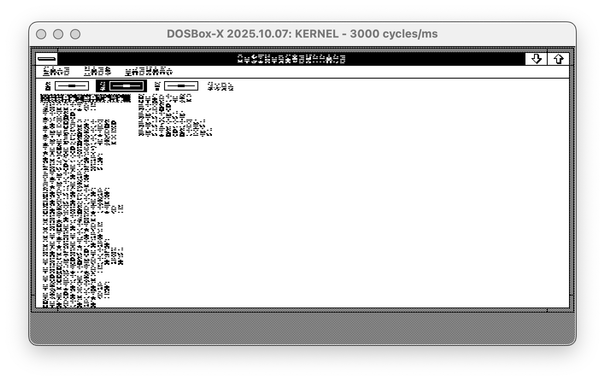
However, Windows 1 drivers handle fonts in a different way. Windows 2 is supposed to offer a new Font API, but most apps are using the legacy entry point for ExtTextOut. The font format is completely different, though. So, imagine you transplant a Windows 1 driver to the Windows 2 system. The second screenshot is what you get.

(🧵2/? continue)

All my previous experiments with Windows 2 running on Windows 1 drivers ended here. But I had a stray thought: if fonts for Windows 1 and Windows 2 are different, maybe I can just bring fonts from Windows 1?

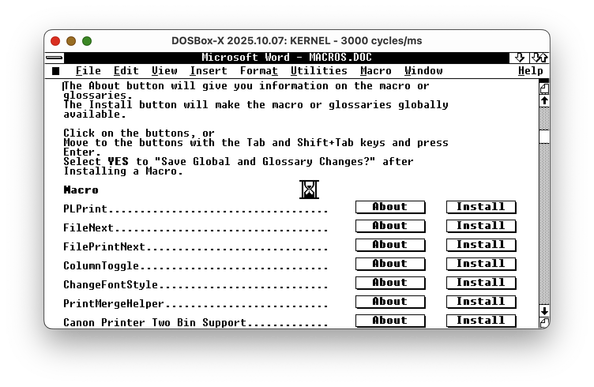
Turns out, I can! Windows 2 with Windows 1 video driver and fonts seems to work as expected - I can run Word, I can run little games, I probably should be able to run most, if not all, programs this way.

The fonts are different from the regular Windows 2, but who cares if it works, right?

So... circling back to the beginning of the thread: for my Windows 2 on Apricot PC port, I can just use the existing Windows 1 driver!

...Except I can't. Windows 1&2 use a thing called "fast boot"; the SETUP tool links all the drivers together in WIN100.BIN and WIN100.OVL files. The only Apricot PC video driver available is hard-linked to the Windows kernel.

So, my next task is to unlink the driver from the kernel. But this is far easier than writing a new driver.

🧵 3/3 fin~

@nina_kali_nina you say "fonts" … but are we talking "outline" scalable fonts? Or just preset size bitmap fonts?

Hmm wow I've never seen that interface on WordWin before … is that, yikes, installation within a Word macro? No wonder the viruses broke out here first.

@whophd preset bitmap fonts. Windows 1/2 doesn't support scalable fonts out of the box (there's Adobe extension for Windows 2 that enables Type 1 fonts in some programs).

And yes, that's Word For Windows macros installer, fascinating stuff :)

@whophd It is possible to enable "Ribbon" in the Word settings, then it looks less alien. Excel doesn't have the "ribbon" toolbar yet.

(This is still Windows 1 video driver; Word and Excel require Windows 2).

@nina_kali_nina Do you see the fonts named 'Roman', 'Modern', or 'Script'?

You wouldn't believe (actually, you would) how hard these are to google.

Anyway they're a dumpster fire but they totally work … if you are into non-intersecting polygons. This is when Adobe Type Manager was hella expensive, and TrueType was a liberating dream coming soon, from two enemies joining forces f.f.s.finally.

BTW, yes this screenshot is from Windows 3.0 Runtime (or something like that … CONTROL.EXE not found haha) but they are the fonts that Windows 3 inherited, I swear

#Windows2 #Windows3 #outlinefonts #Modern #Roman #Script

@nina_kali_nina That @ sign is not so much a circle, as a hexadecagon

I even found curly quotes! Singular quotes, though. Very hard, you needed to remember 0145 and 0146, which of course I do

#Windows2

@whophd I bet those look great when printed by a Postscript printer...

@nina_kali_nina IKR, but I literally handed in assignments with these and a dot-matrix printer … it was galling, embarrassing … I'd use the bitmap fonts whenever I could, but sometimes you had to go bigger

But still better than handwriting everything

(Didn't stop my English teacher rejecting printouts on the basis of "can't prove it wasn't photocopied", which surprisingly was an attitude better suited to 2025 than 1985)

@whophd reminds me how in 2010 my university demanded some assignments to be hand-written to reduce cheating 🥲 I bet this forbidden technique is in vogue again, with "no, we're writing the essay right here, right now, in this class room, with the phones off"

@nina_kali_nina 😵

the only faculty at my university to use paper submissions into the 2000s was the IT one, but maybe they “knew”

(This didn’t excuse their habit of having 11:59pm deadlines … no excuse not to use 5pm or 9am)

The question remains, is a good AI-assisted answer a good answer? What happens if you just judge it (harshly) on the final result? Isn’t this just like the transition from pre-calculators to post-calculators in maths? The questions need refining now?

@whophd if my uni taught me anything, good AI-assisted answer is a bad answer. WolframAlpha for year 1 math becomes a blocker for year 2 physics (difficult math problems are supposed to become trivial, if all done well). Looking up things for year 2 physics exam is a blocker for year 3 courses in advanced physics, because by year 3 many problems are already from a space that requires original research. There's nothing fundamentally wrong with looking up things, or using CADs for simplifying calculations, but they all produce _inputs_ for further work, not _outputs_.

@nina_kali_nina yep, “AI creates more work, not less” is the first conclusion I drew when using generative AI video restoration … but it’s a new tool to the toolbelt. Or more like, you have construction equipment from shovels to heavy machinery, and now you’re adding dynamite — excellent addition to your capabilities, but also needs training, and without training it makes things worse. Plus causes new types of problems in the wrong hands.

I still can’t really argue against testing people against the metrics they’ll be at work, whether that’s job interviews or exams allowing StackExchange … because law exams have been open book for decades or centuries. Memorisation is not the point; “rings a bell” is.

And yet, “qualifications” means you know the fundamentals. Without those you’re useless in an emergency. And you’re not professional if you’re that.

So is AI to essays what calculators are to maths?

Calculators don’t help with algebra except where it doesn’t matter? I like the idea of “sanity check” of all work, in all disciplines — it’s pretty applicable to everything.

@nina_kali_nina … my other new favourite analogy — I invented this yesterday — is that AI is to technology in the 2020s, what microwaves were to cooking in the 1970s

So much excitement, a whole new method of heating. New cookbooks with new recipes, all a little enthusiastic beyond reasonable. Didn’t last into the 1980s.

Meanwhile the “establishment” was aghast at this prospect of “progress” — they probably worried that by the year 2000, we’d all have abandoned our ovens and stoves, and the culinary world would have regressed to the Stone Age. Sounds like LLMs now? Thankfully MasterChef was 30 years away and proved them wrong.

And yet you’d be a lesser kitchen without one. It helps you do things you would be trying to avoid before.

And 10-year-olds were masters of a new domain — they could handle the freezer-to-microwave food chain, and (rightly or wrongly) had the first realisation that “wow, I can imagine my bachelor future now” haha — not great, not terrible; it was a new option for survival. Tin cans had rightful supremacy for a century but now Spam had competition.

Sounds like a lot of new fans of technology now — liberated from their dependence on others

There’s almost no examples of using a microwave to turn food from “inedible” to “edible” — it’s always a red flag if you think you’re about to achieve that. Poached eggs is maybe the only example, where it makes it much easier to do a middling job; a good chef would never. But a bad one couldn’t do it with a pot.

But I think rice cookers are basically pointless because the microwave is right there. It’s because the microwave is still unconventional and easy to misunderstand. You have to be a bit sciencey to use it, and know it’s a dehumidifier.

Like AI, it’s solving new problems, not replacing old solutions.

@whophd I will avoid commenting on microwaves-AI comparison, but I will comment on the rice cookers vs microwaves: if I had to choose between a microwave and a rice cooker, I'd keep the rice cooker. If I had to keep my kitchen as minimal as possible, my rice cooker would have been the only appliance I'd keep, even over a kettle and a stove. And it seems I'm not alone here, there are millions of people in the rice cooker cult. It can make rice, it can bake, it can lightly fry things, it can prepare yoghurt, it can make curry - and none of it is going to be a compromise in taste. I do have a microwave, but the only job it does well is cooking mushrooms. Everyone says it's great for thawing and reheating, but it really isn't.

@whophd the factual imprecision with plausible look is a big no-no for me personally. And also all the fascists making the tools, too. :)

Here's a strawman of an argument: tactical missiles potentially can be used as a mining tool, but it's probably bad idea to go buy them and hope this action will make the world a better place.

@nina_kali_nina by the way ...

the work that went into joining lowercase characters in Script font was INSANE

The curriculum had this until nearly 1990 at which point "cursive joining" was less of a mandatory thing … actually on second thoughts there's a few differences, because we had a "p" that looked like an "h" so to allow the carryon line to join. And their "h" and "l" have loops in it.

But the 'w' and 'u' and 'v' — the real head-busters when you saw them all joined together — those look EXACTLY the same as what we did. If you know what to look for, there's a minimal viable difference: I typed fffsmnwuvvv

#typology #cursive #fonts #script #1980s #handwriting #vector #windows2

@whophd fwiw my default writing is cursive. I used to use Russian cursive (which, I believe, is still the default handwriting style in Russia), but it maps poorly into English, so I learned French Ronde, and eventually merged the two together into one. Cursive is so much faster to write.
@nina_kali_nina Russian (cyrrilic?) cursive is a nerdswipe I wanna do now

@nina_kali_nina finishing off my research for 2025, to publish in one place:

- these were the only scalable fonts before TrueType in Windows 3.1 and free unlike ATM (Adobe Type Manager) using PostScript

- these #fonts were known as:
#outline
#scalable
#plotter
#vector or Vector Font File Format
#CONTINUOUSSCALING
"(All res)" in Windows registry

- came as
MODERN.FON
ROMAN.FON
SCRIPT.FON

- shared the .FON extension with bitmapped fonts, but not the .FNT extension, and #FNT can contain multiple #FON … which apparently had executable code … and were renamed .EXE files … ?? … holy attack surface, Batman!

- FNT follows KB65123

- apparently a utility called FNT2FON could create new ones … and here are all the ones from a "Hershey" collection in 1997: https://github.com/fontforge/fontforge/files/3450898/Hershey_FONs.zip

- great information here: https://github.com/fontforge/fontforge/issues/3841

- the Windows 1.03 SDK Programmer's Reference explains:

C.2.2 Vector Font File Format
The header information for a vector font file is as described in Section C.2, "Font File Formats."This section describes some additional information for vector font files.
The CharOffset field is used to specify the location and usage of the character strokes in the bitmap area. For fixed-pitch fonts, each two-byte entry is an offset from the start of the bitmap to the beginning of the strokes for the character. For variable-pitch fonts, each four-byte entry consists of two bytes giving the offset (as for fixed-pitch) and two bytes giving the width of the character.
For both fixed- and variable- pitch fonts, the bitmap area is the same. Each character is composed of a series of vectors consisting of a pair of signed relative coordinate pairs starting from the character cell origin. Each pair may be preceded by a special value indicating that the next coordinate is to be a pen-up move. The special pen-up value depends on how the coordinates are stored. For one-byte quantities, it is -128 (080H) and for two-byte quantities, it is -32768 (08000H). The character cell origin must be at the upper left corner of the cell so that the character hangs down and to the right of where it is placed.

The storage format for the coordinates depends on the size of the font. If either dfPixHeight or dfMax Width is greater than 128, the coordinates are stored as 2-byte quantities; otherwise, they are stored as 1-byte quantities.

@whophd oh, yes, you're right, my debug version of Windows doesn't have them, but they totally should be supported! And I don't think the format has changed for those