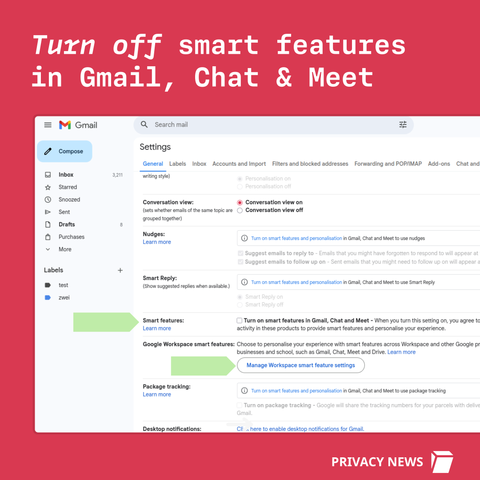
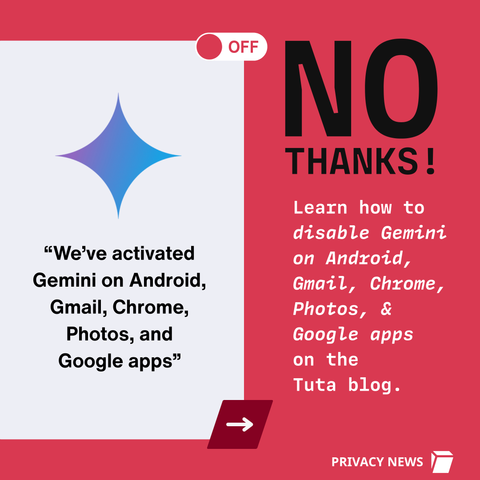
🚨 BREAKING #Google just activated #Gemini on #Gmail - without asking you.

Turn it off now; here's how!
https://tuta.com/blog/how-to-disable-gemini-on-android

✊️ Fight AI & fight Google

You have to manually turn off Smart Features in the Setting menu in TWO locations.

Share so everyone is aware. ❤️
@Tutanota
It wasn't activated for me but it's good to know where the setting is 😄
@Tutanota Even in the EU/UK, There’s a screen where you have to decline Google’s “smart” shit before getting to the app. Bastards.
@H4Heights @Tutanota Never seen that. And all oft the smart settings here are off.
@Tutanota I haven't used Gmail for months so I don't even care anymore. I deleted the Gmail app by using Canta app. I'm not gonna install it again on my Android just to change some settings
@Luminex If you have a gmail account, it still applies to the web interface for Gmail and I turned it off anyway just in case it still reads my stuff even though I don't use Gmail directly, either.
@DrewNaylor I tried to do it through the web version on my Android. But there wasn't any option there
@Luminex I had to switch to the desktop site and I use Firefox, if that makes a difference.

@DrewNaylor Thanks. I just tried it on my IronFox browser and it worked.

Although, I couldn't turn off and delete Gemini apps activity or disable Gemini from apps. Just so you know, most Google apps on my phone were deleted by using Canta by me. Including Google, Gemini, Play Store, Chrome etc.

I’m in the process of changing my email client to tuta, not going all the way yet until everyone who reaches me through that and the services I use with that email are switched over
@jasperthewolf7 Good and valid decision
@Tutanota just pass to Tuta easy solution

@Tutanota To be fair, that setting exists already for quite a while (and I've turned it off ages ago on my gmail account). Good to remind people to check once in a while whether it's still turned off, but it's not like they did this yesterday.

Here's the post from january 2025 about exactly this interface.

https://workspace.google.com/blog/product-announcements/updated-smart-feature-settings-give-users-increased-choice-and-control

Updated smart feature settings to give users more choice and control | Google Workspace Blog

Learn how our updated smart feature settings make it easier to manage your data

Google Workspace Blog
@Tutanota all my critical informations are stored with @Tutanota. All what remains in my gmail is basically junk I can lose without blinking. It's money well spent.
@mrteddybear Happy to hear that. 😍
You should consider backup nonetheless
@mrteddybear @Tutanota Critical information should be stored on an encrypted drive
@Tutanota hmm I see no changes in my settings. I guess if you already disabled these, they just stay the same.
@Tutanota OK but how do I disable automatic translation on your article so I can read it in plain English instead of sloppy French? :/
@Tutanota OK found it. Please stop pushing AI, please

@tut_tuuut fwiw, it looks like they're volunteer-provided translations: https://tuta.com/blog/tutanota-translation-project

If it was first-party-automated then the pages would be available in each language, but both of these ones are only in half the languages list.

@Tutanota

Tuta Mail in your language? Help us bring privacy to the world! | Tuta

Join the open source Tuta Translation Project to enable everyone to use an email service that respects your privacy.

Tuta
@MHLoppy @Tutanota for the interface I don't know but the article was clearly translated either by someone who doesn't speak french or by something that's not human :)
@Tutanota Wow, that’s concerning. Thanks for the warning. Most people won’t even notice Gemini was switched on automatically. Really appreciate you breaking this down and showing how to disable it. Sharing this! ❤️
@Tutanota funny enough, just one of my three accounts was enabled
@Tutanota also disable flag: chrome://flags/#ai-mode-omnibox-entry-point

@Tutanota second toot about this today - how is this "breaking" when I already switched it all off the last time it was "breaking" two or three months ago?

(I verified it's all still off...)

@mossman On Android it happened a few months ago, for Gmail it's brand new.
@Tutanota I see - okay, I'll check my wife's alternative accounts then

@Tutanota Will share the link with family who need to hear it from "someone else".

Had to go Proton for all bc every time I attempted to sign up w Tuta for a account (paid annually after sign-up) I was flagged as potential abuser. With VPN. W/O VPN. Multiple devices, IPs, and browsers over a two-month period. 🤷🏻

That said, I still appreciate what you do. Disappointing to not have been able to sign up and pay. 💰 Maybe fix that. -Random midwestern parent who likes privacy and technology 👍

@SlangC5326 Just let us know the email address at sales, and we'll check that manually!

@Tutanota Anyone who thinks Google gonna honor that setting its a fool.

Google will keep raping everything you put on their servers, like they have being doing forever. 

@Tutanota Thanks for reminding. I am afraid these toggles are just make believe. They have your data on their servers and already used it for Gemini crap behind the scenes.
And none of the alternatives is safe as long as billions of people continue to use gmail blindly.
Every mail you sent/receive to/from gmail is a door wide open.
No other option then to block all traffic from gmail accounts.
@Tutanota
I checked my settings today as I had looked to make sureit was off a while ago. Still off, so they aren't switching it on for people already opted out.
@Alternatecelt Some good news at least...
@Tutanota
Also: Why I don't bother to update G-apps on my phone...
@Tutanota For Europeans too?
@troed Not yet, no.

@Tutanota @troed

I'm European. It was on. I disabled it per your instructions.

@lbheuschkel

I'm surprised this is legal in the EU.

@Tutanota

@troed @Tutanota I'm pretty sure it isn't.

I'm also pretty sure Google will have found some legal loophole that can be argued over for a decade, while we all just grow used to it.

@troed @lbheuschkel It's not, and not yet active in the EU - fortunately!
@Tutanota @troed I'm very confused now, seeing as that I literally turned it off as per your instructions -- and I'm in Europe. Makes me wonder if Google thinks I'm in the US, though.

@Tutanota Unfortunately the Gemini star icon remains active so you can accidentally click on it.

It's a problem on the small top area of the Gmail app on an iphone

@Tutanota I already turned off smart features, anticipating this.

Only use my gmail for trash and unimportant logins though at least

@Tutanota
I have tried this several times on different days and even weeks. The places I'm supposed to go do not exist on my phone. I'm still getting Gemini and I can't turn the damn thing off.
@Tutanota Just as a warning for folks, even though inbox category tabs predates these "smart" features by probably a decade, shutting off smart features will disable inbox category tabs.
@Tutanota You can just...not use google services
@stepheno @Tutanota Some of us are not excited to replace perfectly functional hardware.

@Tutanota To skip potential UX variants this direct link https://mail.google.com/mail/u/0/#settings/general may be a good starting point.
(& don't use evil G's services at all!)

#howTo

Gmail

Gmail is email that’s intuitive, efficient, and useful. 15 GB of storage, less spam, and mobile access.

@Tutanota Dans la partie Gmail, la formulation prête à confusion "Cliquez pour désactiver" Il vaudrait mieux "Décochez la case si elle est cochée". Merci !