 paulrickards
Tried to make a stamp today with my 3D printer using PLA for the handle and TPU for the stamp. Results are meh. Maybe the flow rates aren’t right which leaves the gaps. I did use the iron feature on the top layer too.
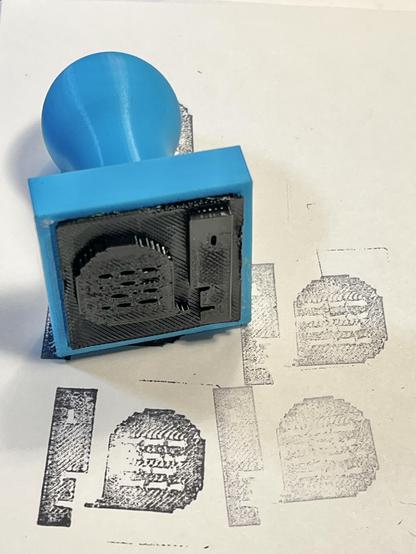
Tried to make a stamp today with my 3D printer using PLA for the handle and TPU for the stamp. Results are meh. Maybe the flow rates aren’t right which leaves the gaps. I did use the iron feature on the top layer too.
That’s somewhat better. 100% infill (was 20%) and top iron at 20% flow (was 10%). Also using the TPU (85A) manufacturer settings file for Bambu P1S.
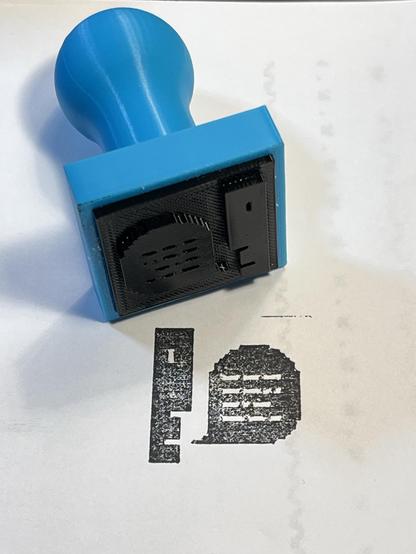
@AasaMariaHedberg I started with this model for the handle. Then sized a 10mm tall base that was 5mm larger than the artwork. Extrude the stamp part 2mm tall. And then the print settings in the previous posts. Have fun!

Custom stamp for use with a standard ink pad.The stamp is divided into 3 parts the main stamp body, a cap for the stamp to stop the ink from drying and a replaceable section for the text which should be printed in TPU.To add text use your preferred design tool to add 5mm tall text and extrude 2mm up, the stamp can accommodate 1 or 2 lines of text. Don't forget to mirror your text before you print!
@paulrickards @billgoats do it and report back. I'm curious what filament would work best
Usually seals are done in metal to suck the heat from the wax quickly. So you'd need something with good thermal conductivity

@byruit I'm sure Blender would work fine. I did these in Tinkercad. More details:
@paulrickards Ooh... these are SO NICE!
Btw: Do you know my icon cards? 😃
https://makerworld.com/en/models/32512-apple-macintosh-icon-plates#profileId-30616

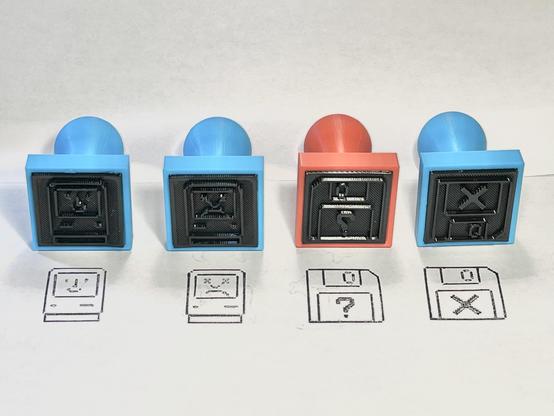
Download this free 3D print file designed by LAYERED. Boost MeDeveloping these models is a true labor of love, but it requires significant time, effort, and numerous tests to ensure they are easy to print. Each test print uses filament, and perfecting the models can take many iterations.If you enjoy my work, your support would mean the world to me. It helps me keep creating high-quality, innovative designs and motivates me to push further.Thank you for your support, and stay healthy! 🤞🏼Susan Kare is an American artist and graphic designer, who contributed interface elements and typefaces for the first Apple Macintosh personal computer from 1983 to 1986. She was employee #10 and Creative Director at NeXT, the company formed by Steve Jobs after he left Apple in 1985. – WikipediaWell, as a tribute to all these great graphical elements I made a set of plates with the most favorite ones. Just put them down with the included base, frame them all together or individually and hang them on the wall or use them as refrigerator magnets. To get the pixels clean and sharp, I recommend to print everything with a 0.2mm Nozzle. A 0.4mm nozzle will also work, but it will be better with the 0.2mm. The print time with the finer nozzle is about twice as high as with the larger ones. Color it as you want and print it upside down, if possible on a structured PEI plate. This guaranties a smooth surface. The current set of plates is designed so that you can stand them up with the base. If anyone needs cutouts for small magnets on the back, please let me know. I will gladly fulfill your wishes. Also if you want a specific icon to go with it, please contact me. Actual these icon plates are available:AlertBombCommandFillFloppy DiskHappy MacMac ClassicMacPaintMoof the DogcowSad MacSpray PaintTrashcan

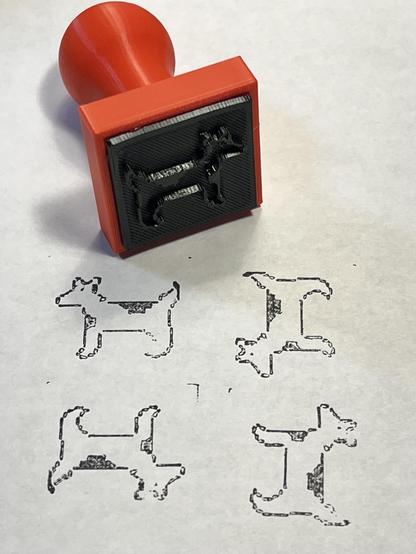
@pixel This is my first time using TPU. It strings a little but otherwise seems OK. It's flexible but not very stretchy.
I left it loaded in the printer overnight and the next morning it broke off in the extruder when I unloaded it. I had to take it apart to clear it. I recommend unloading it when you're finished.
I suppose the 3D printing aspect lets you get the pixelization over hand carved.
FWIW I've seen "rubber" stamps and plates for letterpress made with photopolymer process.
@paulrickards What's the infill on your TPU?
Looking at your open spot, it seems like that might be where it buckled away from the paper. If you haven't tried at 100% infill, I'd definitely try it that way.
Totally disregard if that's already the case but it's where my brain went with the image.
@gooba42 The default infill, which I think was 20. Trying again at 100%.
The buckled edges were from under-extrusion on the first few layers on the bottom caused by the filament reel not spinning inside the dry box as it was being pulled out. It's on a cardboard reel which I suspect is the problem.
The extremely low surface energy of TPU might be working against you by preventing it from picking up much ink. Try TPE (like eSun eLastic) instead, if your printer can handle it.
 JennyFluff
  💾
💾 Åsa Maria Hedberg - artist
 dan 💾
dan 💾 4bz
4bz Elena
Elena 
 Wesley Moore
 Kawaoneechan
 Erik Ableson
 Andy Piper
 Earthshine
 kwayk42
 ~/phranck
 Jorge Bejarano
 Jamie Booth
 europlus
 nackmack
 FeedMe Doughnuts
 Harry Karadimas
 Colin Haynes
 Eric Vitiello
 Empterdose
 Michael Wolf
 Katti
Katti Eli the Bearded
 Mark J. Blair
 🇺🇦 haxadecimal 🚫👑
 Sergi
Sergi kianryan ☑️🐙🏳️🌈
 zbrando
 Urzl
Urzl Bel Polaris
 mmu_man
 Metin Seven 🎨
 Alistair Buxton
 vxo
vxo