 Stylus
Micropython on m68k mac? why not! It's reached the point of sorta working.
Build updated at https://emergent.unpythonic.net/files/sandbox/micropython.dsk
Almost all of the "full features" support level of micropython are enabled, "mpz" for long integers and "float" for floating point numbers.
Backspace works in the repl. arrow keys don't.
A TODO section in the new README lists key items to work on:
- Correctly implement GC collection (stack + registers)
- Add Mac API support (e.g., quickdraw, arbitrary traps)
- Support larger heap
- Address GPL files (RetroConsole), GitHub Actions CI, and other issues that might prevent upstream inclusion.
Darn, I think all the easy parts of the micropython mac m68k port are done.
unfortunately, vfs_posix doesn't seem to be a good fit. I did manage to create a "file" but couldn't actually write data to it.
And while it was working in system6 I just tried it again with system7 and it's failing to start at all. boo.
https://github.com/jepler/circuitpython/blob/ports-m68kmac/ports/m68kmac/README.md#key-todos

It looks like the failure to start under system7 is just an artifact of a too-big executable file, caused by enabling micropython language & stdlib features willy nilly. Which prompts the question: why is the executable file already around 1MB !?
the basic 'hello world' produces a ~750kB file when the main object file is just 872 bytes. The "retro console" object files are only about 32kB., so I guess it's coming from retro68 including a lot of stuff as "standard library". Is it supposed to be that chonky? Can it ... not ?
740 -rw-r--r-- 1 jepler jepler 755712 Jun 25 18:04 HelloWorld.code.bin
"retro console" pulls in a substantal amount of code, maybe from libstdc++?
Oh hi, I'm std::time_get<wchar_t, std::istreambuf_iterator<wchar_t, std::char_traits<wchar_t> > >::_M_extract_via_format(std::istreambuf_iterator<wchar_t, std::char_traits<wchar_t> >, std::istreambuf_iterator<wchar_t, std::char_traits<wchar_t> >, std::ios_base&, std::_Ios_Iostate&, tm*, wchar_t const*, std::__time_get_state&) const and I'm adding 4.5kB to your program and so are each of 100 of my closest friends.
Trying to be excited about the opportunity to write my own terminal emulator for m68k mac... and failing.
OK, well, it was much easier to hack out part of RetroConsole that was pulling in locale-sensitive routines. Now a "full features" build is under 400kB on disk and uses about 1MB when first opened (with a 100kB heap)
Next task is filesystem I/O I guess?
ugh, Unicode support? micropython is utf8 only, while mac has its own pre-standardization encoding I suppose. (yup: https://en.wikipedia.org/wiki/Mac_OS_Roman)
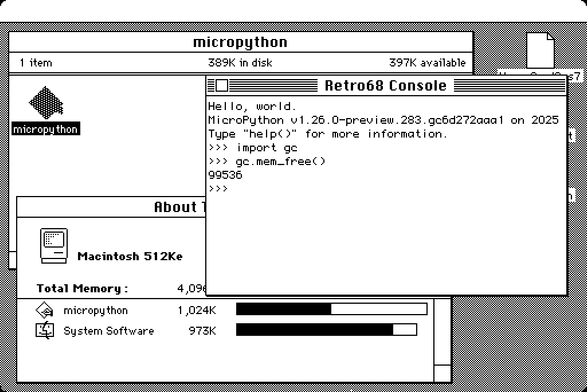
I hope to use adafruit_editor (simplistic python full-screen editor) as the editor for .py files.

Whee! Now we can import files from the filesystem, as well as reading and writing files. Still haven't wrapped my head around how folders work, still can't enumerate files ..
as usual, work pushed to my micropython fork on github (which is called circuitpython, because you can't have two different forks of the "same" original project, argh).
#micropython #python #retrocomputing #retro68 #macintosh #m68k
I thought I had m68k GC collection working, but I don't.
There may be multiple problems. I'm worried about one possible problem though: micropython assumes pointer types are sizeof(pointer) aligned, but I'm not sure that's the case on m68k macs. and indeed the compiler tells me alignof void* is 2. When it comes to the content of the stack, this may be trouble.
yup. putting in a nasty hack so that pointers can be found at multiple-of-2 addresses makes it work a LOT better.
oh my yay, it now works well enough to save and edit a file, then import and run that file.
you could basically use an old m68k mac as a python3 (well, micropython) development system now.
don't mind the debug messages, they're as scared of you as you are of them.
#micropython #python #retrocomputing #retro68 #macintosh #m68k
Are there any folks with vintage Mac programming experience who'd like to collaborate on figuring out what's next with Micropython on Mac?
I think that might be: What's the minimal set of APIs to do a fun graphical demo.
Pointers to "how to"-ish documentation in Pascal and C would be great as well, I have failed at finding this kind of stuff. (I do have Inside Macintosh but it is not a great tutorial)
asyncio is working on mac micropython!
also (not shown here) the "sys.stdin" object is pollable, and you can double-click a python file to run it as the main code file.
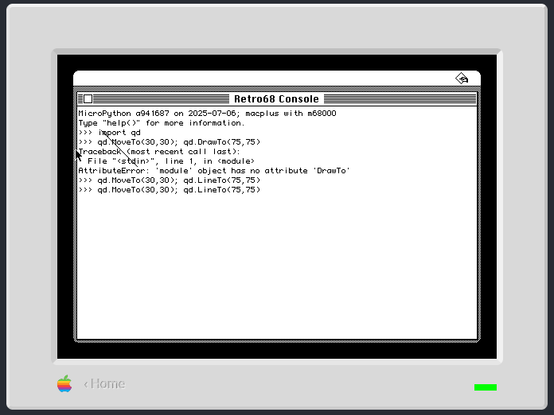
Now you can witness one of the first quickdraw calls from MicroPython on mac... 🎉 ⬛
#micropython #python #retrocomputing #retro68 #macintosh #m68k
Doing a little iterative code development in micropython on an emulated m68k mac... I might not be so happy with the loading time if a real floppy was involved, but in an emulator it's heckin' snappy.
Clearly I need to tackle the issue that you can't REALLY draw to the same window as the terminal....
#micropython #python #retroComputing #retro68 #macintosh #m68k
I went ahead and created a github organization for a fresh fork of micropython, and then made a release. You can get a fresh dsk of this micropython mac port from https://github.com/m68k-micropython/micropython/releases and as @smallsco noted it works on infinitemac.org
 Scott Small 🇨🇦
@stylus What data structure do I need to be using in order to draw text using QuickDraw in MicroPython 68k, i.e. qd.DrawString("Hello, World!") ?
Passing a str or bytes object results in “TypeError: object with buffer protocol required”.
I’m hoping to put a little demo together 🙂
@stylus I did a quick and dirty port of the Mondrian demo from the “Macintosh C Programming Primer” book, using Micropython 68k. Working great on System 7.6!
Some notes:
- You have to use print() and write something to the console before doing any QuickDraw operations, or the system freezes. I’m guessing that it’s because the console window doesn’t exist until you print something and so the graphics port hasn’t yet been initialized? Maybe calling InitGraf directly in that case would make it work. Hmm.
- How do you access the QuickDraw globals like screenBits? I dug through the multiversal yaml file for QuickDraw but couldn’t figure it out.
- time.time() gives a negative number… but it still works enough to seed the random number generator. time.time_ns() on the other hand gives a positive number like one would expect.
- As mentioned earlier, I’m not sure how to print text with QuickDraw yet, it’s not clear what data structure is required.
@smallsco Thanks for the reports. Also, thanks for the video.
yes, printing anything is the workaround for getting the console window.
I'm not sure what's going on with time. In umac time.time is starting at 0. But, I don't think umac implements the RTC at all, while your emulator probably does. Anyway, I entered an issue: https://github.com/m68k-micropython/micropython/issues/8
I don't think it's possible to get screenBits. This is part of qdGlobals which is not wrapped.
This served to draw text but it's clearly not ideal:
>>> text = "Hello World"
>>> qd.MoveTo(30,30); qd.DrawText(uctypes.addressof(text), 0, len(text))
It should also have worked just to pass in the string (or maybe a byte string b"hello") but for some reason it didn't.

 Irenes (many)
@ireneista @stylus Yeah, I assumed whatever tool is doing the Python code generation from the multiverse interfaces was automatically handling this - but maybe it’s not?
@ireneista @smallsco the tool doesn't know anything about pascal strings yet.
The type of the argument for DrawText is just Ptr and I don't think it's a Pascal string .. is it? That'd be StringPtr or ConstStrNNParam, right?
Here's how multiverse shows it:
- function:
    name: DrawText
    args:
      - name: tb
        type: const Ptr
      - name: fb
        type: INTEGER
      - name: bc
        type: INTEGER
    trap: 0xA885
    executor: C_
Inside Macintosh calls the parameters (in Pascal style) like so: (textBuf: Ptr; firstByte, byteCount: INTEGER).
@ireneista @stylus Been doing a bit of digging and messing around, it looks like the difference is that while DrawString() explicitly expects a Pascal string data structure, DrawText() simply takes a pointer to an address in memory and a number of bytes, and draws whatever it happens to find there.
I was able to get DrawString() to work by manually constructing one using a struct (though micropython’s struct annoyingly omits the ‘p’ format, so I had to hardcode the length into the format string). Using DrawText() with uctypes is a workable, if verbose, solution for now.
As for screenBits, the “Programming QuickDraw, 1992” book says (on pages 224/225) that global was actually deprecated with the Mac II line because there’s no way to support multiple monitors with it, and that “GetGrayRgn()” should instead be used.
Except that “GetGrayRgn()” is part of the Window Manager, not QuickDraw. So we don’t have that in Micropython yet!
@smallsco @stylus anyway hmmmm yeah you normally want to draw into a window rather than onto the screen directly. when System 7 happened, there were a bunch of old programs that had been written on the assumption everything was a black-and-white internal monitor with exactly one program running on it at a time, and they'd produce various forms of interestingly broken rendering depending on exactly how they were coded
@ireneista @smallsco also thanks for harping on NIM a bit. I have been sticking with the original, wanting to avoid accidentally learning stuff that wouldn't be in old system software versions; but NIM starts with such a clear tutorial on creating an application window that I'm won over: they may have figured out how to write better documentation in the intervening years since the original Inside Macintosh volumes.
@stylus I’ve attached some screen captures of the time being messed up. The first is on Basilisk II running Mac OS 7.6, the second is on Mini vMac’s Mac II emulation running System 6.0.8, and the third is on Mini vMac’s Mac Plus emulation running System 6.0.8.
I’ll try drawing text using uctypes, and also see if I can initialize the port without creating a console window, after work today.
It’s too bad that there’s no way to access the globals currently, because QuickDraw saves so much in global variables and doesn’t have any built-in getters to retrieve it. You’ll need to implement your own getters for these, then.
 Ian Scott
@polpo @stylus Oh yes, I’ve been watching this development really closely 😁
As the author of what is probably the largest 68k MacPython project in 25 years, I’m excited for what this potentially means for the future of Macstodon. I’m getting excited to work on it again - potentially having it running on System 6, porting the code to Python 3 syntax for better maintainability, and maybe even having built-in SSL for higher-end systems.
And more generally, I’m excited for making 68k Mac programming more accessible to folks who don’t know C or Pascal, folks like me who work with Python exclusively in their day jobs.
 bitcrush.io
@stylus
Niiiiiice.
Niiiiiice.
 Jennifer Kramer (she/her)
@stylus That's so cool!
@stylus You’ll need to implement QuickDraw in order to draw any kind of graphics.
Take a look at “/Mac/modules/qd/Qdmodule.c” from the MacPython 1.5.2 sources I linked the other day which may be of some help.
There’s a ton of PDFs of old Mac programming books here: https://vintageapple.org/macprogramming/
This one in particular may be what you’re looking for: https://vintageapple.org/macprogramming/pdf/Programming_QuickDraw_1992.pdf
@stylus oh one sec, we can look up the books we learned from...
https://archive.org/details/howtowritemacint00knas
https://archive.org/details/macintoshcprogra0001mark
https://archive.org/details/macintoshprogra000mark
https://archive.org/details/THINKCUsersManual1989
https://archive.org/details/THINKCStandardLibrariesReference1989
not as essential, but also useful: https://archive.org/details/mac_Macintosh_Inside_Out_ResEdit_Complete_1991/mode/2up

@stylus you will also want a full set of New Inside Macintosh, because that's the API reference, but you seem to have already figured that out
@stylus we do personally recommend C over Pascal but either is a reasonable choice. we don't have a mental list of books for learning Pascal on the Macintosh though.
@stylus our memory includes details of lots of books from that era, which can be almost impossible to find today if you don't have the map in your head, so if there's some specific topic you want more depth on, let us know and we'll try to find something
@stylus oh, right, and there are some unstated things, like how system extensions work, for which the best intro is original Inside Macintosh, despite it nominally being replaced by New Inside Macintosh