 Stylus
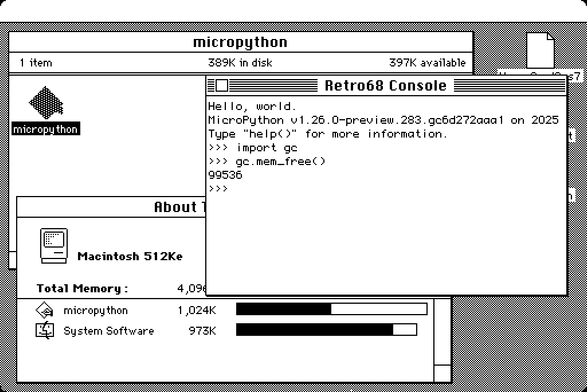
Micropython on m68k mac? why not! It's reached the point of sorta working.
Build updated at https://emergent.unpythonic.net/files/sandbox/micropython.dsk
Almost all of the "full features" support level of micropython are enabled, "mpz" for long integers and "float" for floating point numbers.
Backspace works in the repl. arrow keys don't.
A TODO section in the new README lists key items to work on:
- Correctly implement GC collection (stack + registers)
- Add Mac API support (e.g., quickdraw, arbitrary traps)
- Support larger heap
- Address GPL files (RetroConsole), GitHub Actions CI, and other issues that might prevent upstream inclusion.
Darn, I think all the easy parts of the micropython mac m68k port are done.
unfortunately, vfs_posix doesn't seem to be a good fit. I did manage to create a "file" but couldn't actually write data to it.
And while it was working in system6 I just tried it again with system7 and it's failing to start at all. boo.
https://github.com/jepler/circuitpython/blob/ports-m68kmac/ports/m68kmac/README.md#key-todos

It looks like the failure to start under system7 is just an artifact of a too-big executable file, caused by enabling micropython language & stdlib features willy nilly. Which prompts the question: why is the executable file already around 1MB !?
the basic 'hello world' produces a ~750kB file when the main object file is just 872 bytes. The "retro console" object files are only about 32kB., so I guess it's coming from retro68 including a lot of stuff as "standard library". Is it supposed to be that chonky? Can it ... not ?
740 -rw-r--r-- 1 jepler jepler 755712 Jun 25 18:04 HelloWorld.code.bin
"retro console" pulls in a substantal amount of code, maybe from libstdc++?
Oh hi, I'm std::time_get<wchar_t, std::istreambuf_iterator<wchar_t, std::char_traits<wchar_t> > >::_M_extract_via_format(std::istreambuf_iterator<wchar_t, std::char_traits<wchar_t> >, std::istreambuf_iterator<wchar_t, std::char_traits<wchar_t> >, std::ios_base&, std::_Ios_Iostate&, tm*, wchar_t const*, std::__time_get_state&) const and I'm adding 4.5kB to your program and so are each of 100 of my closest friends.
Trying to be excited about the opportunity to write my own terminal emulator for m68k mac... and failing.
OK, well, it was much easier to hack out part of RetroConsole that was pulling in locale-sensitive routines. Now a "full features" build is under 400kB on disk and uses about 1MB when first opened (with a 100kB heap)
Next task is filesystem I/O I guess?
ugh, Unicode support? micropython is utf8 only, while mac has its own pre-standardization encoding I suppose. (yup: https://en.wikipedia.org/wiki/Mac_OS_Roman)
I hope to use adafruit_editor (simplistic python full-screen editor) as the editor for .py files.

Whee! Now we can import files from the filesystem, as well as reading and writing files. Still haven't wrapped my head around how folders work, still can't enumerate files ..
as usual, work pushed to my micropython fork on github (which is called circuitpython, because you can't have two different forks of the "same" original project, argh).
#micropython #python #retrocomputing #retro68 #macintosh #m68k
I thought I had m68k GC collection working, but I don't.
There may be multiple problems. I'm worried about one possible problem though: micropython assumes pointer types are sizeof(pointer) aligned, but I'm not sure that's the case on m68k macs. and indeed the compiler tells me alignof void* is 2. When it comes to the content of the stack, this may be trouble.
yup. putting in a nasty hack so that pointers can be found at multiple-of-2 addresses makes it work a LOT better.
oh my yay, it now works well enough to save and edit a file, then import and run that file.
you could basically use an old m68k mac as a python3 (well, micropython) development system now.
don't mind the debug messages, they're as scared of you as you are of them.
#micropython #python #retrocomputing #retro68 #macintosh #m68k
Are there any folks with vintage Mac programming experience who'd like to collaborate on figuring out what's next with Micropython on Mac?
I think that might be: What's the minimal set of APIs to do a fun graphical demo.
Pointers to "how to"-ish documentation in Pascal and C would be great as well, I have failed at finding this kind of stuff. (I do have Inside Macintosh but it is not a great tutorial)
 Irenes (many)
@stylus oh one sec, we can look up the books we learned from...
https://archive.org/details/howtowritemacint00knas
https://archive.org/details/macintoshcprogra0001mark
https://archive.org/details/macintoshprogra000mark
https://archive.org/details/THINKCUsersManual1989
https://archive.org/details/THINKCStandardLibrariesReference1989
not as essential, but also useful: https://archive.org/details/mac_Macintosh_Inside_Out_ResEdit_Complete_1991/mode/2up

@stylus you will also want a full set of New Inside Macintosh, because that's the API reference, but you seem to have already figured that out
@stylus we do personally recommend C over Pascal but either is a reasonable choice. we don't have a mental list of books for learning Pascal on the Macintosh though.
@stylus our memory includes details of lots of books from that era, which can be almost impossible to find today if you don't have the map in your head, so if there's some specific topic you want more depth on, let us know and we'll try to find something
@stylus oh, right, and there are some unstated things, like how system extensions work, for which the best intro is original Inside Macintosh, despite it nominally being replaced by New Inside Macintosh