Https://www.youtube.com/watch?v=8uHI4DCn4pc
And .. the University of Canterbury Teece Museum of Classical Antiquities “Accessibility Project”
Https://www.youtube.com/watch?v=XyPYa3_F_tE #globalmuseum #museums #UMAC
I went ahead and created a github organization for a fresh fork of micropython, and then made a release. You can get a fresh dsk of this micropython mac port from https://github.com/m68k-micropython/micropython/releases and as @smallsco noted it works on infinitemac.org
Darn, I think all the easy parts of the micropython mac m68k port are done.
unfortunately, vfs_posix doesn't seem to be a good fit. I did manage to create a "file" but couldn't actually write data to it.
And while it was working in system6 I just tried it again with system7 and it's failing to start at all. boo.
https://github.com/jepler/circuitpython/blob/ports-m68kmac/ports/m68kmac/README.md#key-todos
Build updated at https://emergent.unpythonic.net/files/sandbox/micropython.dsk
Almost all of the "full features" support level of micropython are enabled, "mpz" for long integers and "float" for floating point numbers.
Backspace works in the repl. arrow keys don't.
A TODO section in the new README lists key items to work on:
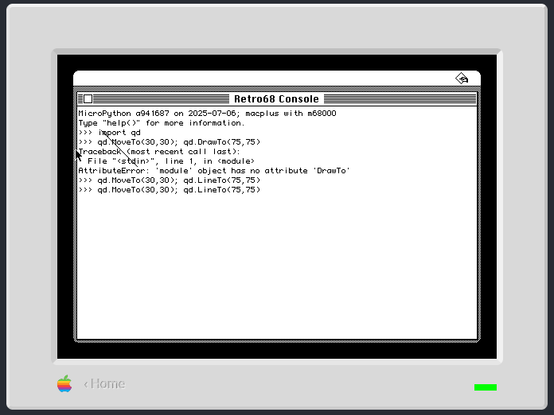
Micropython on m68k mac? why not! It's reached the point of sorta working.
what it's not #marchintosh anymore? Now #umac can not only mount 2 disc images at a time, but it can cycle the image on the "external" drive. Here I've booted a System 7 disc with hypercard from the "internal", and then cycled Glider and Dark Castle images in the external one. Base work is at https://github.com/evansm7/umac/pull/18 and further work is at https://github.com/evansm7/umac/compare/main...jepler:umac:multidrive-remount-when-ejected?expand=1
.. it won't be added by me to pico-mac anytime soon as I didn't bring any compatible HW on my trip, but ideally it'd work there as well, possibly by putting the images into a "umac1" folder on the SD card.
Two disc images can now be mounted in umac, by specifying two -d arguments. However, it's only compatible with one of the two system images I tried it with: System-Disk-1-1g.dsk hates it, quick...
Two disc images working in umac!
I have pico-mac playing the system beep on an i2s dac (though when @adafruit @ladyada made a build locally, it didn't work for her, hmmmm, I'll get that sorted tomorrow)
in the process, I discovered an interesting problem that might be randomly corrputing a certain 740 bytes of RAM when pico-mac or umac is configured for a non-power-of-two memory size! https://github.com/evansm7/umac/issues/15
the fix seems to be another rom patch:
/* Fix up the sound buffer as used by BootBeep */
ROM_WR32(0x292, RAM_SIZE - 768);
and is also included in https://github.com/evansm7/umac/pull/14
you also avoid the problem if you configure pico-mac for 256kB, 512kB, 1024kB, etc.
I contributed a patch to umac to allow bigger resolutions. How about 1280x720? I even learned a tiny bit of 68k assembly in the process.
It was a bit tricky, as there were places that the screen width in bytes is used as an 8-bit signed constant. For 1024 pixels and up, the immediate value became 0x80, which is -128, not 128... out-of-line patches were needed in order to have 16-bit constants in the mouse cursor draw & hide routines.
https://github.com/evansm7/umac/pull/12
my hope, which is quite distant, is to support this resolution on rp2350 with hstx (since I've previously seen it make an excellent 1280x720 text mode with dvhstx)