 jjesse
I've really been trying hard to use Kubuntu for several weeks, but there is always something little that screws up and I waste time googling it.
It's juts a death by papercuts over and over.
I've really been trying hard to use Kubuntu for several weeks, but there is always something little that screws up and I waste time googling it.
It's juts a death by papercuts over and over.
Here's an example of a dumb one. When I do "git push ..." Ksshpass window opens up and asks for a password first, but what it is really asking for is my username which it hides behinds *. Took way too long to figure that out.
Do you mean ksshaskpass? I don't understand how could possibly ask for a username, since with a SSH Git remote the user is "git" ([email protected]...)
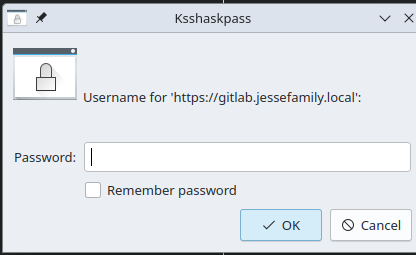
You are not using SSH, you are using HTTP as Git remotes. Evidently ksshaskpass never added HTTP support.
My guess is that Git invokes an external program when configured to do so and assumes that program support both clear and obfuscated inputs. Instead ksshaskpass assumes Git will only ask for a password. Something like that.
Maybe you could try to specify the username in Git config:
 Alex L 🕊 🇵🇸