 Jyrki
Jyrki 
wtf???
this happens only in this one terminal window
and only the shell is affected, i can’t even type # without it appearing as £
opening this file in vim is fine though!
this happens only in this one terminal window
and only the shell is affected, i can’t even type # without it appearing as £
opening this file in vim is fine though!
TIL: there is an escape sequence that makes a line wide (\e#6), which Konsole apparently understands


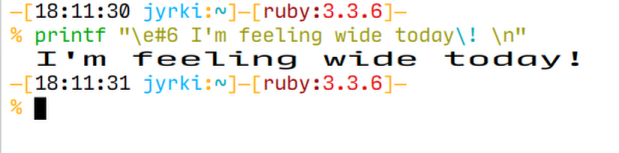
@nilsding @dancrescentwolf It's a feature of DEC terminals since the VT100 and is there for compatibility with them.
Not finding the hard evidence, but I wonder if this was originally a DECwriter feature they carried over to their video terminals.
I was compelled to make this happen directly inside of bash.
https://gist.github.com/infinityb/d7a09d1b0c0ee0c234e26bb48845525e
@dragonminded omfg this is so cool, i'm on a proper terminal! :3
but that explains why the text is split in half like that!
@nilsding basically, under the hood, this was an 80x24 (or 132x24) text mode only display (hey, there's where peoples' dogmatic insistence on 80 character lines comes from!!!) and those escape sequences caused it to change the "sprite mapping" for a character at a specific spot. they handled the double wide case because i guess that just means advancing the cursor, but given the terminal supports intelligent scrolling within a window, i guess it was too difficult to handle it properly for double tall. so it's the programmer's responsibility to echo the text twice. you can skip that, at which point the hardware will actually display only the top or bottom half, as expected.
also i was gonna get a picture of these posts on the terminal but for some reason my vt-100 mastodon client is actin' up rn.
@nilsding oh jk it started working again idgi lmao here u can be on a proper terminal again :3
side note: thanks for alt texting, it makes using this interface possible!
@whimsy I just noticed that I've never replied to this -- sorry for the delay ^^
basically I discovered them while investigating the alternative charset thingy from the opening post where my # includes were replaced with £. eventually it lead me to discover vttest, a tool for testing terminal (emulator)s from the xterm maintainer. while running it I noticed that some tests displayed wide and large text -- something I've never seen before in a terminal window!
thankfully the source code of vttest is relatively easy to grep through, which finally led me to these escape sequences
\e#4 should've only printed the bottom half of the large textgcc main.c || printf "\e#6This code is ass. Compilation terminated.\n"
 DanCrescentWolf


 FiXato
 PunnO)))
 greeeen
  🔜 Easterhag 4377
 Tay
Tay Luna Ruby Artemis 💛🤍💜🖤
 infinityb / aibi
 [SUYA] ひみつ
 Sinnamon (despicable arc 😈)
 Aspiring Deathclaw Wife
 Dan Cassidy 🦌
 Daniel Neuman
 Frost, wolf of winter 🐺🎄
 Ember is so tired of people.
 polprog68k
 Akseli

 Treat! (Nik)
 mmu_man
 Jernej Simončič �
 fabiosantoscode
 Javier
 John Rockefeller
 「AD-808-7870」

 BB
BB 
 Claudius
 Lambda
 fops Now On Merping Synth Download