 Jyrki
Jyrki 
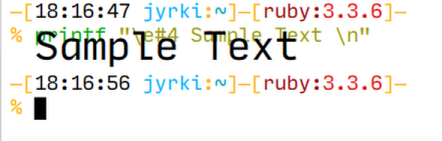
wtf???
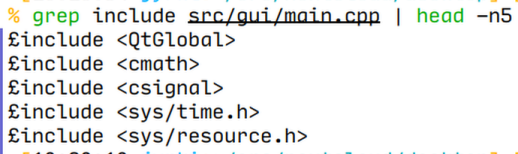
this happens only in this one terminal window
and only the shell is affected, i can’t even type # without it appearing as £
opening this file in vim is fine though!
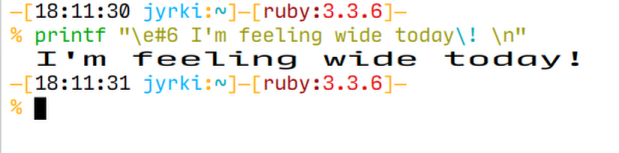
TIL: there is an escape sequence that makes a line wide (\e#6), which Konsole apparently understands


@dragonminded omfg this is so cool, i'm on a proper terminal! :3
but that explains why the text is split in half like that!
@nilsding basically, under the hood, this was an 80x24 (or 132x24) text mode only display (hey, there's where peoples' dogmatic insistence on 80 character lines comes from!!!) and those escape sequences caused it to change the "sprite mapping" for a character at a specific spot. they handled the double wide case because i guess that just means advancing the cursor, but given the terminal supports intelligent scrolling within a window, i guess it was too difficult to handle it properly for double tall. so it's the programmer's responsibility to echo the text twice. you can skip that, at which point the hardware will actually display only the top or bottom half, as expected.
also i was gonna get a picture of these posts on the terminal but for some reason my vt-100 mastodon client is actin' up rn.
@nilsding oh jk it started working again idgi lmao here u can be on a proper terminal again :3
side note: thanks for alt texting, it makes using this interface possible!
 Aspiring Deathclaw Wife