Why is “Writing Tools” the first thing shown in Safari’s context menu? It’s pointless and makes it harder to get at the things I actually use: “Lookup” and “Translate”.

Some manager at Apple decided that showing off a new feature was more important than usability. That’s bullshit.

/cc @gruber
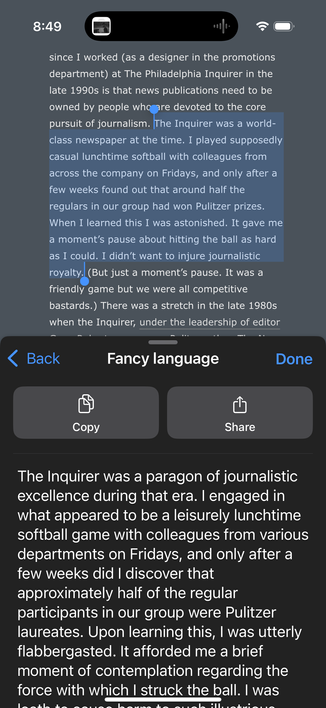
The only use case I can see for this feature is plagiarism.

Select a passage in Wikipedia or wherever, and change it to make it your “own”.

Geezus. What a thing to put front and center.

@chockenberry I use it to proofread what I write
@chockenberry
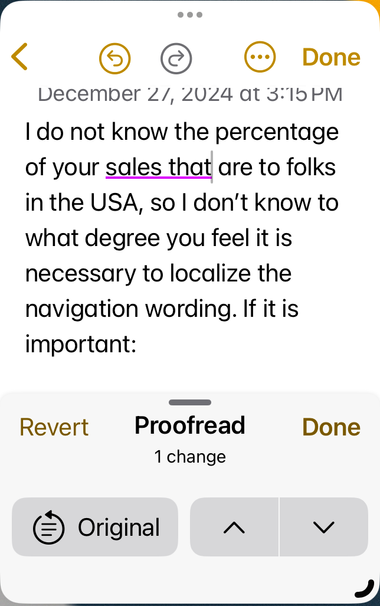
Highlight my text > Writing Tools > Proofread
@RedStateExile @chockenberry That's the use case from the commercials too, not using it on text you've not written.

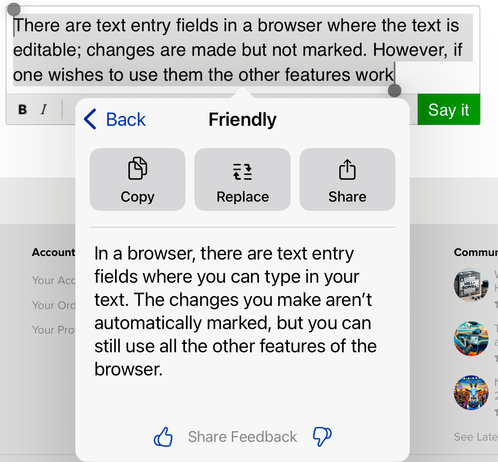
@RedStateExile The problem I have with that solution is that there’s no attempt to show what, if any, changes were made.

You’re given a result and expected to trust it.

@chockenberry

Notice the red underline, that is the one correction.

@RedStateExile Right. That’s the UI that appears in Notes when you’re actually writing.

In Safari the text isn’t editable so proofreading doesn’t show changes.

(My complaint is that writing tools aren’t appropriate for a web browser.)

@chockenberry Theft and criming is the in thing these days .Or so says the American voter.

@chockenberry The slop version is such awful writing, too.

If this feature had to exist at all, it should only have appeared in circumstances where you're ostensibly applying it to your own writing (Mail, text editing apps, etc). Integrating a copy-and-remix feature into an app used for consuming other peoples' work—yeah, it's obvious how this will primarily be used.

@chockenberry Maybe a justifiable use case could be to make selected text on a website „easier“ to read? Say legal text or highly technical text? But yeah, probably most usecases aren’t of the noble sort.
@subraumpixel @chockenberry pretty cool idea but yeah, it will get used to cover the tracks of plagurizing students
@chockenberry or just changing your own text. I don’t think I’ve ever needed to plagiarise text from Wikipedia.
@chockenberry summaries and key points are the legitimate use cases. It’s not first for me, but could be further down…
@chockenberry @gruber I wish you had the choice to reorder the options tbh. Things like lookup I only use personally when it’s a word, but I use copy, search web and translate more, yeah
@jglypt @chockenberry @gruber I just wish the choices stayed in the same damn order. If seems like they're always shuffled around.
@chockenberry @gruber Marketing team, probably.
@chockenberry @gruber I’ve always wanted to be able to customize the order of things in that menu… plus the order of things seems to change with every major iOS release which is frustrating.
@chockenberry @gruber Besides, John's writing is already fancy.

@jsnell @gruber He could be more fancy.

Ooops forgot to use writing tools…

He might exhibit greater elegance.

@chockenberry @gruber We might all benefit from embracing a touch of elegance.

@chockenberry This has been driving me nuts. It’s a big step backwards in usability for me.

Not horrible on iPad where there is enough screen screen real estate to show more options at once. On a phone it’s horrible.

@chockenberry @gruber I’ve long wished that menu became a regular vertical popup instead of that tiny, hard to scroll horizontal thing. That UI needs a rethink in general now that it’s not only cut/copy/paste like it originally was.
@kalleboo @chockenberry @gruber Totally agree. Interestingly it’s already fixed in Springboard but not everywhere.
@john @kalleboo @gruber The problem with that menu is that there are some items (cut/copy) where it’s important to see the selection. A larger menu would be harder to place and probably be an issue with non-English languages.
@chockenberry @kalleboo @gruber Maybe the solution is a Windows 11 style “cut/copy/paste” icon at the top of the menu and scroll down if needed on smaller devices? 🤔
@chockenberry @gruber A benefit from staying on my iPhone 13 Pro Max maybe!?

@chockenberry @gruber Nobody (or maybe its just no executive) actually uses Apple products at Apple. That is the only explanation for things like this.

There are plenty, like suddenly on iOS to browse iCloud Tabs you can only do it three at at time because they decided it was pretty to make each entry gigantic, on and for the hell of it you must scroll sideways.