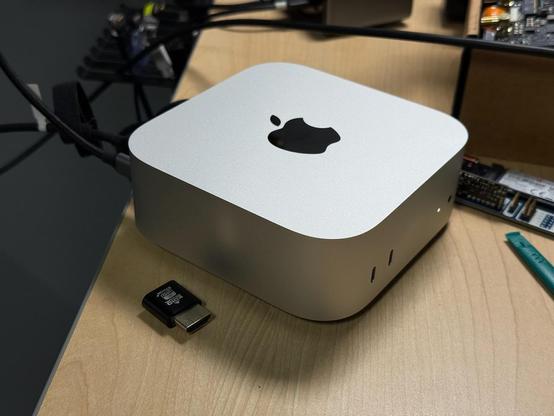
M4 efficiency is stunning. First machine I've tested getting over 5 Gflops/W with HPL, and in fact it goes beyond 6 Gflops/W... with fan only spinning up to a quiet 2500 rpm.

Maybe this is why Qualcomm abandoned their marquee Dev Kit—it is thoroughly trounced by M4.
@geerlingguy The hardware is truly great. I just wish that MacOS was better. I got the base M4 Mac Mini as my first Mac but unfortunately I’m probably going to end up returning it.
@that_leaflet @geerlingguy MacOS' lackluster window management is the deal-breaker for me. I'd love to get my hands on this hardware otherwise, but I'd want to use Fedora and GNOME.

@stutstev @geerlingguy

Same. I really like Gnome's workflow. Could live with KDE and Windows (except I find Microsoft makes all their products annoying to use). But from the few days I've been using MacOS, it's just been super quirky, in a bad way.

@that_leaflet @geerlingguy Honest question, what would make macOS better for you?

@donkey @geerlingguy

* Make fullscreening more consistent; let the user decide whether the green button does "Entire Screen Fullscreen" or just "Fills" (keeps dock and menu bar visible); also don't hide window controls when in Entire Screen Fullscreen
* Don't force Entire Screen Fullscreen apps onto their own space
* When I close a window, don't automatically move me to a new space to focus on another window
*Fix scrolling on traditional mouse wheels
*Always show top previews in Mission Control

@that_leaflet @geerlingguy Great list - thanks! If I might offer some suggestions: (1/3)
It’s the distinction between full-screen (in its own space) and having the window take up the whole viewport minus the dock and menu bar? In Sequoia, if you long press on the green button you can select the ‘take up the whole viewport’ option that you’re after. Unfortunately I don’t know of any way to swap the default single press of the green button though. There is a spotlight alternative called Raycast which also has window management functions in it which might help. (2/3)

When you say “fix scrolling…” do you mean having the scroll direction work the same way as other OSes? If yes, the scroll direction is selectable in settings. I think you can even have the trackpad work one way and the mouse the other.

Mission Control, as far as I am aware, doesn’t have any configuration options available - I agree that would be useful to have the top previews! (3/3)

@donkey

The scrolling issue is that Apple sells devices with touchpads and mouses with touchpad scrolling. MacOS is just not optimized for traditional mice with wheels that move in steps.

They seem to apply an acceleration curve to scrolling. One scroll moves a tiny amount and is jittery. You need to scroll pretty fast for it to go a decent speed.

Luckily, there's an app called Mos that addresses this. However, it seems to just be doing many scrolls each time you scroll once. This.......

@donkey

.... breaks apps and games where you want one scroll to correlate to one event. For example, in Minecraft you want one scroll to move to the next item in your item list, not to skip over the next 5.

Luckily the app also lets you override things on a per app basis, but you still have to set those exceptions manually.

@that_leaflet Oh no - yes, that is sub-optimal! I had a Logitech ‘designed for Mac’ (MX Anywhere 3 for Mac) mouse that had a scroll wheel that would do individual clicks unless you spun it fast, then it would do a gliding scroll. That seems to fit your explanation of how it works.
@geerlingguy It's a great accomplishment to be sure. On the other hand it really sucks that we only have a single producer of high efficiency and performance ARM chips and they are saddled with non-upgrade-able storage and RAM.

@geerlingguy I got my M4 Pro Mac Mini yesterday, and I have to say, I'm really impressed with it. I was already impressed with my work supplied M1 Pro Macbook Pro, but didn't expect this thing to be so much better in performance as well as efficiency.

Really enjoying this purchase.

@geerlingguy Yeah, while the Apple Silicon chips are really cool, literally everything else Apple does... not so much :(
@geerlingguy eh, MS still sold the previous devkit despite being wrecked by Apple, my guess is that the devkit had even more serious issues than just the wonky HDMI port we were led to believe
@geerlingguy As much as Apple in general displeases me but their ARM SoCs are dang good, Qualcom has still a lot work todo, still bummer about the dev kit.
@geerlingguy did you check idle power without ethernet connected, I found it to make a big difference.
@paul @geerlingguy did you test the 1G or 10G? Probably base model?
@timo @geerlingguy I did 10G on base model, 1G on Pro. Both were down at < 1.5W idle without ethernet/HDMI/Thunderbolt.

@paul @timo Insane.

Like... other companies should try to even come close. The thing is, Apple started with mobile-optimized architecture, and applied all those learnings to macOS as well.

Other OSes and chips just assume you have wall power. What's 3W here, 8W there...

Benchmark M4 Mac mini · Issue #47 · geerlingguy/top500-benchmark

I have an M4 Mac mini with 10 CPU cores and 32 GB of RAM. Would be nice to see the results and efficiency.

GitHub
@geerlingguy @paul @timo A headless Mac mini needs just two cables to work. Who is going to drill a hole in the side of their fridge? You’ll hardly notice it next to the Bud.

@ashpole @geerlingguy @paul @timo It could probably run fine on one cable if the mini supported PoE.

(It can run on one cable when using WiFi, but that would be problematic in the fridge?)

@geerlingguy you got 4.xW with nothing connected but power? I got it down to low 1.x, wonder why the difference.
@paul @geerlingguy can depend on apps running and running in the background. Like Chrome won't allow the CPU to sleep as well as Safari can.
@paul What power monitoring setup do you have? I tested on a Kill-A-Watt and a ThirdReality Zigbee Smart Outlet. And I did have HDMI plugged in, and my Thunderbolt dock (for keyboard and mouse), so it's enumerating other devices on the TB bus. Could use more power doing that.
@geerlingguy oh yeah both HDMI and Thunderbolt will cause it to use more power. I tested it with literally nothing but power plugged in, I think with just 10GbE plugged in it was using about 3W.
@geerlingguy How stable is the performance under load? Need a new box for benchmarking, so hoping this is nicely consistent ...

@thesolidpixel Quite stable, though Apple seems to be okay with toasting the SoC a bit (100°C for over an hour today running some workloads).

Entirely stable but I'd rather the fan ramp up a bit more and keep it at 90°C. I manually forced it to 3000 rpm and it was only a little louder, but temps stayed between 80-90°C with all cores maxed out.

@geerlingguy can't wait for Asahi Linux to be stable on that thing.
@geerlingguy wish it would be less proprietary. It's a pain to install GNU/Linux, or any other free OSes. Even the Asahi have a lot of problems. Anothe huge problem which is not spoken widly that by default macOs have a remote hole (as a part of a managment system for corporations). Nobody even think to control it and blame Apple for this.
@geerlingguy all you have to do is turn it upside down to get the power button in right place and cover up the apple logo. You also get more cool air when its sucked in from the top.
@geerlingguy I am soooo tempted to pull out my wallet and buy one and give apple some of my money for the first time in 10 years!
@geerlingguy I won't lie seeing the efficiency of these ARM pcs makes me wish we had a good, supported and cost effective solution for a ARM linux server at home.
Both Qualcomm and Apple don't seem to care about Linux, we have the software; we're just missing the hardware
😭😭