 Julia Evans
quitting in the terminal
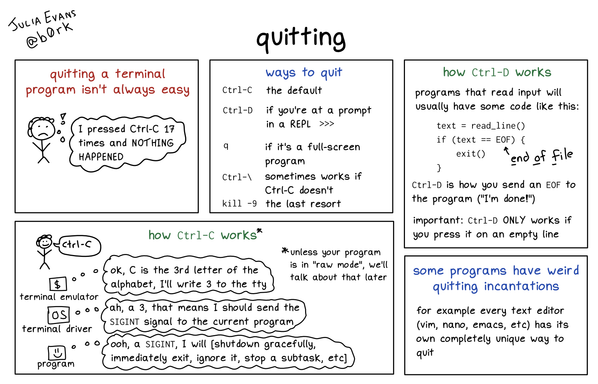
quitting in the terminal
@KMohZaid what do you mean? I can never tell if "I can't quit vim" is a joke or serious, like I kind of assume that if people are confused about how to quit vim they can google it and see that you can do something like “ESC :qa!" to get out.
but maybe that’s wrong? my brain might be distorted from using vim for too long :)
@b0rk Stubborn programs get a
Ctrl-Z
bg
kill -9 %1
@colin_mcmillen @b0rk I generally use
ctrl-z
kill %%
@dngrs @b0rk A tiny technical caveat: control-C sends a byte with value 0x03 on purpose; this is designed into ASCII; the control key maps A through Z to control codes 1 through 26 in alphabetical order; yes, this is why control-[ is another way to type the ESC key.
But the "character code 0x03 means send SIGINT" rule is adjustable (with the `stty` command) and SIGINT itself is usually *not* signal number 3 (there's no official rule for which signals have which numbers, but SIGINT is almost always number 2).
@zwol @dngrs thanks, I need to be better about clarifying which parts of this are configurable and which parts aren't
I think the rules are
* you *can* sometimes configure what `alt` or `option` do in your terminal emulator
* you *can’t* configure what byte `Ctrl+C` will send
* you *can* configure what `3` does (via stty like you said)
* if your terminal emulator sends an escape code (via alt+x, mouse, etc), you usually *can't* configure how the program will handle those escape codes
* ???
@b0rk @dngrs stty also lets you change _which byte_ will send SIGINT (and SIGQUIT and SIGTSTP), like if you want Ctrl-\ (0x28) to mean SIGINT instead of SIGQUIT you can do that. It doesn't even have to be a control code! But setting it to any graphic character or to ^@ ^H ^I ^J ^L ^M ^? ESC or SPACE is liable to have undesirable side effects. This is probably too much detail for the zine I'm just brain dumping.
Some programs do let you configure how the escape codes are handled but it's gonna be program by program and you will have to dig through the manual to find out if it's possible. Because this was the jargon back in the 1970s and it stuck, the term to look for in the manual is often "key binding" or "key rebinding".
I can't think of anything else right now.
@zwol @b0rk @dngrs re. graphic characters, a weird historical thing is that bell labs era unix used # to delete a character and @ to delete a line - the stty erase and stty kill characters that are these days usually ^? and ^U
https://man.freebsd.org/cgi/man.cgi?query=tty&sektion=4&apropos=0&manpath=Unix+Seventh+Edition
and nowadays its rare to encounter tty cooked mode unless typing directly into cat
@fanf @b0rk @dngrs Oh that's a good point. I actually have no idea if readline / editline / vi / etc pay attention to what the terminal thinks the special characters are.
You're in tty cooked mode whenever you need to SIGINT or SIGTSTP a long-running program that doesn't talk to the terminal, though.
I remember # for erase and @ for kill line being mentioned in a 1980s guide to programming microcomputers (think original IBM PC) in cut-down C — there was one chapter of "here's all the stuff Unix 7 C has that Lattice C had to leave out" and of course then had to orient you to the shell a little bit first. I imagine they date to the very earliest days when everyone was stuck using printing terminals.
@zwol @dngrs @b0rk I'd like to link this [1] here since it does a great job of explaining the relation between keys and codes, for whomever is curious about this. (It also claims that Ctrl+C has no relation to ETX which would explain why SIGINT isn't signal number 3)
[1] http://www.catb.org/~esr/faqs/things-every-hacker-once-knew/#_ascii
@b0rk Unfortunately, not for the stuff covered by that one. I have occasionally been tempted to write my own version but it would be so much tedious fact-checking that I probably won't ever do it unless someone wants to pay me to do it.
The backspace key nowadays almost always sends ^? to the software running in the terminal (ASCII DEL, 0x7F). However, a long time ago (I remember this being a Thing in the 1990s), depending on which terminal (emulator) you had and how it was connected to the computer (actual serial line, ssh, rlogin, telnet, local pseudoterminal pair, etc) there was a good chance backspace would send ^H (ASCII BS, 0x08) instead. I never knew how to predict which I'd get.
(On terminals that used ^H for backspace, the delete key, if there was one, would usually send ^?. Nowadays, with ^? being used for backspace, the delete key sends ESC [ 3 ~ instead (no spaces).)
@b0rk it really is such a giant mess
notes off the top of my head mostly about readline:
- Character 0 should be spelled NUL, not NULL (this is a historical quirk of the ASCII spec, reused nowadays to distinguish it from C's NULL *pointer*). It is sent by Ctrl-@ and usually also Ctrl-SPACE.
- Readline's meaning for Ctrl-K is 'delete text from cursor position to the end of the line' and for Ctrl-U it's 'delete text from cursor position to the beginning of the line'. This is important if you have the cursor somewhere in the middle of the line.
- The terminal driver also understands Ctrl-U; for the terminal driver it technically means "delete the whole line" but because you *can't* have the cursor in the middle of a line if the terminal driver is what's processing control keys, it's functionally the same thing as readline
- Readline does have a meaning for Ctrl-T, it is "swap the characters right before and after the cursor", unless the cursor is at the end of the line, then it's "swap the two characters right before the cursor." It's for fixing typos. Examples: type "sl" and then Ctrl-T, you'll now have "ls". Type "pyhton", put the cursor on the t, Ctrl-T, you'll now have "python".
- If you turn off pause/unpause as discussed in earlier threads, then readline will make Ctrl-Q be the same as Ctrl-V, and Ctrl-S be "search *forward* from where we are in history search", which is handy if you typed Ctrl-R a few too many times.
- Readline _also_ has a meaning for Ctrl-_: "undo" (character by character, I think).
- The reason readline *doesn't* have a meaning for Ctrl-X is that Emacs uses that key as a prefix for another set of keybindings (e.g. in emacs C-s means search forward in the file but C-x C-s means save the current file).
- all the readline keybindings are documented in "man readline" and can be configured in a dotfile, "~/.inputrc". you can even switch it over to acting like cut-down vi rather than cut-down emacs if you want.
Apropos of that:
If you've used ctrl-z to suspend a program but haven't put it in the background with bg, many versions of bash will warn you about it the first time you try to exit with ctrl-d (or exit). That's helpful, because maybe you weren't done with that program.
It happens more often than I'd like that I can't quit [some program] because ... I am looking at a screenshot of [that program].
The way ctrl-\ gets turned into a signal is very similar to ctrl-c
@b0rk Great work! I never digged into why Ctrl-D works and this explains it well!
Though I am confused about the description that terminal sends SIGINT for ctrl-C because C is the third letter in the alphabet. That doesn't happen to any other letters. For example, Ctrl-A doesn't generate a signal
@lesley yeah Ctrl-A sends the number `1` to the OS terminal driver but `1` isn't translated into a signal the way `3` is, `3` is special.
`1` is just passed through to the program, so if you type Ctrl-A the program will just get a `1` byte.
@b0rk @lesley You probably know this or saw it while making this page, but I just learned: that ^C = 3 = SIGINT = exit doesn't mean anything, it's just a random reuse of the ETX code started by DEC (although: "citation needed") https://en.wikipedia.org/wiki/End-of-Text_character
^D = EOT = End Of Transmission seems more logical! https://en.wikipedia.org/wiki/C0_and_C1_control_codes
@ednl interesting, what do you mean by “doesn't mean anything"?
I’d assume that 3 = SIGINT is standardized somewhere (maybe POSIX???) though I don't know where
@ednl I guess I don't really understand how the number 3 could have a semantic meaning?
like choosing what 3 should do seems arbitrary in the first place and I don't understand why what "3" does on my computer today would necessarily be related to what a different arbitrary standard from the past decided "3" should mean
(probably what's going on is that there's some "important" standard here that I don't realize is important)
@ednl oh I get it, I think you're saying that a lot of control characters in ASCII have a name, and a lot of the time the name is related to what it does today (like "bell" or "line feed") but also sometimes it doesn't
sorry I'm slow :)
@b0rk Yes. I mean no, you're not slow :) I was too concise! The name is the most obvious logical connection, but also I think the first reply you replied to was looking for a deeper meaning of the number 3 "why would that be a SIGINT?" But there just doesn't seem to be a logical or semantic connection, it randomly came together (and apparently at DEC).
I always thought C stood for Cancel but that's probably an explanation after the fact. My own folk etymology!
@b0rk I feel like it might be worth trying to squeeze "Ctrl-Z and then kill %%" into the "ways to quit" box as another thing that sometimes works when Ctrl-C doesn't
nowadays this feature is almost always turned off by default, but Ctrl-\ *might* drop a large and mostly useless file named "core" in the directory you're in, as a side effect; this doesn't need to be on the page you're showing but if there's a "weird side effects of quitting" page then it should go there
@b0rk I saw a reply go by asking if there was anything that would _always_ work, and I was going to answer but then the reply disappeared, but I think the answer might be worth mentioning somewhere (again probably not on this page):
`kill -9 <process-ID>` (on modern computers, you can also type `kill -KILL`, but I'm old and `kill -9` is what's wired into my fingers) is guaranteed to work *as long as it's the program itself that's suppressed all other ways of quitting*, but you have to be able to get another shell prompt to use it. It may cause data loss (it's effectively "force quit without saving first", whereas ^C and ^D and so on do give the program a chance to save files on the way out) and it might leave the terminal in a messed-up state.
Sometimes you have to do `kill -CONT <process-ID>` as well to make the kill -9 work. I don't fully understand when this is necessary, it's just tripped me a few times.
In rare circumstances -- the most common being that the program is stuck trying to talk to a network file server that's down -- it *isn't* the program itself that's preventing quitting, but the kernel, and then you may have no recourse whatsoever short of rebooting the entire computer.

 KMohZaid
 mafe en españa
 Lulu 🍉 לולו
 Colin McMillen
 No Gate Key
 daniel:// stenberg://
 alpha
alpha Lambic
 Miles Offit... 🇨🇦🇪🇺🇺🇦
 Kraftwerk-Das Model Collapse
 Zack Weinberg
 Tony Finch
 dandels
 Dr Lee A. Christie
 Stylus
 Elric
Elric Reinout van Schouwen
 Lesley Lai
 ednl 🇪🇺
 Roxy Light
 multioculate
 Just van den Broecke
 Fabian ¯\_(ツ)_/¯
 idlestate's SDF liason acct
 saud
saud
 uzayran
 Jima
Jima 
 Samuel 🌐
 Jérôme Mainaud