 Julia Evans
quitting in the terminal
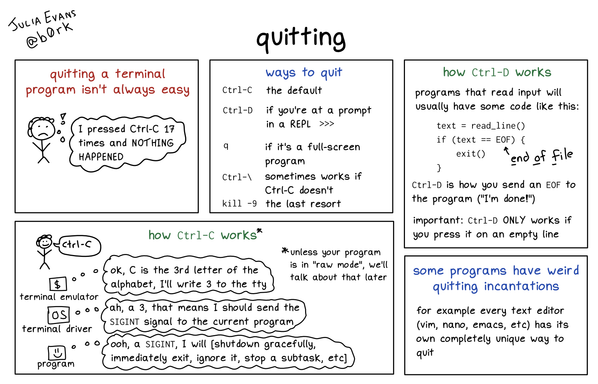
quitting in the terminal
@dngrs @b0rk A tiny technical caveat: control-C sends a byte with value 0x03 on purpose; this is designed into ASCII; the control key maps A through Z to control codes 1 through 26 in alphabetical order; yes, this is why control-[ is another way to type the ESC key.
But the "character code 0x03 means send SIGINT" rule is adjustable (with the `stty` command) and SIGINT itself is usually *not* signal number 3 (there's no official rule for which signals have which numbers, but SIGINT is almost always number 2).
@zwol @dngrs @b0rk I'd like to link this [1] here since it does a great job of explaining the relation between keys and codes, for whomever is curious about this. (It also claims that Ctrl+C has no relation to ETX which would explain why SIGINT isn't signal number 3)
[1] http://www.catb.org/~esr/faqs/things-every-hacker-once-knew/#_ascii
@b0rk Unfortunately, not for the stuff covered by that one. I have occasionally been tempted to write my own version but it would be so much tedious fact-checking that I probably won't ever do it unless someone wants to pay me to do it.
The backspace key nowadays almost always sends ^? to the software running in the terminal (ASCII DEL, 0x7F). However, a long time ago (I remember this being a Thing in the 1990s), depending on which terminal (emulator) you had and how it was connected to the computer (actual serial line, ssh, rlogin, telnet, local pseudoterminal pair, etc) there was a good chance backspace would send ^H (ASCII BS, 0x08) instead. I never knew how to predict which I'd get.
(On terminals that used ^H for backspace, the delete key, if there was one, would usually send ^?. Nowadays, with ^? being used for backspace, the delete key sends ESC [ 3 ~ instead (no spaces).)
@b0rk it really is such a giant mess
notes off the top of my head mostly about readline:
- Character 0 should be spelled NUL, not NULL (this is a historical quirk of the ASCII spec, reused nowadays to distinguish it from C's NULL *pointer*). It is sent by Ctrl-@ and usually also Ctrl-SPACE.
- Readline's meaning for Ctrl-K is 'delete text from cursor position to the end of the line' and for Ctrl-U it's 'delete text from cursor position to the beginning of the line'. This is important if you have the cursor somewhere in the middle of the line.
- The terminal driver also understands Ctrl-U; for the terminal driver it technically means "delete the whole line" but because you *can't* have the cursor in the middle of a line if the terminal driver is what's processing control keys, it's functionally the same thing as readline
- Readline does have a meaning for Ctrl-T, it is "swap the characters right before and after the cursor", unless the cursor is at the end of the line, then it's "swap the two characters right before the cursor." It's for fixing typos. Examples: type "sl" and then Ctrl-T, you'll now have "ls". Type "pyhton", put the cursor on the t, Ctrl-T, you'll now have "python".
- If you turn off pause/unpause as discussed in earlier threads, then readline will make Ctrl-Q be the same as Ctrl-V, and Ctrl-S be "search *forward* from where we are in history search", which is handy if you typed Ctrl-R a few too many times.
- Readline _also_ has a meaning for Ctrl-_: "undo" (character by character, I think).
- The reason readline *doesn't* have a meaning for Ctrl-X is that Emacs uses that key as a prefix for another set of keybindings (e.g. in emacs C-s means search forward in the file but C-x C-s means save the current file).
- all the readline keybindings are documented in "man readline" and can be configured in a dotfile, "~/.inputrc". you can even switch it over to acting like cut-down vi rather than cut-down emacs if you want.

 Kraftwerk-Das Model Collapse
 Zack Weinberg
 dandels