

What a load of shit! Yesterday I installed #Windows 11 24H2 on one of my computers because I wanted to have a look at what's new.

And - in best #Microsoft style - I was immediately negatively surprised. Contrary to M$'s promises, #RECALL is activated by default! And without any indication.

Redmond has promised that Recall is an OPT-IN function. But screw the customer! An unbelievable scandal and a very bad joke, Microsoft!

Nobody in their right mind should use this spyware and advertising spam spinner Windows 11 anymore!

And if you have already updated to 24H2, here's a quick guide on how to check if Recall is already silently enabled and how to disable it:

1. start Windows Powershell AS ADMINISTRATOR

2. query recall status, whether active or deactivated:
dism /Online /Get-FeatureInfo /FeatureName=Recall

3. if active, then deactivate as follows:
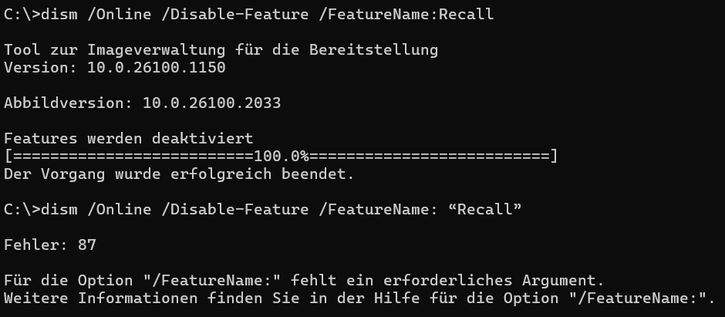
dism /Online /Disable-Feature /FeatureName:“Recall”

Reboot, for security reasons.

But be careful: with every Windows update, Recall can be activated again silently and secretly!

And best of all, if you haven't already done so: switch to Linux or BSD! The time is more than ripe!

#microsoft #windows #windows11 #windows10 #recall #spyware #privacy #linux #opensource #freesoftware #unix #fedora #debian #arch #ubuntu #linuxmint #manjaro #opensuse

@unixviking There's a prelude to recall in windows 10 (before it was called that). MS had one of their schedules reactivating recall that can be disabled. Somewhere post 23H2 KB updates maybe they moved it. I'm still not 11 until where the schedule can be turned off permanently again.
@unixviking And you are surprised by MS action? They gotta feed their AI and keep you hostage!
@ppulfer Not directly surprised. But the fact that they then brazenly lie and secretly activate this “feature”, even though they have communicated that it is NOT automatically active - that is a new level of brazenness for me.

@unixviking Wait until you find out that they have added it as a *dependency* to the File Explorer, so you will not be able to remove it as well.

It is a blatant violation of trust for the sake of feeding their AI. Worse part is no longer will you be sending the analytics and have them compute the data, the Recall will use your compute power to properly put things in perspective.

@unixviking Now imagine how easy it will be to target you if you open a meme on your PC which does not comply with the current political scenario.
And that is precisely why everyone, absolutely everyone who can, should get away from such systems! @ppulfer

@unixviking Indeed. Also disabling it will most likely last only until the next update turns it on by default.

We're already in #cyberpunk distopia :)

@ppulfer It can be assumed that the spyware is reactivated with every update - that's why I explicitly pointed out that you should always keep an eye on it.

I'm trying as best I can to beat this dystopia. With simple things that anyone can do: Choosing their operating system, their smartphone, their online services, etc.

My holy trinity: Linux - Graphene OS - Nextcloud.⛪

@unixviking Indeed.

I've moved all family desktops to Linux; moved to a Synology NAS for most of my office, files and photos needs.

Next steps is mobile: I'm currently testing @postmarketOS or @droidian. The only thing missing for me is GPS Navigation.

@ppulfer @postmarketOS @droidian That's well done!

Thank God I no longer need navigation. And even if I did, I come from a time when the only way to navigate was by using a road atlas. I can fall back on that if necessary.

@unixviking aren't You in the EU? I thought it wouldn't arrive here, at least not yet.
@harald Yes, I am. Austria. And I thought so too. But I pulled the 24H2 ISO fresh from Microsoft and installed it. And Recall with my location in the EU was active by default! I did a bit of research and there are now many videos on YouTube about it, where everyone else is just as surprised that it was secretly activated during the update.
@unixviking Checked my Windows 11 24H2 workplace test installation today and Recall was indeed listed as enabled. ISO-Download was done from M365 licensing, my institution is located in Germany.
BTW: you might want to edit the "Disable-Feature" line of your original post - it won't work with the typographical quotes used there.
@mschomm Yes, these quotation marks must be set when deactivating. I did it the same way and it worked.
@unixviking Doesn't work with your type of quotes here but did without.
@mschomm Das ist mehr als seltsam, weil sowohl bei mir als auch im Video, welches ich vorhin verlinkt habe, es MIT den Anführungszeichen funktioniert hat
@mschomm Ah, I've found your mistake: You have put a SPACING between the colon and the quotation mark, but there should be no space!
@unixviking You're right, without a space your line works. But I haven't put it there as I copied & pasted from your OP, so maybe you could change that - instead of the quotes...
@mschomm I have corrected it! Sorry, I didn't realize with the small font here that I had a space in between... my mistake! Thanks for the hint!
Windows 11 24H2 - Recall Feature deaktivieren - Das ist nicht Opt-in! [GERMAN]

Die Wellen zum Thema "MS Recall" gehen gerade wieder hoch. Obwohl MS versprochen hat, das Recall-Feature "opt-in" zu gestalten, also so, dass es aktiv vom An...

YouTube

@unixviking You may remember Google+, the ill-fated social network from Google, headed at the time by a guy called Vic Gundotra who had a habit of distorting words, data, and facts to fit his narrative.

One day he announced some new opt-out feature in an internal meeting that should have been opt-in because it had privacy implications and someone called it out.

"But it is opt-in!" he said. "People are opted in by default!"

And that's how the phrase "default opt-in" became infamous at Google.