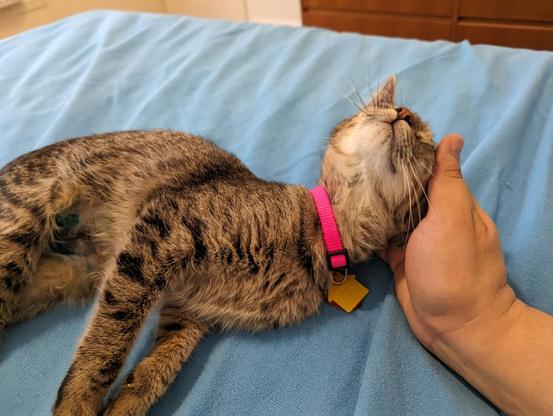
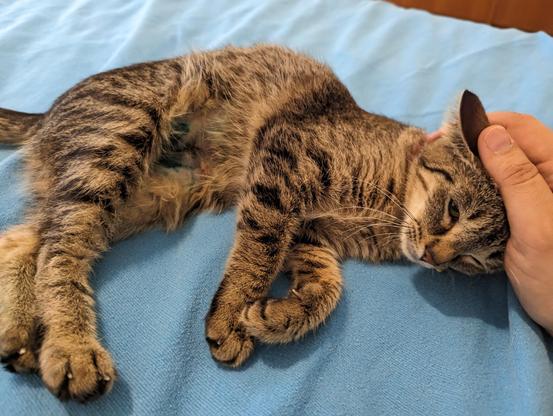
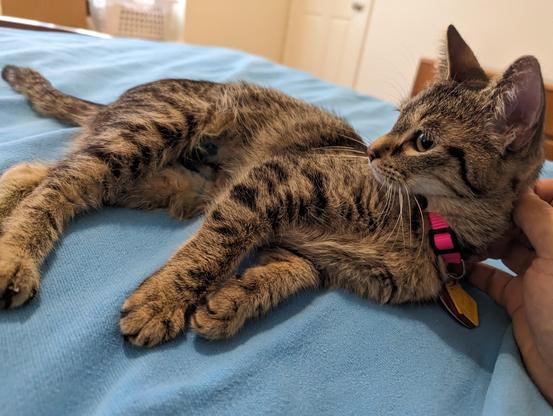
Ladies and gentlenerds, it is with profound pleasure that I introduce to you,

Mira Delenn Furlan Dane

I don't know how but she already loves me.
It's truly amazing.
I feel guilty for taking up >14 MB on that last toot, but the downscaler on my phone didn't seem to have a batch mode. :(

But then again, I think Ad?min is def' gonna be ok with this one ;)

@rl_dane

It's a worthy cause. :)

Also GoToSocial automatically does compression and what not.

@amin

That was the size downloaded (looking at /tmp/tutfile1111111yaddayadda.jpg)

Random aside, why the heck are people still enforcing three-letter extensions? That's so dumb. :P

@rl_dane
Be glad it's not ".jpe"...
@amin

@ddlyh @rl_dane

Speaking of, the "P" should pronounced as an "F". After all, it stands for "Photographic".

I will die on this hill.

@amin
I mean, strictly speaking, it should be "JFIF" anyway...
@rl_dane

@ddlyh @amin

JFIF is the container format. JPEG is the spec/algorithm.

...as I understand it...

@rl_dane @ddlyh

Strictly speaking, "JPEG" is the name of the group that made the spec. "Joint Photographic Experts Group". ;)

@amin @rl_dane @ddlyh and .jpg is “JPEG-encoded Photo or Graphic”, bam.

@mirabilos @amin @ddlyh

I'm not a fan of providing retronyms for abbreviations necessitated by crappy operating systems and/or crappy conventions.

It should always be .jpeg, in my book.

@ddlyh @amin @rl_dane nah, 3-char extensions are fine and the usus.

And in some cases even more correct, e.g. in .htm (as the file is not the language).

@mirabilos @ddlyh @rl_dane

And if we’re talking the Unix world the file extensions are basically ignored anyway. It’s only on Windows that it actually matters.

@amin @mirabilos @rl_dane Only on the commandline - in graphical shells, the Unix world uses them for the icons.

It's RISCOS that ignores them pretty much entirely (I think?)...

@ddlyh @amin @mirabilos

I need to play with RiscOS.

I need to get a proper three-button (no wheel) mouse, first.

@rl_dane @ddlyh @mirabilos

…a mouse with no scroll wheel? Why?

@amin @ddlyh @mirabilos

Because #RiscOS uses the second mouse button as the right click.

It's infuriating to try to click the mouse wheel that much.

@amin @rl_dane @ddlyh use a Thinkpad, they have three mouse buttons

@mirabilos @amin @ddlyh

But then, instead of having a frustrating button arrangement, I'd have a frustrating pointing device.

Sorry, I know that's sacreligious. 😁

@rl_dane @amin @ddlyh it is 😾

@mirabilos @amin @ddlyh

You sit down at a desktop. At the desktop is a keyboard, a USB mouse, and a USB-connected trackpoint by itself.

All other things being the same, which one do you reach for?

For me, it's the mouse, hands down.

@rl_dane
Depends on the interface. All things equal, a keyboard is more efficient than a mouse/touchpad because it only has a single point of movement. Mouse and touchpad you move them and they move the mouse pointer: the disconnect makes it less efficient. Touchscreen is as efficient as keyboard but most of our touchscreen UIs are rubbish, so generally I'll choose the keyboard thanks...
@mirabilos @amin
@rl_dane @mirabilos @amin
TBH, you can see this sort of thing with file management. GUI file managers are only useful when you use them with both mouse AND keyboard! Just mouse leaves you with a UI akin to touchscreen file managers, which are awful. Yet just keyboard and typing "cp * /otherplace" is much faster than even pressing a select all button, then finding a copy action, then navigating to a directory and pasting, etc.!

@ddlyh @mirabilos @amin

I agree. I find myself using dolphin less and less, but I do find it useful when there are many files present and I want a quick overview, or when I want more clues as to file type (icons!) (although I understand that tools like exa give you some of this)

@rl_dane @ddlyh @mirabilos

ls --color gives some clues to filetype too. ;)

@amin @rl_dane @ddlyh

$ ls --color ls: illegal option -- - usage: ls [-1AaCcdFfgikLlmnopqRrSsTtuWx] [file ...]

This works, though:

$ alias l l='ls -F'

@mirabilos @rl_dane @ddlyh

Yeah yeah yeah, I'm sure the flags are different on BSDs. ;)

@amin @mirabilos @ddlyh

#FreeBSD has ls --color (I think it might be the only --gnu-style flag in any stock BSD utility, lol), but not most of the other BSDs.

There's an lscolor in most ports, and of course, GNU coreutils if you want all that.

Honestly, alias ls=ls -F kinda does the job. ;)

@rl_dane @mirabilos @ddlyh

Except when piping ls to something, yes.

@amin @mirabilos @ddlyh

This is true.

@rl_dane @mirabilos @ddlyh

Which I used to do a ton but don't do as often now that I wrote a wrapper script for the use case.

@amin @mirabilos @ddlyh

Also, its easy enough just to do

\ls |whatever

to strip the aliases per-invocation

@amin @rl_dane @ddlyh hence why I add it to l but not to ls. Except you mustn’t parse ls(1) output anyway.

@mirabilos @rl_dane @ddlyh

Except you mustn’t parse ls(1) output anyway.

I know that in my brain, but my heart says it's a quick and easy way to get files in a directory. 😂

@mirabilos @rl_dane @ddlyh

Wait why would that be better?

@mirabilos @rl_dane @ddlyh

If I were trying to do it properly I'd probably use find.

@amin @rl_dane @ddlyh yeah, find -print0 or for file in *; do … "$file"; done
@mirabilos
Yet parsing ls (with cut) was one of my first Linux assignments at uni...
@amin @rl_dane
@rl_dane @amin @ddlyh in IT we know that all uni graduates who haven’t been doing OSS in their spare time are at first totally unsuitable to the job and need to be trained, while those who were self-taught or come from vocational school can be used productively more quickly. This is why my employer never required titles, for example.

@amin @rl_dane @ddlyh fun side fact, I used cut(1) for the first time in 2023 or so. I never needed it before, it feels cumbersome and is totally nōn-intuitive.

And mind I’ve been using shell scripts (well batch…) since 1989/1990.

@mirabilos @rl_dane @ddlyh

Oh, I love cut and use it daily. Easier to remember the syntax than awk, if less powerful. :)

@rl_dane @ddlyh @amin even easier to do it in mksh… if less performant by necessity.

@mirabilos @rl_dane @ddlyh

Though I’m self-taught and do OSS in my free time but would still be totally unsuitable. :)

@ddlyh @amin @rl_dane I doubt that.

@mirabilos @ddlyh @rl_dane

Less about technical ability and more about how rebellious I get whenever I have to code something for someone else instead of myself. It’s why I don’t want a career in tech. ;)

@ddlyh @mirabilos @amin @rl_dane I think the closest I've done to ls+cut is tar tvf $file | sort -k 5 to sort contents by size, which I'd probably never use outside of a throwaway oneliner.

@rl_dane @amin @mirabilos @ddlyh

Personally I just do ls -alh but that's just my preference...

misc-scripts/bash/.bash_aliases at 2999339de4df13457f3a43cbb13beba9e55268ba · kkarhan/misc-scripts

random scripts for various admin tasks. Contribute to kkarhan/misc-scripts development by creating an account on GitHub.

GitHub
@kkarhan
I use ls -lAh, but I think --color defaults to "on" on mine anyway...
@rl_dane @amin @mirabilos

@ddlyh @kkarhan @amin @mirabilos

--color=auto is the best bet. I think it detects whether or not you have a tty and outputs plain text if not (for piping)

@rl_dane @ddlyh @amin @mirabilos AFAICT my terminals & SSH clients seem to automagically output colours...

@kkarhan @ddlyh @amin @mirabilos

Most Linux distros alias ls='ls--color=auto'for you by default. For many years.

Color ls is not a given in other Unixes.

@rl_dane @ddlyh @amin @mirabilos makes sense...

For example, #toybox's #ls implementation doesn't do #colours...

@rl_dane @kkarhan @ddlyh @amin @mirabilos I really dislike "color ls"

@xenotar @kkarhan @ddlyh @amin @mirabilos

Wrong colors for your terminal background, or do you just not like colors in your terminal?

@rl_dane @kkarhan @ddlyh @amin @mirabilos
I don't like the colored output of 'ls', I prefer the monochrome output, the colored one doesn't offer any advantage for me and sometimes it even makes it difficult to read (purple letters on a dark background, for example). But I'm old, I started with monochrome terminals, I shouldn't be taken into account :)

@xenotar @rl_dane @ddlyh @amin @mirabilos

I think you still should be taken into account - if only for #accessibility...

I do want to actually account for that in @OS1337 ...
https://infosec.space/@kkarhan/113314177161389536

Kevin Karhan :verified: (@[email protected])

@[email protected] @[email protected] @[email protected] @[email protected] makes sense... For example, #toybox's #ls implementation doesn't do #colours...

Infosec.Space

@xenotar @kkarhan @ddlyh @amin @mirabilos

Honestly, ls -F is good enough most of the time.

I even have some really nice aliases for exa to make the output look like a flippin' graphical file manager, and never used it again after setting it up. 😅

@rl_dane @xenotar @ddlyh @amin @mirabilos I have exa on the wishlist for @OS1337 but I'm convinced most folks would just use #NvChad 1 once #neovim 2 is available prepackaged for OS/1337 ...

#OS1337

pkgs/docs/WISHLIST.tsv at b9913cc81bc0d3a82f56b135d6f3de494e03c9f5 · OS-1337/pkgs

OS/1337 Package Repository. Contribute to OS-1337/pkgs development by creating an account on GitHub.

GitHub

@kkarhan @rl_dane @xenotar @ddlyh @amin @mirabilos @OS1337

I think exa is currently unmaintained, and people are moving away to eza.

https://github.com/eza-community/eza

GitHub - eza-community/eza: A modern alternative to ls

A modern alternative to ls. Contribute to eza-community/eza development by creating an account on GitHub.

GitHub

@kkarhan @amin @mirabilos @ddlyh

Ah, another bash enjoyer!

I never do -a by default (let that which is to be hidden remain hidden until the right time!), and I use an environment variable to put commas in the file size output so it's always readable, even for terabyte-sized files.

@rl_dane @amin @mirabilos @ddlyh lets just say I do expect to be the one in control on a system...