 R. L. Dane
Ladies and gentlenerds, it is with profound pleasure that I introduce to you,
Mira Delenn Furlan Dane
I don't know how but she already loves me.
It's truly amazing.
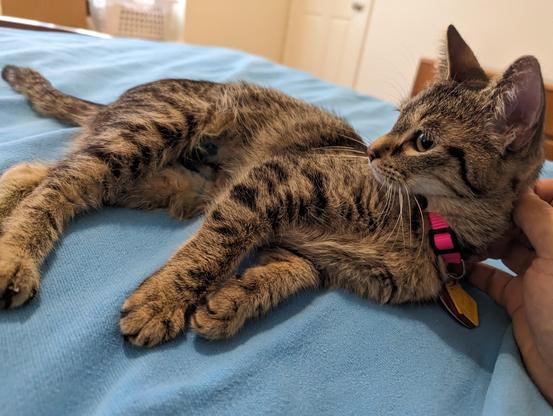
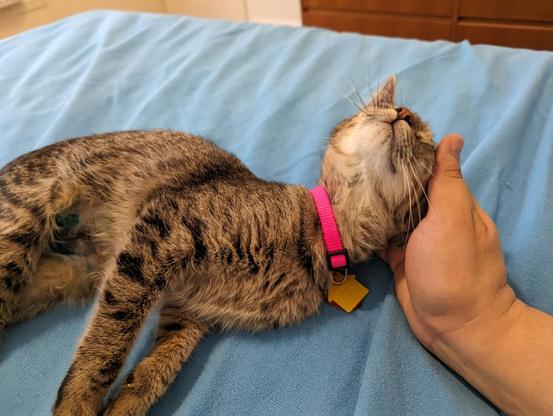
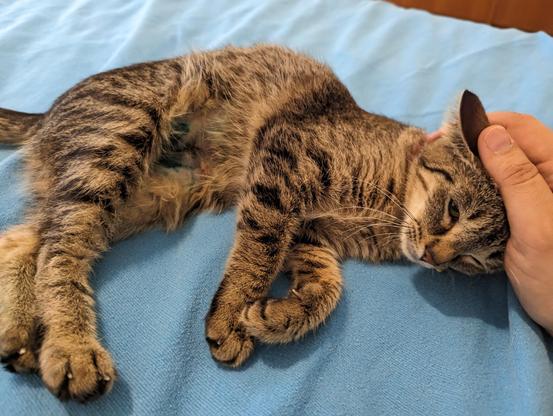
Ladies and gentlenerds, it is with profound pleasure that I introduce to you,
Mira Delenn Furlan Dane
I don't know how but she already loves me.
It's truly amazing.
I feel guilty for taking up >14 MB on that last toot, but the downscaler on my phone didn't seem to have a batch mode. :(
But then again, I think Ad?min is def' gonna be ok with this one ;)
That was the size downloaded (looking at /tmp/tutfile1111111yaddayadda.jpg)
Random aside, why the heck are people still enforcing three-letter extensions? That's so dumb. :P
I'm not a fan of providing retronyms for abbreviations necessitated by crappy operating systems and/or crappy conventions.
It should always be .jpeg, in my book.
And if we’re talking the Unix world the file extensions are basically ignored anyway. It’s only on Windows that it actually matters.
With the latter I can add a .disabled or something to the end of a filename to keep it from being sourced, so that's what I'd do. If I wanted that.
Ehh, kinda.
Graphical file managers (Yes, I know the REALLY cool kids don't use 'em) use the extension to determine the mime type.
The craziest was classic Macintosh OS, which did not use extensions at all (and most applications (especially in the early days) did not create them). File type was determined by an invisible (kept in the fs metadata) case-sensitive four-character alphanumeric file type code, and file association was determined per file via a similar four-character creator code.
So a PNG you created in Photoshop would always open in Photoshop, and a PNG you opened in Illustrator would always open in Illustrator. And a file named "Mona Lisa" was just "Mona Lisa," not "Mona Lisa.JPG" or "mona_lisa.jpeg." Later Macintosh applications started adding extensions to standard files (like JPEGs) to ease compatibility with PCs, but most native Macintosh applications had no three-letter extension set or defined in any way.
Somehow, we never thought all that that odd in the least.
Modern MacOS is even weirder, using neither extension, MIME, nor type codes, but something else I don't know the name of (but it's strongly tied to extension and MIME type)
(Yes, I know the REALLY cool kids don't use 'em)
I don't use TUI ones either. :P
There are some workflows for which a GUI fm helps. For that, I use Dolphin.
But most of the time, I just use bash and a few custom scripts that make heavy use of fzf. ;)
Oh, and edir. That's super helpful.
True. I use vidir (from moreutils) now though, so I don't need to install via pipx.
I like vidir, but it doesn't use trash. I prefer to use the trash, just in case. ;)
I've stopped bothering with the trash. :P
I make backups for a reason. ;)
lol, same wavelength!
Well, at least you have borg. How often does yours run? I have mine set to 15 minutes, as the diffs are quite small.
Mine are hourly to multiple locations. Never losing more than an hour's work is an acceptable situation for me.
If you have 15-minute backups, why do you need the trashcan? 😂
Do not underestimate the POWAH of the dork side!!!!
@amin @mirabilos @rl_dane Only on the commandline - in graphical shells, the Unix world uses them for the icons.
It's RISCOS that ignores them pretty much entirely (I think?)...
I need to play with RiscOS.
I need to get a proper three-button (no wheel) mouse, first.
…a mouse with no scroll wheel? Why?
Because #RiscOS uses the second mouse button as the right click.
It's infuriating to try to click the mouse wheel that much.
Huh, interesting.
You could do like me and bind mouse buttons to keys on your keyboard. ;)
In RiscOS? 😅
My keyboard uses QMK, I'm altering the actual firmware of the keyboard to send those signals. ;)
But then, instead of having a frustrating button arrangement, I'd have a frustrating pointing device.
Sorry, I know that's sacreligious. 😁
You sit down at a desktop. At the desktop is a keyboard, a USB mouse, and a USB-connected trackpoint by itself.
All other things being the same, which one do you reach for?
For me, it's the mouse, hands down.
I agree. I find myself using dolphin less and less, but I do find it useful when there are many files present and I want a quick overview, or when I want more clues as to file type (icons!) (although I understand that tools like exa give you some of this)
ls --color gives some clues to filetype too. ;)
Yeah yeah yeah, I'm sure the flags are different on BSDs. ;)
#FreeBSD has ls --color (I think it might be the only --gnu-style flag in any stock BSD utility, lol), but not most of the other BSDs.
There's an lscolor in most ports, and of course, GNU coreutils if you want all that.
Honestly, alias ls=ls -F kinda does the job. ;)
Except when piping ls to something, yes.
This is true.
Which I used to do a ton but don't do as often now that I wrote a wrapper script for the use case.
Also, its easy enough just to do
\ls |whatever
to strip the aliases per-invocation
Except you mustn’t parse ls(1) output anyway.
I know that in my brain, but my heart says it's a quick and easy way to get files in a directory. 😂
Wait why would that be better?
Though I’m self-taught and do OSS in my free time but would still be totally unsuitable. :)
tar tvf $file | sort -k 5 to sort contents by size, which I'd probably never use outside of a throwaway oneliner.@rl_dane @amin @mirabilos @ddlyh
Personally I just do ls -alh but that's just my preference...
@ddlyh @kkarhan @amin @mirabilos
--color=auto is the best bet. I think it detects whether or not you have a tty and outputs plain text if not (for piping)
@kkarhan @ddlyh @amin @mirabilos
Most Linux distros alias ls='ls--color=auto'for you by default. For many years.
Color ls is not a given in other Unixes.
@kkarhan @amin @mirabilos @ddlyh
Ah, another bash enjoyer!
I never do -a by default (let that which is to be hidden remain hidden until the right time!), and I use an environment variable to put commas in the file size output so it's always readable, even for terabyte-sized files.
Sorry, I meant choosing just between the mouse and the trackpad.
I understand that most of us will want to eschew pointing operations as much as possible.
Except for Amin, that uses his keyboard as his mouse like a NERRRRRRD!!! /j
I use super+t to disable the trackpoint when I'm not using it (and super+shift+t for the trackpad if the device has both, like my x260), and Xbanish to remove the mouse cursor when I'm typing.
So 90% of the time, I have neither a pointing device enabled, nor a cursor.
(Not counting my work machine -- that's a very different workflow)
Ah, I do use keyboard shortcuts for selection, copying and pasting, but that only works with foot terminal (Wayland) right now
 Amin Hollon 🏳
 DHeadshot's Alt
 mirabilos
 Haelwenn /элвэн/
 Kevin Karhan
