Can somebody bring me up to speed on the changes in iOS 18 to resource constraints in widgets? They go into a crash loop if images are over a certain size? But what is the size? And is it different per-device?

It looks to be about 500x500 for a small widget, if I'm reading the logs right. Not 512, because why would it be 😛
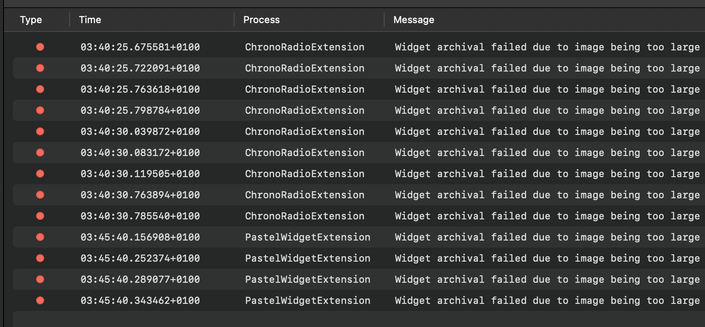

@stroughtonsmith this bit me big time. I had an image widget I developed with iOS 17 that was working fine but wouldn’t work at all with iOS 18 because of the sizes you mentioned. I pulled it for the moment. 🤷🏻‍♂️
@stroughtonsmith I think it might be related to the size of the widget converted from points to pixels?
@stroughtonsmith My understanding is that an image should be no larger than the widget, with some wiggle room for one dimension going over due to aspect ratio.
@stroughtonsmith IIRC this limit was introduced back in 17.2.
I resize images to max of context.displaySize * context.environmentVariants.displayScale?.max()

@stroughtonsmith I believe there are 3 different resource limits (which have all existed since widgets started, but some got stricter in iOS18).
1) a 30MB memory limit while refreshing the widget
2) an archive size limit on the complexity of the swiftui view
3) an image resolution limit

2&3 seem to vary based on device/size and I believe are not specifically documented. Generally for #3 the limit seems roughly the size of a widget’s pixel bounds. So you have to resize down based on family.

@_Davidsmith @stroughtonsmith those constraints should be documented. It is really annoying that we need to find them out by experimenting.
@stroughtonsmith I’m sure you’ll also love to know that depending on the size of the source image, resizing it to be small enough for this limit might hit the 30MB RAM limit.
@paul @stroughtonsmith us iPhone SE users appreciate this in the long run 😜