Quick day-0 workarounds:

- Premium subscribers: You can turn off the now-playing ad banners in settings, Overcast Premium, Banner Ads for Podcasts (sorry, that should've migrated the old preference)

- Not seeing your data or not syncing? Try force-quit and relaunch, or settings, Sync Profile, Refresh All Data

@overcastfm I wasn't seeing the update.

Fix: download Overcast from the app store!

(I forgot I was still on the testflight)

@ents Is this a question or instructions?

In the same boat…

@chrisfinazzo instructions! i was on the test flight. install the app from the app store
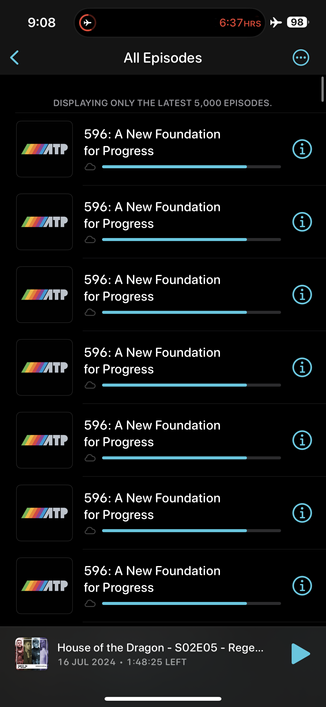
@overcastfm tried both, still not seeing my playlists come through and all my podcast episodes are stuck “waiting to download” so I can’t play them. Any other workarounds?

@overcastfm here’s a screen recording of the behavior I’m seeing. Nothing downloads, nothing plays. And after I choose refresh all, none of the buttons at the top work anymore until I force quit. I’ve tried both quitting and reinstalling the app but getting the same.

Lmk if there’s any way to get you logging information to help investigate or reproduce.

@josephschmitt @overcastfm This happened to me at first as well. My best guess is that it was syncing and it took a while because it was a full sync and with the new release the Overcast servers were getting hammered the first day or so? I just let mine sit for 10 minutes and then it was good.
@overcastfm tried both those options before this was even posted. i see episodes in playlists and recents, but no podcasts in the list down below.
@overcastfm congrats on the rewrite! the screenshots and reviews I've been seeing look great.
unfortunately for me both options did not work. even a complete reinstall from app store does not fix the issue.
start screen is empty (no custom playlists, nothing under all/current) except for episodes on top, which cannot be played due to endless download state :(
@overcastfm force quitting or refresh syncing doesn’t help here. Should I supply logs or something ?
@overcastfm the settings button works once (to change theme). On second attempt to open it does not respond
@ninjazebra @overcastfm this happened to me, too. Also couldn’t open the downloads screen. Force quitting reenabled those buttons.
@overcastfm Marco could you please consider simultaneously posting updates like this on X? There are still plenty of overcast users over there. It’s dumb luck I even caught this here.
X is a cesspool of bots, Elon, and hate.
@overcastfm tried all those now tried resetting all data and now I have a clean slate but unable to figure out how to import OPML backup
@coreyallen I believe OPML isn't yet implemented - one of the few things that need to be done to bring it back in line with the prior version
@mattwilcox lol damn i completely rest everything so i guess i need to switch to a different app until i can import via OPML again. Thanks for the reply
@coreyallen I'm sure Marco will be on that quickly - but seems like one of those features that isn't usually used much, so it got punted down the line a little. Just a bit of a problem if it turns out people are needing to use it to fix other glitches.

@overcastfm

Same issues as other replies, no podcasts visible. Just echoing for sake of illustratjng number of folks with the problem.

Excited to use it and appreciative of your work.

@overcastfm Rebooted, force quit, waited…
@overcastfm Ok. It eventually worked after an hour.
@overcastfm After the update to the new version my playlists don’t appear grayed out anymore when there are no episodes currently in them. Is that an intentional change or a bug/feature that still needs to be added back in the future?
@overcastfm Ran into a bug where for my existing Queue playlist, I added a new episode to it from a smart playlist and it reordered the existing contents in no obvious sort before adding the new item to the top.
@overcastfm the File Uploads pref didn’t migrate for me, either
@overcastfm Where did settings for smart speed, voice boost, etc move. I can’t seem to find those settings.
@overcastfm update looks nice but it seems I cannot select multiple episodes simultaneously to manually reorder a Playlist. Is that an intentional change?
@overcastfm Ignore my deleted post. ;-)

@overcastfm Mini bug report: when I toggle the “always use dark theme” switch, the settings sheet will close and sometimes it won’t come back up. And at that point the settings can’t be opened at all anymore until I force quit and restart the app. (I don’t think it’s iOS 18 related because that’s a kind of familiar SwiftUI bug)

Otherwise great update so far 🎉

@overcastfm I'm running into an issue where playback stops on completion of an episode. Doesn't matter whether the next episode in the playlist is downloaded or not – I have to go in and start the next one manually each time. Playlists all worked fine in the previous version and I'm getting the same behaviour on iPhone, iPad and Mac. Known issue?
@nekofever @overcastfm I’m having the same issue. The podcast gets to the end and then the next in the queue doesn’t start. I’ve been fast-forwarding over that past minute or two of the episode, but I’m.l not sure if that’s the cause.
@nekofever @overcastfm Same here, on iPhone. It seems to work on the Watch, but probably because it hasn’t been updated yet.
@overcastfm Ads on Overcast for Mac 2024.7 now seem to be always on, even though I have Premium subscription. Is that expected? I can turn ads off on iOS. EDIT: I didn't see the "Setting" icon in the upper left earlier. All the options are there, duh me! All is well :)

@overcastfm Thanks for the work-around about ads on the now-playing screen!

The new Overcast is looking good so far 😀

@overcastfm perhaps I’m misunderstanding, but if I mark all episodes as unplayed, then all episodes gets added to download queue, even if I have changed settings to “download manually”!
@overcastfm also Can’t hide/delete the auto playlists. Can’t change their colours and icons.
@overcastfm congratulations @marcoarment, great work on this new version.
@overcastfm Is the new version 2024.7?
@overcastfm Feature Requests: Option to hide podcast list and just have playlists on home screen. Add forward and back rewind onto the mini-player. Love your work!
@overcastfm im seeing the playlist settings totally not working. Is that a known bug? If not I’ll email you a video.
@overcastfm playlist creation is also buggy. Can’t create playlists with only 5 podcasts. When we go back the option is not staying saved.
@overcastfm Love the new look and feel! Congrats. Only feature I miss is adding to my drag/drop selection with 2nd finger tap. Didn’t realize how much I use this to cue up my next listens.
@5tu @overcastfm I second this. Please bring it back if possible 🤞

@overcastfm The only problem I think I'm having is that it looks like episodes I've completed aren't going away/deleting from the UI? Any tips?

And FWIW, I really miss being able to swipe left to mark as listened. Thx!

@overcastfm I’m thankful for the first issue. I was a legacy one time purchaser and saw the ads and thought you finally added ads for us with this version. Made me finally get around to subscribing. Happy to support you!
@overcastfm can we no longer reorder playlists on home screen?
@overcastfm it does this for a few seconds when downloading a new episode
@overcastfm this seems to be fixed in the latest version. Thanks!

@overcastfm ⚠️ Too many retries is back this morning and…

I’m getting a weird playback bug where it skips ahead a minute (in one spot in one podcast so far) and then won’t let me rewind past that spot (unless I go waaay back past it).

The delayed observable-like pattern also gives unresponsive UI and podcasts with skip intros that briefly play the first few seconds before finally skipping the intro.

Better, but def v1. 😧

@overcastfm UI hang example.
@overcastfm I also, eg, occasionally get an ad at the bottom that eventually goes away.