 ➴➴➴Æ🜔Ɲ.Ƈꭚ⍴𝔥єɼ👩🏻💻
Woohoo!
Finally got my NAS board. Now to figure out how to install Linux on it.
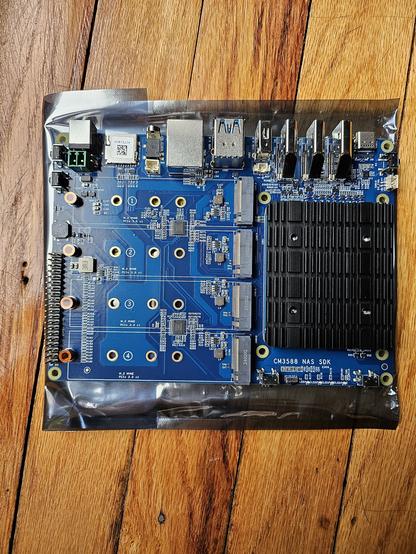
Woohoo!
Finally got my NAS board. Now to figure out how to install Linux on it.
@AeonCypher Let me guess:
It has a Denverton or Celeron J SoC ?
At worst some Server Installs boot with an enabled SSH server in live mode and allow you to remotely use the install on a headless machine...
And if this is using #ARM64 instead then your only option is a Linux image or #ARM+#UEFI bootable ISO.
@AeonCypher maybe check out if it has a #BIOS?
It does have a #MicroSD slot (or #nanoSIM I'm not shure) so you may find some boot settings...
@AeonCypher Also it's not #amd64 / #ix86 but #arm64...
Found some #documentation for it:
https://wiki.friendlyelec.com/wiki/index.php/CM3588_NAS_Kit
@AeonCypher np.
Not shure how the #RK3588 boots but I stubled upon this "lost" datasheet via #DuckDuckGo:
https://www.cnx-software.com/pdf/Rockchip%C2%A0RK3588%C2%A0Datasheet%C2%A0V0.1-20210727.pdf
#Protip: Save it now!
@AeonCypher np...
You're welcome...
 Kevin Karhan