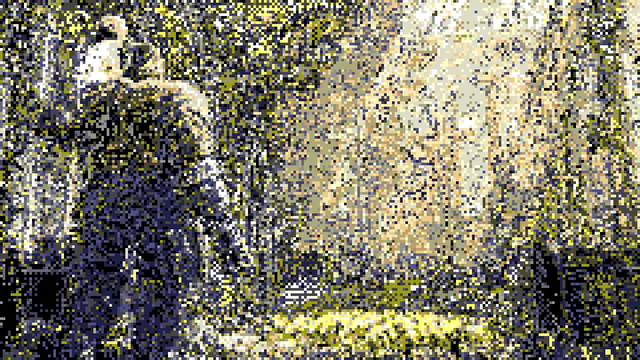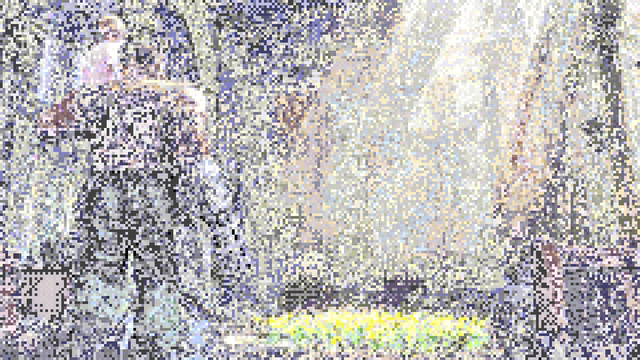
so @TomF talked me into making it so blending colors on the #Mega68k console is true blending rather than resolving back to one of the 64 palette colors (so that the output is always 64 color)

i made a utility that takes an image and converts it into a tile layer with only 16 base colors with the framebuffer overlaid using all 64 colors with alpha blending and i can't help but wonder if this isn't too powerful
i mean you can only do this with static images, so i guess it's like a sort of secret 4096 color mode that you can only use for that?

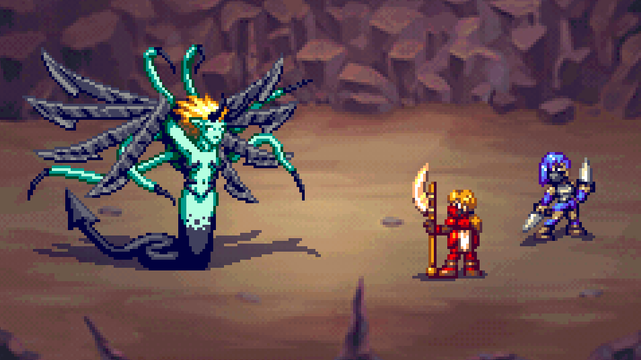
grabbed a background from opengameart.org (https://opengameart.org/content/backgrounds-3) processed it and slotted it into the battle scene i've been working on and

yeah, i'd say that works pretty well?

#PixelArt #Mega68k #FantasyConsole

Backgrounds

backgrounds for RPG battle   Patreon: https://www.patreon.com/nidhoggn Twitter: https://twitter.com/nidhoggn Enjoy :)

OpenGameArt.org
in case its not clear you overlay the 4th image in the original post on the 3rd and you get the result. like this:
@eniko if I’m understanding correctly this is sort of how the Amiga HAM (Hold And Modify) mode worked to give you 4096 colours, except you couldn’t use it with other elements
@sinbad I don't know enough about the Amiga to verify that but @TomF mentioned that same thing so probably!
@eniko @sinbad @TomF Sounds a bit different (if I'm understanding the above) to HAM.
How HAM works (not googling, I'll try from memory):
You have 6 bits per pixel.
Two bits decide between colour index, red channel, green channel and blue channel.
The other 4 bits decide either one of the 16 colours from a palette of 16, or set the the specified channel to a 4 bit colour, preserving the other two channels from the pixel to the left.

@eniko @sinbad @TomF So you get all 4096 colours at once, but it can take up to 3 pixels to get the right colour (each pixel in a row only changes one channel).
That results in colour fringing and made it hard to animate.

There was also Extra Half Bright. You get a palette of 32 colours, but 6 bits per pixel. There's an extra 32 colours that are all half as bright as the colours you set. Since the display was planar, one bit plane could work as a shadow layer.

@kojack @eniko @TomF sure but same idea though: take a paletted system and apply some delta modifier afterwards to add more colour depth

[edit: comparing it wasn’t a neg or anything btw, I think it’s cool that these ideas come back around in a similar form and this one is cool]

@sinbad @kojack @eniko Yup - but fortunately in this case the modifier is from layer to layer, not from the pixel to the left. Which was bloody awful to deal with if anything had to move!
@TomF @sinbad @kojack yeah and if you need dithering even that's easy to apply in a position independent way if you use ordered dither

@eniko

Dang! Looks good to me... Really good!

@eniko
is this blending between multiple tile layers, or a tile layer and sprite layers?

could it also work with moving objects that stay aligned to the tile grid? (i.e. board games, tetris blocks)

@clyde it's blending between one tile layer and the framebuffer (which sort of acts like a layer as well)

the trick is that the console's framebuffer uses 1 byte per pixel, allowing you to use all 64 colors plus all 4 blend factors (25%, 50%, 75%, and 100%) so even though the tiles are restricted to a 16 color palette the framebuffer can blend over that to create 16 * 256 = 4096 theoretical colors

it would be very hard to do with anything non-static because you have to figure out for each pixel which of those 4096 combinations is closest to your source pixel

you can however layer the 2nd tile layer on top of this, as well as sprites

@eniko with the 2nd tile layer and sprites it might make a good background for a shmup if it can be scrolled

wrt whether it's too powerful it seems like exactly the kind of neat trick that makes retro systems and fantasy console development fun!

@eniko Fwiw I am pretty sure you could do the exact same thing on the SNES... Edit: maybe with only two tile layers though

@glairedaggers well the secret sauce here is that the framebuffer allows you full use of all 64 available colors in order to blend them into the base 16. not sure you can do that on the SNES?

looking at it mode 3 has a 256 color plane and a 16 color plane so maybe? though i think the blending could only do 50% blend, not 25%, 50% and 75%

@eniko pretty sure you could also do plain additive blending on the SNES
@glairedaggers yeah but that wouldn't be as useful in the top range of luminance. could probably still make it work though

@eniko The second image is just the FB, right? Already looks pretty nice to me! The final has a little bit less dithering in places, but you have to look pretty hard.

This is easily as annoying to use as Amiga HAM mode, with similar end results. I don't think it's too much :-)

@TomF the 2nd one is the reduced color one yeah. it uses both a 16 color tile layer plus the framebuffer with blending, so once you set both of those up its set and forget

and i guess you do have to roll your own utility to do the conversion which is not exactly trivial >_>

@eniko @TomF so wait is the second image the combination of the third and fourth images? :O
@aeva @TomF yeah. save em and overlay the blended one on the opaque one and see!
@eniko @TomF woah, way cool
Eniko Fox (@[email protected])

Attached: 1 image in case its not clear you overlay the 4th image in the original post on the 3rd and you get the result. like this:

People Making Games
@eniko @TomF isn't that very similar to how a lot of actual genesis games busted past the color limit (not with alpha blending for the actual generation of the base image though, obviously) for the higher res full screen artwork. I remember quite a few games using the trick with the shadow/highlight and palettes to show 100+ colors per frame. (though the trick technically is capable of showing over 1000, but i've only ever seen that in tech demos)
@raptor85 @TomF yeah i think so although i never found an explanation of how the shadow/highlight stuff actually worked on the genesis XD

@eniko @TomF it's weird but effectively you can think of it as just tripling the available colors, with the restriction that the two additionals are shades of the normal 15 colors per sprite limit, combine that with compositing multiple sprites, ntsc trickery, and even mid-frame palette updates you could do a LOT of onscreen colors. (though in practice around 100 is what the most "colorful" games used)

I really love tricks like that with color, lets you do cool things with not much to work with

@eniko Feels like there needs to be a tradeoff somewhere. Like if you set the "true blending" bit, then you get 2x1 nonsquare pixels or something.
@joeld42 I mean the tradeoff is already there in that for the blending you're limited to 6 bit color (before blending)
- YouTube

Enjoy the videos and music you love, upload original content, and share it all with friends, family, and the world on YouTube.