And now for a thread of initial* impressions

*Some impressions may actually be lab impressions masquerading as initial impressions
Q: Should you buy this?
A: If you have $3500 burning a hole in your pocket, sure. Otherwise no. This is not a comment on the hardware (I cannot really judge that compared to anything else) but the apps don’t exist
The battery is 36 Wh and surprisingly heavy. I have no idea why it is this heavy. It seems pretty small? You will probably want to use this at your desk plugged in most of the time
You cannot actually read normal text with passthrough. I am surprised none of the reviewers mentioned this. I went through iCloud setup this time and it was a real pain to get CVVs entered. It is obvious Mac Virtual Display exists out of necessity, not convenience
Latency on passthrough is pretty low. It’s almost like wearing goggles if you don’t make sudden movements; you can easily perform actions like play catch or eat food with Apple Vision Pro on. If you do move things fast they will (predictably) flicker
The whole “look at things to interact with them” is not bad but as some other reviews have mentioned it takes a bit to get used to. IMO it has a high “dwell” time. You kind of need to stare at something and then select it; it’s natural to move on and it taps something else
Ouch, my Mac Virtual Display keyboard is now skipping and repeating keys sometimes 😬

(I promise I am reviewing this objectively, not just because I am making a competitor)
Taking a break for lunch. The device is starting to get warm
Finished with lunch and back to wor–lol, no. Spent a couple hours trying out the other apps and watching a movie
For movies: 9/10 even without any fancy 3D stuff going on. It does get heavy and its battery is unlikely to last through Oppenheimer but for shorter watching it’s quite good. I don’t even have the new AirPods Pro and the sound is directional. It’s like a portable home theater
Tried a Spatial Video courtesy of @aaron. It’s also excellent, if a bit low on the frame rate. I am looking forward to people making content with higher fps. Panoramas are also nice except they are not very tall if you took them on iPhone, so it’s visor-like rather than immersive
@aaron iPad apps: they’re ok. You can *really* tell which ones are native and which ones are not because of how focus highlighting works. Telegram for example is miserable (using custom UI for everything comes back to bite you, who would’ve thought?). Discord is eh. Slack’s great
@aaron Everyone has mentioned how typing is hard and I won’t rehash that but the whole keyboard *experience* itself is also bad. If you send someone an iMessage it pops up and covers the window. The “send” button is in main window so you need to move the keyboard out of the way
@aaron Once you send a message the keyboard goes away briefly as it loses focus and then it pops up again. If you had moved it down to type it will now pop up where you are looking which is probably the main window (and thus covers it again)
@aaron Safari is borderline unusable without a trackpad. I tried some Wikipedia and Hacker News (purely reading!) and the tap targets on everything are incredibly small. It would keep previewing links as I was reading if I lingered for even a second on a word
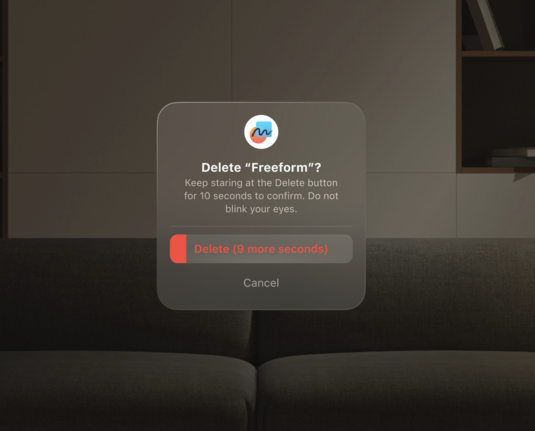
@aaron That brings me to my next gripe which is if you are designing any destructive UI for visionOS you *need* to design in like 2-3 confirmation screens before you actually do the thing. Vision input is far too sloppy and easy to activate for anything else to fly here
@aaron For example: deleting an app on visionOS is the same interaction as it is on iOS. You long-select an app, then hit “Delete”. This is not a good interaction because it is really easy to accidentally long-select something and the “Cancel” button is right next to “Delete”
@aaron Like, I am actively going through all my UI now with the lens of “these two buttons are next to each other is something bad going to happen if the user accidentally looks at the wrong item while selecting it”
@aaron A lot of apps and frameworks seem half-baked; I assume they didn’t get much time to polish this stuff before launch. For example I can’t find a Contacts app so all my contacts are being synced in *somewhere* but I can’t see where they are
@aaron I ran it down from 100% → 1% watching TV episodes. On my device, with a brand new battery, it lasted just over 3 hours. I expect the 2 hour estimate is accurate when something uses the CPU. Don’t expect too much of it (on the flip side, the small battery charges fast).
@aaron I realized about half an hour in that I had tightened it so most of the weight was on my forehead and not over my face, which made it painful to use. I refused to take a break but after adjusting it things went back to being OK (but still heavy) over the next hour or so
@aaron With practice I’m definitely getting better at the gesture controls. There is an area that you have to do things in that the camera is able to see, and also you need to angle your hands so that your fingers coming together are normal and not tangent to the line of sight
@aaron UI tip #2 is that controls should never be designed so that you can take your attention off of the *immediate* interaction. Again, you cannot bridge your iOS paradigms to this platform. The keyboard fails at this too
@saagar
Thanks for all the details! It's a really interesting read!
@saagar @aaron i have a proposal
@neilsardesai @aaron This is basically what Optic ID does tbh

@neilsardesai @[email protected] @aaron

stare at this spot for 10 secondsdon't blinkthere's a screen a few cm away from your eyesis this only hard for me

@neilsardesai @saagar @aaron The idea is good but 10 sec is way too long. Also could be an accessibility issue.
@saagar I find Slack highlighting everything to be both necessary and distracting to reading. Something to get used to
@saagar @aaron @Migueldeicaza can you use Personas in Discord video calls?
@covercash @aaron @Migueldeicaza I have not tried. Will get back to you on that
@covercash @saagar @Migueldeicaza it worked for me in a Slack hangout and an Amazon Chime video call so I don't see why Discord wouldn't work
@covercash @saagar @aaron @Migueldeicaza from what i heard the personas act as a virtual front camera
@tay @covercash @aaron @Migueldeicaza Yep. I used it in Discord just fine yesterday and that’s an iPad app

@saagar @aaron > Telegram for example is miserable (using custom UI for everything comes back to bite you, who would’ve thought?).

this is an apt summary of telegram on iphone let alone avp

@saagar saagar should i get one 😳
@saagar wait you answered this upthread. ok maybe i should be smart with my money and spend that money on HomePods to build a mega Siri beacon instead
@slice I would wait for a cheaper one with more apps
@saagar Oh, you are?
GitHub - saagarjha/Ensemble: Cast Mac windows to visionOS

Cast Mac windows to visionOS. Contribute to saagarjha/Ensemble development by creating an account on GitHub.

GitHub
@saagar Ah yes, this is great. For a moment I thought you are working on a headset.
@helge Not at this time
@saagar @helge “it’s an area of interest for us”
@saagar So long as you're prepared to be Sherlocked, we're all looking forward to using your app.
@alexr I welcome it as long as they do a good job
@saagar That's the rough part of being Sherlocked -- they always seek to simplify, so some pet feature won't happen, but it’ll still kill sales.
@alexr As long as they don’t make it impossible to build my app I am happy
@saagar Did you tell it to give you a virtual butterfly keyboard?

@saagar in @nilaypatel 's review he said it is easy to "fly Windows everywhere" if you make hand moves i.e. when talking.

Did you have similar issues of "miss click"?

@jedi The ones I see (I don’t make hand movements much) are that it can be very hard to select things at the periphery of your vision and also if I grab things visionOS will often not let it go with me. So I’ll move a window, unpinch, and move my hand and the window goes flying
@saagar I can _barely_ read text and use my computer through passthrough. it's a tossup whether passthrough or virtual display is better, imo, since virtual display gets you the resolution but the latency is much worse
@shadowfacts Yeah I was expecting much better latency, this kind of sucks. I am trying to figure out how to get the Developer Mode toggle to show up but my recollection is that Ensemble was not significantly worse than this
@saagar tell me if you figure out some trick, I have not been able to get mine to even connect to Xcode yet
@shadowfacts On Apple Vision Pro: Settings > General > Remote Devices
@saagar hmm, nothing shows up there for me other than the ready to pair text, and nothing shows up in Xcode's devices window either. I suspect something is being weird with my wifi
@shadowfacts Ouch. Are you in control of your network?
@saagar have you tried making your room brighter 😆
@khaost This is the new “you’re holding it wrong”
@saagar It was shortly mentioned in the WSJ cooking section: https://youtu.be/8xI10SFgzQ8?si=Id2EIFitCk8acrC2&t=302
I Spent 24 Hours Wearing Apple’s Vision Pro Headset | WSJ

YouTube