BRING BACK THE 3D PAGE INSPECTOR YOU COWARDS
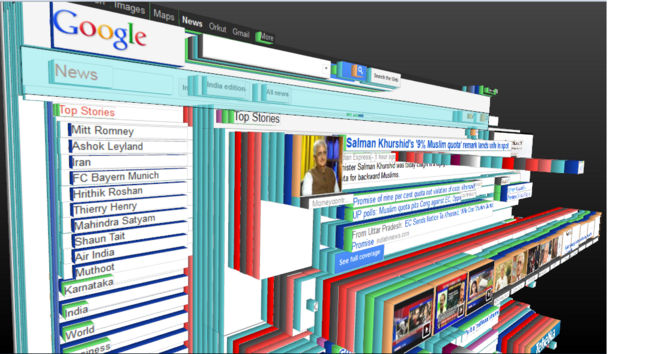
3D view — Firefox Source Docs documentation

Maybe I can convince the WebKit team to build this for VisionOS.

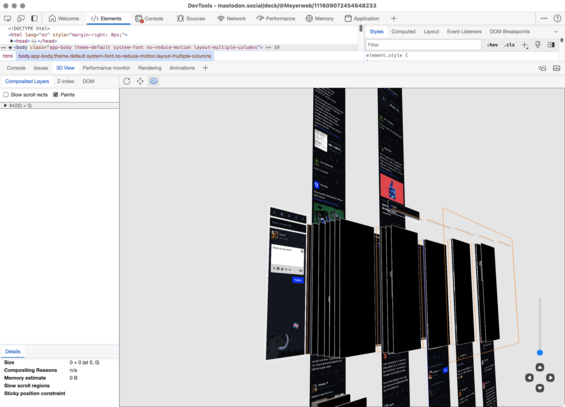
It turns out there’s something *very* similar in Microsoft Edge’s Devtools, though it appears to use floating panes instead of stacked boxes (maybe? the screenshots are unclear and other screenshots I’ve seen appear to be pane-based).

Regardless, it might be of use — particularly since they **also** added a `z-index` stacking context visualizer! https://learn.microsoft.com/en-us/microsoft-edge/devtools-guide-chromium/3d-view/

Navigate webpage layers, z-index, and DOM using the 3D View tool - Microsoft Edge Developer documentation

How to use the 3D View tool, including navigating the 3D canvas and using the Composited Layers tab, Z-index tab, and DOM tab.

@Meyerweb

I had forgotten about that visualization tool.

@Meyerweb Firefox' also had z-index floaters.
@Meyerweb me making web sites in 2024
@Meyerweb Safari has it, but only as layers in the Web Inspector without their actual contents.
@Meyerweb gosh I loved that thing
@anniegreens It was a dark, dark day when they removed it.
@Meyerweb It wasn't just a silly gimmick to me. It was good for seeing the complexity and levels of nesting, something which today's JS-heavy div-tastic sites could benefit from. It helped me visualize designs, as my brain tended to think that way, back in the days of designing in the browser (which I still mostly do).
@anniegreens @Meyerweb oh my gosh can you imagine the "modern" websites with the thousands of nested divs - maybe it was too much and why they had to can it!
@sarajw @Meyerweb I could see that. Perhaps it crashed the browser.
@Meyerweb it was both genuinely useful aaaand you looked cool as fuck using it
@joshbal4 RIGHT?!?!?
@Meyerweb @joshbal4 The main problems I see are that most "modern" websites would be insanely high stacks of generated nested container elements. and that z-layers are no longer the same as parent/child relations. But I'm certain somebody who knows more details about website rendering processes could easily list more than those.

@Meyerweb @joshbal4 Imagine a site that has a hundred nested divs somewhere, but the 75th is something like this:

<div style="z-layer: -50; position: absolute; top: 0; left: 0; width: 100%; height: 100%;">[...]</div>

I can't imagine any "correct" way to render that 3D representation.

@Meyerweb @joshbal4 Please note that I completely and utterly loathe CSS and its countless arbitrary rules about what does or doesn't work together, so my example might not be "valid", or it might result in unspecified behaviour, or summon the very demons that make up said arbitrary rules. In the latter case, I happen to believe that they'll take any sufficiently potent mind altering drugs instead of human souls to pay for the summoning and send them back.
@Denian @joshbal4 Loathing I can’t help you with, but I assure you that the rules of CSS are anything but arbitrary.

@Meyerweb There is an attribute called "max-width". Any sane person looking at it will immediately say "hey, look - this will limit how wide this element can become!" It only works for specific elements. It is NOT called "max-width-of-certain-elements".

some values of "width" do not work depending on how the parent width is set. Aside from values like "available", this also includes percentages in certain constellations.

These are just two arbitrary rules, and they affect "obvious" attributes.

@Meyerweb And the worst part is that all of those weird interdependencies are just assumed to be known and you have to search for "why does XYZ not work" in the most obscure places just to be told that it only works if the grandparent element is "display: curved;", contains exactly 3 children and is at least 20 pixels from the top of the screen, otherwise it will randomly do something else... or nothing at all... but affect OTHER attributes down the line... Seriously, WTF???

@Denian Again, these rules aren’t arbitrary. They’re constructed against the very unique rendering environment of the web. Usually, they are the way they are because the alternatives would be worse, often in ways that aren’t obvious at first glance.

I’m not going to tell you have to like how CSS works, but I am going to tell you that its workings are generally well-reasoned and the result of a lot of thought by people far smarter than either of us.

@Meyerweb Again, I'm talking about "max-width does not reliably limit the width". I'm not even blaming them for obscure fuck-ups like not researching the hue-rotate filter and how the only implementation, which has been copied over and over, does not actually rotate hue values. I am talking about how simple, repeated problems require insane amounts of research because you need to know all thirty ways of solving them and when to use which!
@Meyerweb I don't effing care if the element is "display: inline;" - I tell it "you cannot not grow wider than X", using an attribute that has a very generic name that tells me it SHOULD allow me to do that, but no - I have to dig through a dozen pages until ONE person manages to mention that it was only added for flex elements, or something like that. I can think of NO reason why THIS attribute should NOT work on other elements (that can have a width - I guess that's a reasonable restriction).
@Meyerweb What on earth I missed this entirely
@lemay It was in Firefox 11 – 46! And never, ever should have been removed. https://firefox-source-docs.mozilla.org/devtools-user/3d_view/index.html
3D view — Firefox Source Docs documentation

@Meyerweb Wow! I never saw that, that was in my hiatus period I guess.
@Meyerweb good for finding deep caverns of HTML
@Meyerweb can you imagine what a react app would look like with a thousand divs nested under each other?

@gareth I directly blame the explosion of React-ish page structures on the removal of this feature.

I am only partly joking about this.

@Meyerweb @gareth You would poke your eye out with the divs
@Meyerweb Can't, on a modern webpage it would be a mile-high pile of redundant react nodes

@chris__martin So maaaayyyyybe that would get some people to rethink their choices?

(Yeah, okay, probably not.)

@Meyerweb Has anyone done this but with CSS stacking contexts? That would be even more useful to me.
@twpol I’m not aware of anyone having done so. I think I tried it at one point and it didn’t go well, but that was yonks ago and maybe browsers and GPUs have gotten to the point where that would work now?

@Meyerweb I was thinking about that the other day. It really was the best way to understand what my crappy CSS was doing.

It's a pity they killed Firefox Reality for the Oculus - that would have been awesome in VR.

@Edent Firefox Reality has been continued as @WolvicXR (https://wolvic.com/), and @bkardell and I were just talking about putting web pages fully into VR space, which made me think of the 3D inspector in full VR, which got me to toot about the inspector, which got you to reply, and now here we are!
Welcome to Wolvic

@Meyerweb @WolvicXR @bkardell
Awesome! I plan to spend as much of Xmas in VR as possible. Well, some time.
Well… I'll at least attempt to charge my headset.
@Meyerweb I wonder if you could roughly replicate this using a transform rotate/skew on the page and then translateZ forward on every div
@tomw I’ve actually tried this and it’s not nearly as clear, because the elements don’t have sides so they don’t stack up like boxes. It’s just a bunch of panes floating in space. And, at least at the time I tried, adding dummy elements to every element to rotate them into being box-sides was… let’s call it “computationally taxing”.
@Meyerweb Interesting - I hadn't considered before that we can move elements on the z-axis but have no way to set a z-thickness for them
@tomw Like with most things, it’s hardly ever a problem, until it suddenly is.
@Meyerweb @tomw you can only see 2 sides of each box, so you could use ::before and ::after. That is, if you accept completely wiping away any existing ::before/::after content on the page
@jkjustjoshing @tomw And also can figure out which two sides are in view so you can push the pseudos to the correct spot. Sounds suspiciously like math to me.

@Meyerweb @tomw 😆

If you change the view to an isometric projection, it’s a single global calculation and the result is the same for all boxes on the screen

@Meyerweb Oh how I loved this
@jonkeegan I was SO MAD when I found out they’d removed it, I can’t even tell you.
@Meyerweb I would love some VR version of this as a web scraper where you could physically grab the elements you want to scrape
@Meyerweb it’s in the Chromium dev tools!

@noleli Similar, but not the full experience. The 3D inspector turned every element into a box with depth and color-coded sides. Panes hanging in space, while nifty, aren’t nearly as clear nor as information-rich.

Also, where is that? I don’t have it as an option in my copy of Chrome 120 (macOS).

@Meyerweb Oh, hm, that’s a shame.

And yeah, now that I’m looking I can’t find it in Chrome, either. It’s in Edge, so assumed was in all Chromium browsers. There are a bunch of options that seem like they would do more what you’re describing, but I can’t get it to work.
@Meyerweb OMG I hadn't thought of this in forever
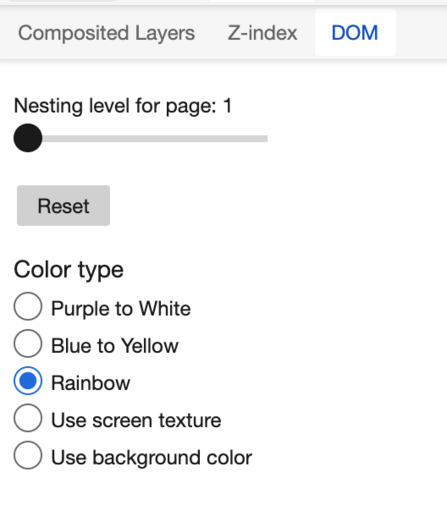
Navigate webpage layers, z-index, and DOM using the 3D View tool - Microsoft Edge Developer documentation

How to use the 3D View tool, including navigating the 3D canvas and using the Composited Layers tab, Z-index tab, and DOM tab.

@fvsch Almost! Theirs appears to be panes floating in space, not boxes that stack. It’s a small difference but an important one, as panes floating in space (which I’ve done using CSS once or twice) are harder to visually parse. But they *did* create a thing to visualize stacking contexts, which is quite cool.