
BRING BACK THE 3D PAGE INSPECTOR YOU COWARDS
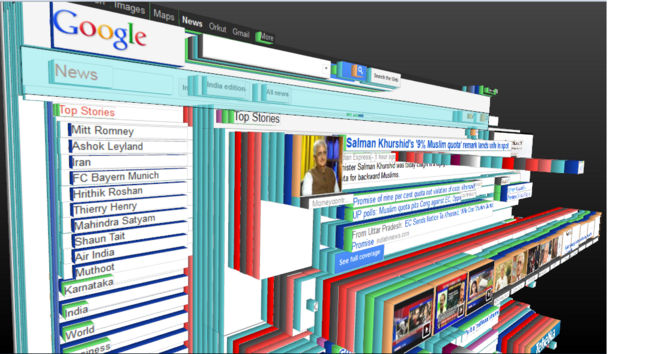
@Meyerweb it was both genuinely useful aaaand you looked cool as fuck using it
@joshbal4 RIGHT?!?!?
@Meyerweb @joshbal4 The main problems I see are that most "modern" websites would be insanely high stacks of generated nested container elements. and that z-layers are no longer the same as parent/child relations. But I'm certain somebody who knows more details about website rendering processes could easily list more than those.

@Meyerweb @joshbal4 Imagine a site that has a hundred nested divs somewhere, but the 75th is something like this:

<div style="z-layer: -50; position: absolute; top: 0; left: 0; width: 100%; height: 100%;">[...]</div>

I can't imagine any "correct" way to render that 3D representation.

@Meyerweb @joshbal4 Please note that I completely and utterly loathe CSS and its countless arbitrary rules about what does or doesn't work together, so my example might not be "valid", or it might result in unspecified behaviour, or summon the very demons that make up said arbitrary rules. In the latter case, I happen to believe that they'll take any sufficiently potent mind altering drugs instead of human souls to pay for the summoning and send them back.
@Denian @joshbal4 Loathing I can’t help you with, but I assure you that the rules of CSS are anything but arbitrary.

@Meyerweb There is an attribute called "max-width". Any sane person looking at it will immediately say "hey, look - this will limit how wide this element can become!" It only works for specific elements. It is NOT called "max-width-of-certain-elements".

some values of "width" do not work depending on how the parent width is set. Aside from values like "available", this also includes percentages in certain constellations.

These are just two arbitrary rules, and they affect "obvious" attributes.

@Meyerweb And the worst part is that all of those weird interdependencies are just assumed to be known and you have to search for "why does XYZ not work" in the most obscure places just to be told that it only works if the grandparent element is "display: curved;", contains exactly 3 children and is at least 20 pixels from the top of the screen, otherwise it will randomly do something else... or nothing at all... but affect OTHER attributes down the line... Seriously, WTF???

@Denian Again, these rules aren’t arbitrary. They’re constructed against the very unique rendering environment of the web. Usually, they are the way they are because the alternatives would be worse, often in ways that aren’t obvious at first glance.

I’m not going to tell you have to like how CSS works, but I am going to tell you that its workings are generally well-reasoned and the result of a lot of thought by people far smarter than either of us.

@Meyerweb Again, I'm talking about "max-width does not reliably limit the width". I'm not even blaming them for obscure fuck-ups like not researching the hue-rotate filter and how the only implementation, which has been copied over and over, does not actually rotate hue values. I am talking about how simple, repeated problems require insane amounts of research because you need to know all thirty ways of solving them and when to use which!
@Meyerweb I don't effing care if the element is "display: inline;" - I tell it "you cannot not grow wider than X", using an attribute that has a very generic name that tells me it SHOULD allow me to do that, but no - I have to dig through a dozen pages until ONE person manages to mention that it was only added for flex elements, or something like that. I can think of NO reason why THIS attribute should NOT work on other elements (that can have a width - I guess that's a reasonable restriction).