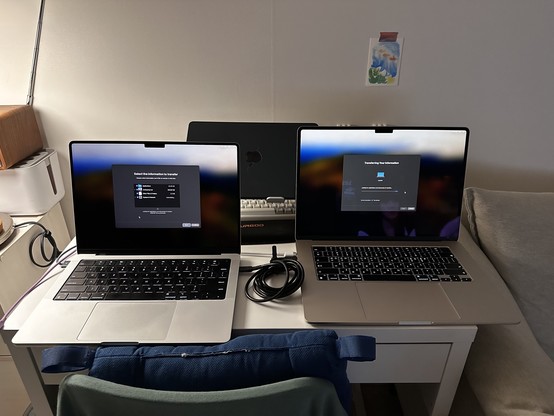
Does Thunderbolt in Migration Assistant just… not work anymore?

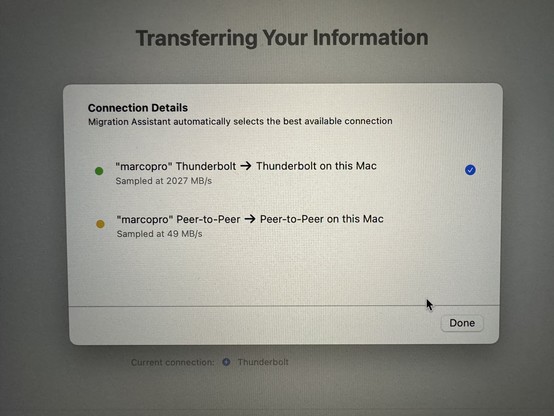
Got Thunderbolt Migration Assistant working!

Had to do half of this: https://discussions.apple.com/thread/253658404

- connect Thunderbolt cable to both

On source Mac:
- create Thunderbolt Bridge interface
- assign it a 10.0.0.x IP
- enable Internet Sharing from Wi-Fi to the Thunderbolt Bridge
- run Migration Assistant

On destination Mac, never set up Wi-Fi. It’ll activate over that Thunderbolt shared-internet connection and never ask for a Wi-Fi network.

(This used to be as easy as “connect them with a cable”.)
If you ever want to migrate from one M1 M… - Apple Community

FWIW, I also tried Target Disk Mode (which is way more complicated from an Apple-silicon Mac) over Thunderbolt and the new Mac didn’t recognize it at all.
@marcoarment
Congrats on the new machine. Can’t wait to hear how much faster it it’s
@marcoarment Uh, wow, that's terrible. That used to works ALWAYS and it used to set up the FW/Thunderbolt bridge automatically.
@marcoarment Crap. Was really relying on this for my upgrade. I don't think I can sit through a restore from a USB time machine

@marcoarment I'm trying to convince an M1 and M3 Mac to transfer files over the Thunderbolt Bridge instead of WiFi which is not going well either. Not migration assistant related.

Didn't have any troubles doing this between an M1 and Intel based Mac earlier today….

@marcoarment Very weird. Last night when I got my new laptop I just plugged a Thunderbolt cable to both, booted Migration Assistant on the source Mac, and everything worked perfectly. I was connected to Wi-Fi on both Macs. 1833 MB/s over Thunderbolt.

@marcoarment I.. didn't need all of this when I transferred data like 2 weeks ago.

It all just "worked” by connecting USB4 cable. I didn't even use a TB cable. (It recognized as “Thunderbolt", funnily enough)

@kudokun
USB4 mandates Thunderbolt with some optional benefit excludable.
@marcoarment yup, this was insanely complicated for me too and I never figured it out. thanks for the solution.
@marcoarment I recently had to do the same. On both the macs, go to system settings and make sure thunderbolt bridge interface is enabled. Then they should self assign IP and start showing up. It might require you to speed run setup with dummy info to get to system settings.
@marcoarment This was once THE BEST way to do it. Crazy.
@marcoarment A few weeks ago it Just Worked for me. Original M1 MBP to new Air. Connected known-good cable and Assistant did the rest. Speed was great.
@marcoarment I have given up on Mac’s my already overpriced M1 13” requires 300 dollars woth of dongles to even work for basic stuff like connecting a 4k 60 monitor.

@marcoarment wow.

How does migration assistant not automagically configure everything?

@b3ll @marcoarment Talk about failing at “you had one job”!! 😳
@marcoarment funnily I did half of this (I skip the assistant part, since I move everything manually), and then I reverted back to WiFi because the transfert was supppper slow, like 3 MBps. Never understood why.
@marcoarment why make things simpler if we can complicate them? 🤪
@marcoarment reason #1 to not buy a new Mac. Reason #2: lack of money.
@marcoarment I set up my review unit last week by cloning my personal MBP using Migration Assistant over Thunderbolt, and didn’t do anything other than connect them via the cable. A+ experience for me.
@gruber @marcoarment Same. Reported just under your speeds by like 50MB/s. It didn’t feel much faster than restoring from my TimeMachine backup on an SSD. 🤷‍♂️
@gruber Maybe @marcoarment accidentally connected his new M3 MacBook Pro to his new microwave by mistake. It is silver.
@Chuck_ORourke @marcoarment I do hope the M4 series of MBPs are equipped with a knob.
@gruber @marcoarment If you need to adjust compile time just give the knob a twist.
@marcoarment It seems to work *very* fast too. At first there was a “calculating” stage that was taking a while. I left my office to eat dinner. I went back after dinner, and it was done.
@gruber @marcoarment I set up a new computer like this recently and was shocked how quickly it moved everything over
@gruber @marcoarment I also had that experience with my M2 MBP (which work purchased in late August, much to my chagrin during the M3 announcement). I didn’t use anything fancy, just my dock’s Thunderbolt 3 cable which is probably 5 years old at this point.
@marcoarment huh, I did “connect with a cable” just a couple weeks ago and it worked fine (Sonoma 14.1, Mac mini to studio). Even seamlessly jumped from Ethernet to thunderbolt mid-transfer when it detected that a faster interface was available.
@marcoarment Pitchforks! We need pitchforks!
@marcoarment thanks so much for this tip, along with the linked article I managed to get Thunderbolt Migration underway. Fingers crossed for a successful transfer Mac Mini -> MacBook Pro…
@marcoarment I can’t believe I had to do this to get Thunderbolt to be recognized. I’ve never had to do anything like this to migrate between systems before

@marcoarment I had to not connect my new MacBook Pro to WiFi and set up a Thunderbolt bridge on the old one, was the only way it would use Thunderbolt

https://support.apple.com/guide/mac-help/ip-thunderbolt-connect-mac-computers-mchld53dd2f5/mac

Use IP over Thunderbolt to connect Mac computers

Connect two Mac computers together using Thunderbolt and set them up to communicate with each other using Internet Protocol (IP).

Apple Support

@marcoarment I hate to say this, but check the cable.

I had one fail because I didn’t have TB 4 (and I thought I did). Replaced it and worked great.

@chockenberry @marcoarment There's a screen that should let you click to see methods available. If it doesn't show Thunderbolt that is certainly what's going on. https://www.macworld.com/article/548637/how-to-check-the-migration-assistant-data-transfer-selection-in-macos.html
How to check the Migration Assistant data-transfer selection in macOS

Learn where to look to make sure you’re using the fastest method.

Macworld

@chockenberry @marcoarment oh $diety.

For all the security alerts and warnings and pop-ups and confirmations couldn’t macOS just bloody well tell me:

“Do you want to connect the USB accessory to this Mac? It supports protocols x, y, and z”

At least as an option. But no - Apple doesn’t do options or informative messaging. Sigh.

@marcoarment I did a migration over thunderbolt today. Weirdly, I had to disconnect from Studio Display before it would use TB.
@marcoarment There's a little blue button in the lower-left of the window that allows you to see what you're connecting with. Thunderbolt worked for me yesterday.
@marcoarment I had to start again and make sure that both machines went through the whole process properly. It looks like it messed up during the pairing screen (one machine jumped ahead of the other).
@marcoarment in my (extensive) experience, the best way to set do a migration is to start over wifi, then connect the cable. It just goes “oh, I have a faster interface now” and just switches over seamlessly 🤷‍♂️

@kellan @marcoarment that would have been great to know, and would have saved everyone involved, including Marco from creating a voodoo cult of unnecessary ritual.

Why is Apple so badly documented in so many ways?

@marcoarment It usually just works I’ve found.

I haven’t done too many where neither Mac was Intel though.

I do have a vague recollection, of doing this once and having it decide to use the connected cable as Ethernet 🤷🏻‍♂️

@marcoarment I used it last week between a 16” Intel MBP and new 14” M2 Pro and had to do none of this, just connected a TB cable to each and followed Migration Assistant’s directions, worked flawlessly.
@marcoarment Am contemplating starting fresh with my incoming MBP. Not sure if that’s a good idea or not.