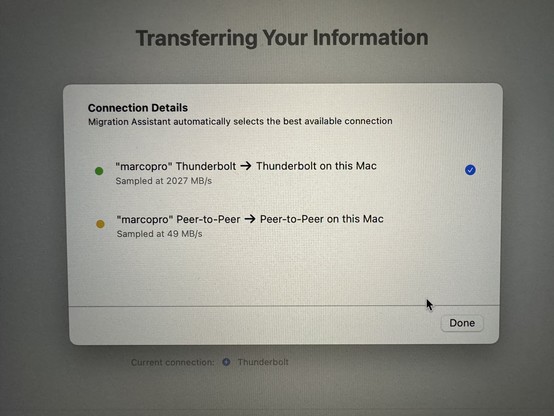
Does Thunderbolt in Migration Assistant just… not work anymore?

Got Thunderbolt Migration Assistant working!

Had to do half of this: https://discussions.apple.com/thread/253658404

- connect Thunderbolt cable to both

On source Mac:
- create Thunderbolt Bridge interface
- assign it a 10.0.0.x IP
- enable Internet Sharing from Wi-Fi to the Thunderbolt Bridge
- run Migration Assistant

On destination Mac, never set up Wi-Fi. It’ll activate over that Thunderbolt shared-internet connection and never ask for a Wi-Fi network.

(This used to be as easy as “connect them with a cable”.)
If you ever want to migrate from one M1 M… - Apple Community

@marcoarment I set up my review unit last week by cloning my personal MBP using Migration Assistant over Thunderbolt, and didn’t do anything other than connect them via the cable. A+ experience for me.
@gruber @marcoarment Same. Reported just under your speeds by like 50MB/s. It didn’t feel much faster than restoring from my TimeMachine backup on an SSD. 🤷‍♂️
@gruber Maybe @marcoarment accidentally connected his new M3 MacBook Pro to his new microwave by mistake. It is silver.
@Chuck_ORourke @marcoarment I do hope the M4 series of MBPs are equipped with a knob.
@gruber @marcoarment If you need to adjust compile time just give the knob a twist.
@marcoarment It seems to work *very* fast too. At first there was a “calculating” stage that was taking a while. I left my office to eat dinner. I went back after dinner, and it was done.
@gruber @marcoarment I set up a new computer like this recently and was shocked how quickly it moved everything over
@gruber @marcoarment I also had that experience with my M2 MBP (which work purchased in late August, much to my chagrin during the M3 announcement). I didn’t use anything fancy, just my dock’s Thunderbolt 3 cable which is probably 5 years old at this point.