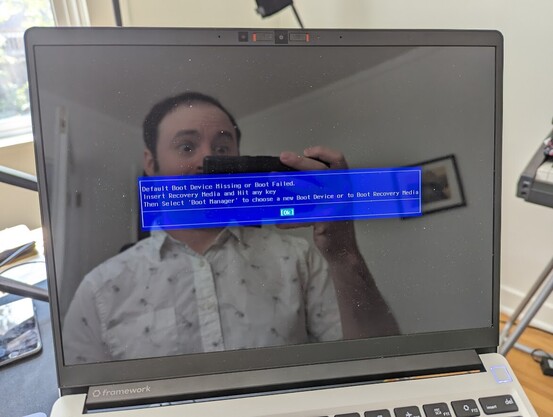
Yesterday morning, I pulled open my laptop to send a quick email. It had a frozen black screen, so I rebooted it, and… oh crap.

My 2-year-old SSD had unceremoniously died.

This was a gut punch, but I had an ace in the hole. I'm typing this from my restored system on a brand new drive.

In total, I lost about 10 minutes of data. Here's how. (Spoilers: #zfs #zrepl)
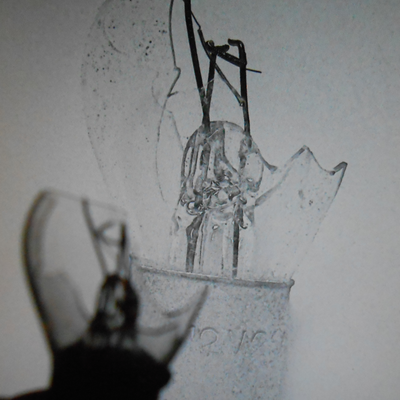
I don’t back up my drives, I replicate them.

Last winter, I set up my first serious home network storage. Part of this project was setting up periodic backups of the computers I do creative work on. After surveying the options, one approach stood out: ZFS incremental replication.

One of the flagship features of ZFS is the ability to take efficient point-in-time snapshots while it’s running. You can then send only the changed data to other machines...

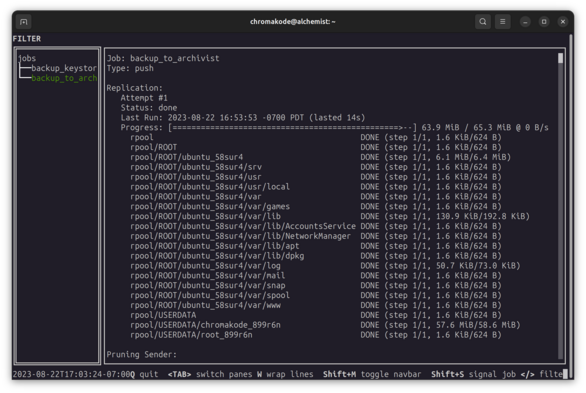
To automate taking snapshots and sending them to my NAS, I’m using a really cool piece of software called zrepl (by @problame). I configured it to snapshot and send my entire filesystem every 10 minutes.

Since the snapshots are incremental, this is fine to run in the background on my home network to keep the replica up to date. The last run took 14 seconds to transfer and sent about 64 MiB.

Restoring the system was a learning process, and unfortunately quite manual. I let the 625 GiB ZFS receive operation run overnight.

My snapshots are encrypted by the original computer (this is cool because the NAS can’t read them!). So I also needed to restore the encryption “wrapper key” to be able to use the backups.

Not gonna lie, it was pretty terrifying until I had my first confirmation I could decrypt the data.

To rebuild my system, I followed the OpenZFS guide for setting up a filesystem from scratch via Ubuntu 22.04 live USB:

https://openzfs.github.io/openzfs-docs/Getting%20Started/Ubuntu/Ubuntu%2022.04%20Root%20on%20ZFS.html#step-4-system-configuration

This was a priceless resource for getting back up and running. It’d intimidated me in the past, but it’s *so* thorough, and I learned a ton going through the process. This is the best hand-on guide I’ve seen for modern partitioning and chrooting in a Debian environment.

Ubuntu 22.04 Root on ZFS — OpenZFS documentation

The end result was a beautiful moment: my laptop booted back up to right where I’d left it. Even my browser tabs restored my unfinished work from the previous night.

There’s this classic series of Chromebook ads from 12 years ago where computers are repeatedly destroyed in elaborate ways, and the host picks up a new machine and picks up where they left off, with no data lost:

https://www.youtube.com/watch?v=lm-Vnx58UYo

How to remain calm, despite what's about to happen to your Chrome notebook

Chrome UX designer Glen Murphy demonstrates some advantages of using a Chrome notebook. 25 computers were harmed in the making of this video. Fortunately, no...

YouTube

That ad has been in my imagination for over a decade. I finally achieved my dream of having a similar disaster recovery plan. And it worked!

Setting ZFS up initially had a really high starting cost: it took a full filesystem swap. Maintaining it takes fairly knowledge-heavy and manual processes. But it certainly has unique benefits.

This is the first time I can recall losing an SSD in over 15 years of using them. It was fantastic luck that I’d set up replication before my first one failed. 😇

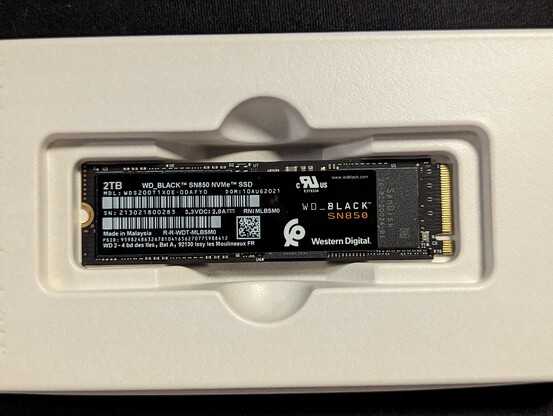
Btw, if you’re curious, the offending drive was a WD_BLACK SN850 from my original Framework order. I’d heard unsettling stories on the Framework forums of this drive spontaneously dying or becoming unbootable. I guess it was my turn to roll some unlucky numbers.

Amazon shipped me a new SK Hynix P41 SSD and a Sabrent NVMe enclosure in about 3 hours yesterday, which was phenomenal. I usually try not to order tech from there if I can avoid it, but credit where credit’s due.

@chromakode This is a great story! I need to build something like this for my home. Can I ask what do you run for your NAS?

@kmartino Thanks! I'm currently running a pretty bog standard Ubuntu setup since it's what I'm most familiar with. I'm using a Sabrent 5 drive USB 3.2 enclosure with some Seagate Exos drives I got on Cyber Monday for about $15/TB new.

TrueNAS is another popular alternative (though I haven't dabbled with it). Happy hacking!

@chromakode @kmartino Good to see I’m not the only one running my “NAS” on a Ubuntu system with usb 3 enclosure. I prefer Lenovo tiny m7xx or m9xx systems where you can run an internal m.2 and SSD (to keep a clone of the OS). I have the same enclosure and exos, but I do nightly clones w/ rsync. Not snapshot good, but also not as risky as raid as I can roll back to a file from yesterday if I fubar something. If I ran a Linux laptop, I’d be all over this.
@brianwilson @kmartino Agreed! It's amazing how far a small form factor machine and and a peripheral drive bay can get you today. Also appreciate you sharing your approach 😁
@brianwilson @kmartino I am continually amazed at the performance of these USFF computers for the home environment. I’ve replaced an extremely power hungry Xenon server with three Lenovo Tinys. This gives me about the same computing power at a tiny fraction of the energy consumption. I am using Proxmox and Proxmox Backup Server to seamlessly handle backups and restoration.
@chromakode @kmartino wow! Nice post. Btw I'm pretty surprised you are running a zfs over usb on your nas machine. I've read quite a lot of cons about this, UASP providing emulated SCSI interface to ZFS above all. What's your experience with your nas so far?

@pirafrank @kmartino I haven't seen IO errors, but ZFS occasionally panics with:

[48259.172886] VERIFY3(c < SPA_MAXBLOCKSIZE >> SPA_MINBLOCKSHIFT) failed (36028797018963967 < 32768)
[48259.172896] PANIC at zio.c:341:zio_data_buf_alloc()

The Sabrent enclosure itself has been very nice. Well built, compact, and USB 3.2 should be sufficient for 4 drives without bottlenecking.

@chromakode to correlate with https://bsd.network/@laffer1/110583871643051046 / @laffer1 , do you happen to have the precise model number of the SN850 that went bad on you?
Lucas Holt (@[email protected])

Just a heads up. Do not buy a WD Black SN770 model for use with ZFS. Possibly avoid any drives without a cache. https://github.com/openzfs/zfs/discussions/14793

BSD Network

@gnomon @laffer1 Oooh! WDS200T1X0E-00AFYO. Thanks for the link, I'll enjoy reading up.

FWIW, I didn't experience a notable amount of crashes or instability for the ~2 years I used it. It just suddenly stopped being an NVMe drive yesterday.

@chromakode @laffer1 thank you very much for sharing all this detail.

@gnomon @chromakode

In my case it was a SN770, not the SN850.

Model was WDS200T3X0E
Has firmware: 731100WD

@laffer1 @chromakode right, with a critical differentiation that the ZFS issues reported by you and elsewhere were on NVMe drives without DRAM, which this SN850 definitely has.

(I know you know this already, just mentioning it for the sake of anyone else seeing the thread but not yet the detailed bug report)

@chromakode uh oh, I ordered that drive with my Framework (batch 2 AMD 13")

I'm now wondering if I should risk it, or remove the SSD from the order and get something else.

@piepants It depends. How's your backup plan? 😉
@chromakode all important data is stored on my NAS, so loss of a drive in my desktop or laptop isn't critical. It's more just the inconvenience of being without the device I'm worried about.
@piepants Yeah, agreed. I immediately ordered a new drive because even if it was an intermittent failure, I wouldn't risk further unreliability. Congrats on the Framework, btw. I have loved daily driving mine for the past 2 years.
@chromakode good to know - I've been following Framework for a while, and loved the idea of having the repairability with the more power efficient AMD CPUs. They are having some issues with firmware on the CPU and the USB controllers, but looks like they will be shipping in September.

@piepants Oof, I hadn't heard about that with the AMD boards. First of the line struggles. I'm keenly waiting to see what the battery life looks like once they land 😁

I upgraded my 11th gen to 12th, swapped the lid, and replaced the heatsink (I clumsily dropped my phone on it while showing a friend). The repairability of these machines is awesome.

@piepants @chromakode What you could do is continuing using this drive but add a storage expansion card on which you setup a regular synchronisation of a bootable version of the OS that is currently runnng on your nvme. That way you still benefit from the speed of the nvme for day to day but if it dies you just boot from the expansion card while waiting for a drive replacement. I/Os will just be slower for a few days. It would be also much faster to restore from it than the NAS.
@piepants @chromakode caveat: that doesn't mean you should give up NAS and off site backup.

@oook @piepants That's a cool idea! For my own purposes I'm a little skeptical of the storage expansion cards. I'd rather not sacrifice a port for persistent storage.

A commenter on the orange site mentioned they use an external NVMe in an enclosure or a hot drive spare. I'd expect that to support better write speeds than a storage expansion card, and then if the primary dies you can swap it in.

If I was doing more road warrioring I'd explore this!

@chromakode @oook out of curiosity, how do you handle the ZFS snapshots when you're away from the home network?
@piepants @oook I set up a Wireguard tunnel so I can sync snapshots while traveling. In practice the WiFi I've had in hotels has been horrible so it'd be an overnight sync at best.

@chromakode @piepants I like your idea to plug an nvme as external enclosure of your nas.

For a while I used a work laptop that was provided with windows. I didn't want to risk wiping the windows install so I installed linux on an usb enclosure that was velcroed to the laptop. Now my work laptop has dual nvme port so I just plugged it in the second port and voilà, cleaner.

@chromakode I'm curious about what maintenance a filesystem requires? What kinda manual processes did you have to do to keep running ZFS?

@thomastospace Beyond the restore process, a few things which have taken time and mindspace:

- Managing encryption on boot and saving backup copies of wrapper keys (not specific to ZFS)
- Setting up zrepl on several hosts and monitoring it in case it breaks
- Re-learning how to fix grub w/ ZFS root
- My wife's system has had intermittent zpool scrub failures which I spent a bunch of time debugging but haven't figured out
- My NAS seems to have some failure modes where the kernel panics :(

@chromakode great that you got it up and running. As we normally say - an untested backup is no backup (or replication). It’s important to know that you can restore from it. I do that a couple of times a month as I’m testing and reviewing different Linux distributions and setups. The actual system files doesn’t really matter but your own configurations, content and tools do. One shell script and almost all of it is restored.

@stayprivate Amen! I tested about 6mo ago when I set up zrepl, but I could have run through the restore flow better -- especially around how to manage Ubuntu's tricky LUKS-nested-in-Zvol key wrapper. To be honest I expected to lose a file or directory for my first real world restore, not an entire drive!

Also agreed that the system files are a convenience rather than a necessity (though they could come in handy in edge case-y forensic situations)

@stayprivate There was a moment during the restore when I transferred over my backup of the key data and it didn't match. It took me a few minutes of confusion -- How could the key be wrong? Had I changed it? Was there some rotation I hadn't accounted for? -- to realize I'd restored the keys for the wrong host 🤦‍♂️
@chromakode scary moment. “Oh shit, oh shit… oh wait… wrong key *doh* in best homer impression”
@stayprivate In such moments every flaw and gap in your process becomes immediately obvious! I like to use it as a prompt when planning for production ("We launched and it failed to X. What did we do wrong?")... but it somehow never has the clarify of a terminal telling you ya done goofed.

@chromakode @problame I totally agree with you - zrepl is fantastic and I use it across my little ISP to have each hypervisor make a block device snapshot of running VMs and copying those offsite to two disk tanks.

I've managed to repair not one but several VMs and even hypervisors that became incapacitated!

@chromakode I've found that any form of ZFS encryption severely limits replication, do you use it at all?
@lordgaav I do! How have you found it to limit replication?
@chromakode mainly the key management is tricky, or too hard for me to understand. I basically want the data to use the key of the receiving pool, but that doesn't seem to be possible. Do you use the raw send feature or something else?

@lordgaav I use raw sends because I want the opposite: I don't want my destination to be able to read the original data.

I haven't had much experience with the flow you're looking for, but I believe it's possible!

@chromakode bookmarking this for later

@chromakode #ZFS is just awesome!

And this is why everyone should use it!

@chromakode This story may give me the will to do a similar setup with #btrfs. Unfortunately encryption is not built in (yet?), I have the usual LUKS+LVM stack, but btrfs has a send feature that I tried and it seems to work quite well.
Having a live filesystem on the backup side is easier, you can apply the "patches", but insecure. Having the "patches" encrypted is safer, but the restore is more complicated. I have to think about it... Thanks for the inspiration!
@chromakode Great success story, thanks for sharing! For the uninitiated me: Why ZFS? Could this be implemented with ext4 as well?
@biodatacore ZFS is a copy on write filesystem, which makes it efficient to snapshot the filesystem frequently. ZFS also has mature tooling for shipping snapshots around. You could implement continuous backups with ext4 as well, but your backup run would do much more work walking the fs to find changes.
@chromakode Good excuse to make sure my ZFS replications are working, since I also have an NVMe from my Framework order. 😬
@terinjokes Friends don't let friends run Western Digital SSDs unreplicated 😔
@chromakode @kkarhan i've had more ssd failures than hdd computers in a pc... (1 vs 0)

like i've had weird things happen with hdd's but they've just kept on working on and on for years, decades

ssd just spontaneously dies like this and I lost a bunch of stuff :(

@lamp @chromakode that's why #backups are essential.

#ZFS makes these easy: You just do a snapshot and transfer it away with zfs-send ...

@chromakode out of sheer curiosity, does this laptop have ECC memory? Were you running ZFS mainly for snapshots/replication?
@betoniusz No ECC, and yep, efficient snapshots motivated switching to ZFS. 😁