If you're building something for iOS 17 and macOS Sonoma (**cough** interactive widgets **cough**), here's something to think about:

It's highly likely that iOS will be released before macOS (typically a month or so). That means you'll be able submit builds created with Xcode 15 for only one of your two platforms.

Now would be a good time to open your macOS project in Xcode 14 and figure out what's broken. Avoid panic for bug fixes or model changes you want to get out on iOS release day…

And when you see broken stuff in Xcode 14, I hope it's nothing to do with protocols. The only solution I've found for a change is this:

#if OLD_PROTOCOLS
extension MyThing: OldProtocol {
}
#else
extension MyThing: NewProtocol {
}
#endif

Ewww…

(#available doesn't work at top-level, @available needs symbol.)

https://mastodon.social/@chockenberry/110890515845065228

The solution to this, of course, is for Apple to accept submissions for ANY PLATFORM with the latest Xcode as soon as ANY PLATFORM needs the latest version.

With so many APIs and improvements being available across platforms, restricting distribution hurts everyone (customers, Apple, and us developers).

@chockenberry The other solution would be for them to not rush their development plans so badly that they can’t release all platforms on the same day.

@chockenberry isn’t

#if canImport(SomethingNew)

the recommended way? Say TipKit? Ugly yes….

@marcpalmer That works at a module level. But the issue I'm dealing with is a deprecated protocol in a module that's already been around for awhile (AppIntents).

Can't use it as a switch.

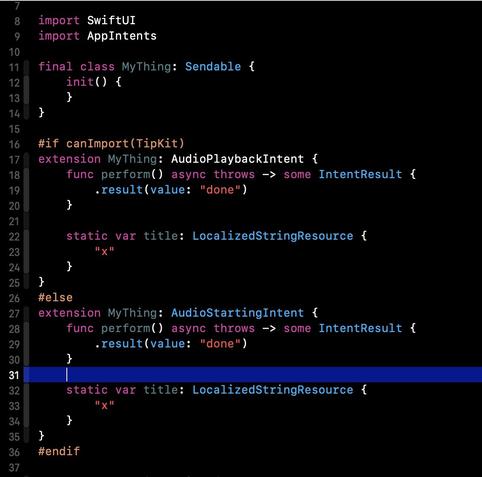
@chockenberry hmm so you can’t use #if canImport(TIpKit) around the use of the new vs old AppIntents protocol?

Also does this mean you’re also on team SWIFT_TREAT_WARNINGS_AS_ERRORS? The onChange deprecation is killing me there.

@chockenberry this is what I mean — I suspect this is the kind of thing you're trying to do? Compiles under both Xcode 14 and 15.
@marcpalmer Clever! But this is the kind of code you're going to look at in six months, when you don't need it anymore, and go “WTH was I thinking?”
@chockenberry Tell me about it… but this was the recommendation I received from people a while back for this kind of problem. Otherwise you have to set build flags conditionally based on which Xcode you’re running. Do you have a way to automate that?

@chockenberry I tell myself every year that I'll work in the Xcode beta and have something ready by iOS launch.

In reality, I wait until Xcode is out of beta and get an update ready for when macOS ships. Ends up working just as well for me. Sure, I miss out on new iOS features on day one, but does that really matter?

@JoshHrach @chockenberry Looking at the calendar and the state of iOS 17/Xcode 15…
I no longer think I’ll have a new app ready by iOS 17 launch day.
It’s been 10 weeks in betaville and I’m not sure I’ll have anything ready much sooner than I would have if I started next week (assuming feature-complete bug-free betas are released next week, hahahahhaha).
@sirshannon @chockenberry I've heard of so many issues with the betas this year, especially around SwiftData, that I'm glad I haven't tried myself yet. 😅
@chockenberry as purely a user, I would usually expect iOS 17 to drop with the new iPhones, but as it’s being reported now, I don’t expect that to happen. That is new iOS -after- the new phones, whatever.